storgae configuration

shlomi

New Member
Jan 12, 2026
6
0
1
Hi,
i think i got some mess on my storage settings:
got 2*1 tb disks, 1 ssd and 1 spindel, node disks screenshot attached.
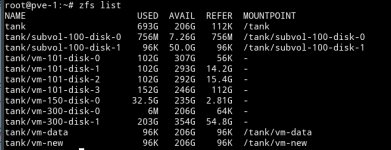
i got zfs mount as tank.
The problem is - on bm creation:
local shows only 25gb out of 100gb.
cannot create vm on the zfs itself. I read on one of my searches that this is caused by zfs isn't clean.

Can someone help me understand how should i fix the storage so i can use my two disks?
Thanks,
Shlomi

 

Attachments

  • proxmox-tank.png
    proxmox-tank.png
    8.7 KB · Views: 15
  • proxmox-lvm thin.png
    proxmox-lvm thin.png
    7.3 KB · Views: 13
  • proxmox-lvm.png
    proxmox-lvm.png
    12.1 KB · Views: 13
  • proxmox-node disks.png
    proxmox-node disks.png
    43.9 KB · Views: 15
  • proxmox-zfs list.png
    proxmox-zfs list.png
    40.2 KB · Views: 15
Hi,
please share the output of the following
Code:
cat /etc/pve/storage.cfg
pvesm status
pvs
vgs
lvs

cannot create vm on the zfs itself
What error do you get exactly or do you mean that you are unable to select the storage upon creation?
 
From the screenshots you provided your boot disk is managed by LVM.
"Local" is a special default/built-in storage pool that points to a directory located on the root partition (managed by LVM).
It appears that you either did not create or removed "local-lvm" that is usually part of the standard installation. It is not a problem in of itself, but indicates that your installation differs from most default home-labs.
It is possible that "local" which shares space with your OS only has 25GB free.

In addition to information requested by @fiona , please add:
df -h
mount
lsblk

Also, please try to use text output encoded with CODE </> tags.


Blockbridge : Ultra low latency all-NVME shared storage for Proxmox - https://www.blockbridge.com/proxmox
 
Last edited:
  • Like
Reactions: fiona
Hi,
thanks for the reply!
i managed to add the thin-local, now it looks like:
Code:
pvesm list local-lvm
Volid                   Format  Type             Size VMID
local-lvm:vm-111-disk-0 raw     images    10737418240 111

Code:
cat /etc/pve/storage.cfg
dir: local
    path /var/lib/vz
    content rootdir,vztmpl,iso,images,import
    shared 0

lvmthin: local-lvm
    thinpool data
    vgname pve
    content images,rootdir
    nodes pve-1

dir: SharedFolder
    path /mnt/ShredDir
    content import,images,iso,backup,vztmpl,snippets,rootdir
    prune-backups keep-all=1
    shared 0

zfspool: tank-vm
    pool tank
    content images,rootdir
    mountpoint /tank/vmstore
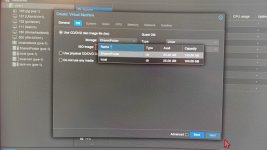
i can see the storage on the datacenter branch main tree, but when creating new vm, i have only the "local" and "shared folder", i cannot use the lvm-thin or zfs, which both marked as root+container.

Thanks,
Shlomi
 
HI,
content is marked for both images+root dir.

vm creation screenshot attached picture.
Thanks,
Shlomi
 

Attachments

  • proxmox-vm-creation.jpeg
    proxmox-vm-creation.jpeg
    183.6 KB · Views: 6
Can you share a screenshot of what you see? I think you may be looking at the iso selection.
@Impact is right on - you are on ISO selection screen, not disk. Select "Do not use any media" and then Next.
You can come back later to add an ISO, if you need one.


Blockbridge : Ultra low latency all-NVME shared storage for Proxmox - https://www.blockbridge.com/proxmox
 
  • Like
Reactions: Johannes S
Hi,
the drop down list is for the storage...
some other side effect of this mess is that i've lost all iso's i had loaded and used before
Shlomi
 
the drop down list is for the storage...
You are correct. It is for storage that is suitable to contain ISO images, which are files. The ZFS and LVM (local) storage are raw block devices, they cannot store files. They are not available for this step in the Wizard.
some other side effect of this mess is that i've lost all iso's i had loaded and used before
I cannot tell how loosing all ISOs happened or related to anything discussed so far.

I also would not call this a "mess" necessarily. Everything is working as designed. You just did not realize what that particular part of the VM creation Wizard is asking you to select. You are not the first one to be in this situation.


Blockbridge : Ultra low latency all-NVME shared storage for Proxmox - https://www.blockbridge.com/proxmox
 
hi,
The mess started when i ran out of disk space on local disk, proxmox got stuck with insufficient storage red alert and crashed.
Since then i manage to restart it but dealing with side effects since then.

Now, i'm having some doubts if it's worth continuing and fix this environment or from the other hand wipe all clean and reinstall proxmox from start or other alternative..

Thanks,
Shlomi
 
...a typo at cfg file had made... nothing to do with keyboard, mount+folder exists.
as can be seen from the screenshot above, shared folder is the only thing besides local that actually in the list