

Proxmox 9.1.4 import SUSE VM from ESXi

jeffgott

New Member
Jan 12, 2026
5
0
1
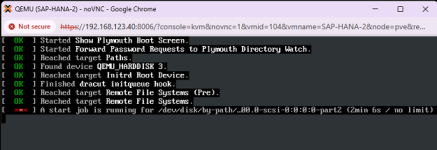
I've tried countless times to import a VM from ESXi (v6.7) that is running SUSE v15 SP3 to Proxmox 9.1.4. The import finishes without errors but the VM will never boot. When the VM first starts, I get the startup screen that it will boot SLES 15-SP3. I then get a screen that has 3 dots. If I press escape I get this screen:
1768322637964.png

I have removed VMWare tools from the ESXI VM before the import, changing the disk types and countless other suggestions (changing BIOS, checking boot order, booting in SUSE recovery mode, etc).

Any ideas what is going wrong?
 
That will be quite a bit of work since I have two SUSE VM's running SAP HANA.
I meant it just as a test that it boots.

If I remember correctly, PVE is not a supported hypervisor from SAP HANA contract perspective. Perhaps it has changed since I last looked?


Blockbridge : Ultra low latency all-NVME shared storage for Proxmox - https://www.blockbridge.com/proxmox
 
It is certified for non-production environments which is what I will use it for.

I will try doing a fresh install and see what happens.
 
I've tried countless times to import a VM from ESXi (v6.7) that is running SUSE v15 SP3 to Proxmox 9.1.4. The import finishes without errors but the VM will never boot. When the VM first starts, I get the startup screen that it will boot SLES 15-SP3. I then get a screen that has 3 dots. If I press escape I get this screen:

View attachment 94889

I have removed VMWare tools from the ESXI VM before the import, changing the disk types and countless other suggestions (changing BIOS, checking boot order, booting in SUSE recovery mode, etc).

Any ideas what is going wrong?
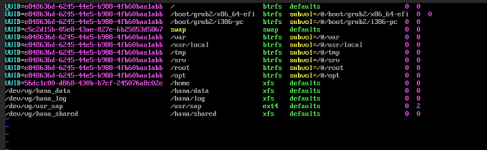
Boot into a recovery CD and chroot to SUSE rootfs, check /etc/fstab and ls -l /dev/disk/by-path to see if the disk mentioned is even there, it may have changed.

Grep recursively /etc and /lib/systemd for that /dev/disk, there's no time limit defined for that job to finish and you may need to edit it to add that in. 1M30S (90 seconds) is what I would recommend, or possibly disable the job entirely if it isn't needed.

https://search.brave.com/search?q=s...summary=1&conversation=57cf0cbb61b1715edf5e3b
 
You'll have to forgive me - I am not a Linux expert by any means.

ls -l /dev/disk/by-path returns 'No such file or directory'. There are no files in /dev - ls command only shows 'null'.

Attached is the contents for fstab.
 

Attachments

  • Screenshot 2026-01-13 143718.png
    Screenshot 2026-01-13 143718.png
    107.5 KB · Views: 3
lsblk returns 'No such sile....' and there are no files in /dev:
 

Attachments

  • Screenshot 2026-01-13 144848.png
    Screenshot 2026-01-13 144848.png
    12.7 KB · Views: 2
As I mentioned, I am not a SLES expert. I don't know whether you properly booted into Rescue mode. I am not sure whether the disk of the VM is still there, is it? Perhaps you need to execute a few more commands to make the Rescue mode usable?

Plug this into google: suse rescure boot from iso
There are multiple discussions and guides on how to proceed, including from SUSE itself.

You need to boot into a mode sufficient to find out how SUSE sees the disk drive when booted within PVE. This is not a PVE specific process.

Check youtube as well, perhaps something like this : https://www.youtube.com/watch?v=8qF8xgy15t0


Blockbridge : Ultra low latency all-NVME shared storage for Proxmox - https://www.blockbridge.com/proxmox
 
Last edited:
