

Issues after upgrading to 6.17.4-1-pve
- Thread starter daviddanko
- Start date
You are using an out of date browser. It may not display this or other websites correctly.
You should upgrade or use an alternative browser.
You should upgrade or use an alternative browser.

Still having the same issue with the newer kernel. First it takes forever to import my ZFS pools etc unlike 17.2 then I get a hard lockup on one of the CPU’s with a complaint about a nvme module.. what follows is the error log.. see pictures taken of the boot screen from my phone
For now I just booted back to the pined 6.17.2-2 kernel and everything is happy again.
For now I just booted back to the pined 6.17.2-2 kernel and everything is happy again.
Attachments
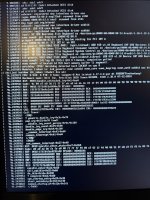
Last edited:
If you are using an Intel-based system with an Intel-VMD (Volume Management Device) - try disabling it in the BIOS of your Mainboard / System. I have two Socket 1700 systems (one "production", one "playground") with a B760 chipset that were displaying the same error with Kernel 6.17.4.x . Disabling the VMD on my playground system eliminated the problems I had.
So I suppose the 6.17.4 has a problem with these Intel VMDs and disabling it fixes the boot issue.
But beware: I did NOT test whether all my storage devices were working as before after I turned VMD off. If you have a setup where this VMD is needed (Pseudo-Hardware-RAID ?), you might not get out of this kerfuffle this way. More Information about VMD here:
https://www.intel.com/content/www/u...anagement-device-intel-vmd-product-brief.html
EDIT: Another warning: I know from firsthand experience, that turning the VMD off will corrupt any Windows 11 installations on that machine. My playground machine had a drive with windows on it and I had to reinstall it after I messed around with the VMD.
EDIT2: Warning network devices might get shuffled around! When you are disabling the VMD, your network devices might get renamed. This happened to me on my "production" system. The network devices were enp2s0 and enp3s0 before, and enp4s0 enp5s0 after the disabling. If that happens, log into your proxmox server via local console, check your new interface names via "ip a", then go to "/etc/network" and edit the file "interfaces" or your files under "interfaces.d". After another reboot everything should be fine again.
So I suppose the 6.17.4 has a problem with these Intel VMDs and disabling it fixes the boot issue.
But beware: I did NOT test whether all my storage devices were working as before after I turned VMD off. If you have a setup where this VMD is needed (Pseudo-Hardware-RAID ?), you might not get out of this kerfuffle this way. More Information about VMD here:
https://www.intel.com/content/www/u...anagement-device-intel-vmd-product-brief.html
EDIT: Another warning: I know from firsthand experience, that turning the VMD off will corrupt any Windows 11 installations on that machine. My playground machine had a drive with windows on it and I had to reinstall it after I messed around with the VMD.
EDIT2: Warning network devices might get shuffled around! When you are disabling the VMD, your network devices might get renamed. This happened to me on my "production" system. The network devices were enp2s0 and enp3s0 before, and enp4s0 enp5s0 after the disabling. If that happens, log into your proxmox server via local console, check your new interface names via "ip a", then go to "/etc/network" and edit the file "interfaces" or your files under "interfaces.d". After another reboot everything should be fine again.
Last edited:
Thank you!!! This does seem to resolve my boot issue.. Was able to complete a boot and a reboot.. Still takes forever now but I am willing to live with that as this system never reboots unless I am doing updates.. Not going to unpin the other kernel just yet and let this run for a few days with load and see how it goes..If you are using an Intel-based system with an Intel-VMD (Volume Management Device) - try disabling it in the BIOS of your Mainboard / System. I have two Socket 1700 systems (one "production", one "playground") with a B760 chipset that were displaying the same error with Kernel 6.17.4.x . Disabling the VMD on my playground system eliminated the problems I had.
So I suppose the 6.17.4 has a problem with these Intel VMDs and disabling it fixes the boot issue.
But beware: I did NOT test whether all my storage devices were working as before after I turned VMD off. If you have a setup where this VMD is needed (Pseudo-Hardware-RAID ?), you might not get out of this kerfuffle this way. More Information about VMD here:
https://www.intel.com/content/www/u...anagement-device-intel-vmd-product-brief.html
EDIT: Another warning: I know from firsthand experience, that turning the VMD off will corrupt any Windows 11 installations on that machine. My playground machine had a drive with windows on it and I had to reinstall it after I messed around with the VMD.
As for my corruption, nope no issue..
I found some more info about this VMD problem on reddit:
https://www.reddit.com/r/archlinux/comments/1mqmjq1/installation_issues_with_intel_vmd_laptop/
Seems, that this problem is not a problem of Proxmox alone.
https://www.reddit.com/r/archlinux/comments/1mqmjq1/installation_issues_with_intel_vmd_laptop/
Seems, that this problem is not a problem of Proxmox alone.
Added another warning to my contribution from 2025/01/01 20:54 above regarding network device shuffling.
The G8's always have a bit of a learning curve attached to them when you don't run them on RAID Controllers.I have been dealing with serious problems for 3 days after upgrading to Proxmox VE 9.1, which uses kernel 6.17.
Cluster issue
I have a 7-node Proxmox cluster.
On one node, after upgrading to Proxmox 9.1 (kernel 6.17):
Because of this, I removed the node from the cluster and attempted a clean reinstall.
- ZFS modules fail to load
- ZFS pool does not import
- System does not load modules correctly
Clean install problems (Proxmox 9.1 ISO)
A clean installation of Proxmox 9.1 fails consistently:
I tested:
- Multiple errors during installation (dpkg, libfaketime, initramfs)
- Errors like:
- unable to sync file ... Input/output error
- unable to install initramfs
- Installer fails while generating initramfs for kernel 6.17
Same errors every time.
- Different USB flash drives
- New SSD disk for the Boot
- Rufus (DD mode)
- Balena Etcher
- Different USB ports
Temporary workaround (not successful)
Out of desperation, I installed Proxmox 9.0 (kernel 6.14) first, which installed successfully, and then upgraded to 9.1.
After the upgrade:
- The server crashes
- Kernel modules do not load correctly
- System is unstable / unusable
Hardware details
This is the cli of the errors i have during a clean install of proxmox 9.1 in the server.
- Server: HP ProLiant G8
- Storage controller: SATA in AHCI mode
- No RAID controller
This is by far the worst kernel experience I’ve had in 7 years as a Proxmox user.
This however looks like a classic USB Flash issue. I guess you run your OS on a Flashdrive?
We have multiple G8s and they all work fine on the newest PVE/PBS Version. Most of our G8s boot from RAID Controllers tho.
The ones that don't don't have the full OS on the Flashdrive, only GRUB (and /boot) lies on the USB Drive and then boots the OS directly from the Disks.
I also tried to disable VMD but with no luck, my Dell 5820 will not boot with kernel 6.17.4-2 but 6.17.2-2 is working.Thank you!!! This does seem to resolve my boot issue.. Was able to complete a boot and a reboot.. Still takes forever now but I am willing to live with that as this system never reboots unless I am doing updates.. Not going to unpin the other kernel just yet and let this run for a few days with load and see how it goes..
As for my corruption, nope no issue..
With 6.17.4-2 I get these messages on screen and no logs seems to be written by systemd either, journalctl -b -1 only shows the last boot with 6.17.2-2
97.0516321 watchdog: CPU14: Watchdog detected hard LOCKUP on cpu 14
97.1322961 watchdog: CPU13: Watchdog detected hard LOCKUP on cpu 13
I do not have a Dell 5820, but if the manual I found online is correct, there should be an entry in your BIOS called "SATA Operation". Try changing this from "RAID on" (which is the default) to "AHCI".I also tried to disable VMD but with no luck, my Dell 5820 will not boot with kernel 6.17.4-2 but 6.17.2-2 is working.
With 6.17.4-2 I get these messages on screen and no logs seems to be written by systemd either, journalctl -b -1 only shows the last boot with 6.17.2-2
97.0516321 watchdog: CPU14: Watchdog detected hard LOCKUP on cpu 14
97.1322961 watchdog: CPU13: Watchdog detected hard LOCKUP on cpu 13
See also the message by MennoMega from Dec 21, 2025 in this thread above. Post in thread 'Issues after upgrading to 6.17.4-1-pve' https://forum.proxmox.com/threads/issues-after-upgrading-to-6-17-4-1-pve.178221/post-826430
If you already tried this, ignore my post. ;-]
Last edited:
This does not help. Kernel crashes on boot with the Dell Precision 5820 in both modes. Updating to the latest BIOS 2.48 does not help either. Only kernel downgrade helps. I have pinned kernel "6.8.12-17-pve" which was the one in use before my Proxmox 9 upgrade and the system works again.I do not have a Dell 5820, but if the manual I found online is correct, there should be an entry in your BIOS called "SATA Operation". Try changing this from "RAID on" (which is the default) to "AHCI".
See also the message by MennoMega from Dec 21, 2025 in this thread above. Post in thread 'Issues after upgrading to 6.17.4-1-pve' https://forum.proxmox.com/threads/issues-after-upgrading-to-6-17-4-1-pve.178221/post-826430
If you already tried this, ignore my post. ;-]
Dell Micro Optiplex 7000 here with 12th gen intel i5, boot drive stored on mirrored zfs nvme drives in "RAID" mode (required for this machine, doesn't actually enable hardware RAID) in the BIOS. I can boot into my older kernel just fine. I just got done completing the pve upgrade to 9.1 and made sure to check the pve8to9 --full output multiple times. Going to try to reinit the boot and try a couple other things noted in this post to see if I can fix it but noting it here for the proxmox team, seems to be something not quite right with Dell machines, maybe? I have Lenovo machines using very similar configurations where the PVE 9 upgrade works just fine.

Hi, for everyone who has boot issues on kernel 6.17.4-2 if Intel VMD is enabled: One option would be to try kernel 6.17.9-1 (currently on pve-test [1] ), it contains a potential fix [2] for the issue. If you test 6.17.9-1, it would be great if you could report back whether it solves the boot issue or not.
[1] https://pve.proxmox.com/pve-docs/pve-admin-guide.html#sysadmin_test_repo
[2] https://lore.kernel.org/all/20251014014607.612586-1-inochiama@gmail.com/
[1] https://pve.proxmox.com/pve-docs/pve-admin-guide.html#sysadmin_test_repo
[2] https://lore.kernel.org/all/20251014014607.612586-1-inochiama@gmail.com/

