

updated to PVE 9.0 then GPU passthrough stopped working on Windows
- Thread starter jasonwch
- Start date
You are using an out of date browser. It may not display this or other websites correctly.
You should upgrade or use an alternative browser.
You should upgrade or use an alternative browser.
Tried your rom file too.. (thank you for putting in the effort by the way)@JonSnow Try this brother: https://github.com/LongQT-sea/intel-igpu-passthru
args: -set device.hostpci0.bus=pci.0 -set device.hostpci0.addr=2.0 -set device.hostpci0.x-igd-opregion=onhostpci0: 0000:00:02.0,romfile=igd.romWindows boots, but still
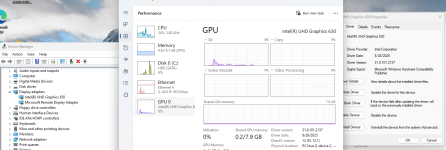
Windows has stopped this device because it has reported problems. (Code 43)that was with Coffee/Comet Lake (8/9/10th gen) rom file since I have a i3-10100T CPU
Reading the issue#15 I installed latest UHD graphics driver available for the gpu - 8/28/2025 from https://www.intel.com/content/www/u...essor-graphics/intel-uhd-graphics-family.html still same issue.
Last edited:

@adystech As long as you meet the Requirements and use legacy mode passthrough, it will work.
Edit: Windows VM must use OVMF/UEFI boot.
Edit: Windows VM must use OVMF/UEFI boot.
Last edited:
sir, you are a life saver!!@adystech As long as you meet the Requirements and use legacy mode passthrough, it will work.
Edit: Windows VM must use OVMF/UEFI boot.
I had not tried the legacy part before,, So I went from
hostpci0: 0000:00:02.0localtime: 1machine: pc-q35-10.0vga: std,memory=512to
hostpci0: 0000:00:02.0,legacy-igd=1,romfile=igd.romlocaltime: 1machine: pc-i440fx-10.1vga: noneNow my Windows 11 VM boots, and works.. Thank you so much!!
How did you dump the roms, would like to dump my own.Tried all the previous kernels on my system but nothing fixes error 43, I really have no idea what changed.
You’re referring to this as a "workaround" ?Still hoping for a fix that does not require these workaround, since this worked for years until recently.
QEMU provides official documentation for passthrough Intel iGPU with OpROM via
vfio, and it also has dedicated source code (igd.c) specifically for Intel iGPU passthrough. Given that, it seems more like a supported feature than a "workaround".The official docs also includes instructions on how to extract and create the OpROM.
Last edited:
It is a supported feature, but this is a workaround because none of these steps were required until recently, it just worked.You’re referring to this as a "workaround" ?
QEMU provides official documentation for passthrough Intel iGPU with OpROM viavfio, and it also has dedicated source code (igd.c) specifically for Intel iGPU passthrough. Given that, it seems more like a supported feature than a "workaround".
The official docs also includes instructions on how to extract and create the OpROM.
Now if this is the official way forward and all previous methods are obsolete, then this is the way it is.
Wanted to report I still could not get rid of error 43, even with @LongQT-sea rom or my own extracted roms on an existing 8.4 install after trying both methods. I had windows installed on another computer, so decided to take an image of it and then installed pve 9.1. Once i restored my windows image, everything worked, no rom needed. However as soon as I went to update the igpu drivers I got error 43 once again.