windows 11 network driver proxmox failure

bellaireroad

New Member
Sep 30, 2025
14
3
3
I've been trying to install win 11 on a vm, and hit a roadblock. When I get to the point where it asks for the disk drivers, all is good, they load and find the disk.

I then preload the network drivers, and it picks up the redhat network drivers, and installs them.

After it loads the OS, it comes back asking for network drivers. They have not been discovered. At this point I attempt to load them again, but it will not discover the redhat drivers when I try to install them for a second time.

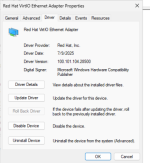
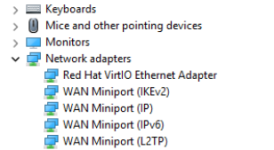
However, if i enter the windows shell and run devmgmt.msc, device manager shows the driver to be installed.
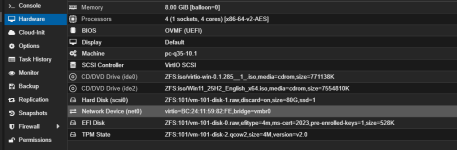
This is on vmbro with Intel® i210 Gigabit Ethernet Controller

How to proceed? thanks
Screenshot 2025-12-23 003301.pngScreenshot 2025-12-23 003400.pngScreenshot 2025-12-23 004307.png
 
Last edited:
Hmm, strange behavior. I haven't had that yet.

Options:
  • Install only the disk driver and, after successful installation, install all other drivers with the setup on the ISO.
  • Use an older version 271; there are some issues with the current 285, so maybe that's related.
I installed Windows 11 last week (also version 25H2 German). It worked normally. Installation of the drivers during installation. Does the checksum of the ISO match?
 
  • Like
Reactions: bellaireroad
Hmm, strange behavior. I haven't had that yet.

Options:
  • Install only the disk driver and, after successful installation, install all other drivers with the setup on the ISO.
  • Use an older version 271; there are some issues with the current 285, so maybe that's related.
I installed Windows 11 last week (also version 25H2 German). It worked normally. Installation of the drivers during installation. Does the checksum of the ISO match?
Thanks for the suggestions
I grabbed 25H2 again and 271 for a fresh start
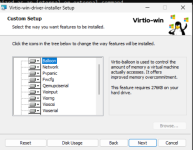
used the driver setup on the iso
same results

I'm going to setup new bridge on a Marvel NIC that has been tested and is good
I may be wrong, but I suspect the redhat driver doesn't like the intel 210
 
The VM can’t see the actual hardware so the NIC is not a factor.

How exactly does it ask for drivers? If it’s in device manager it’s installed

The VM can’t see the actual hardware so the NIC is not a factor.

How exactly does it ask for drivers? If it’s in device manager it’s installed…
Yes, it failed with the marvel NIC as well.

The last step reached during setup is the page where internet access is established. This is the step where it asks to install drivers, although device manager shows them as installed and functioning properly
 
Screenshot 2025-12-23 115505.png

Screenshot 2025-12-23 115558.png

Screenshot 2025-12-23 115035.png

Here is the install screen after drivers have been installed. Device manager shows they are installed. Can procced no further from this point
 
Hi,

You have done this by clicking on the blue button "install driver", and searching the inf file ?

Best regards,
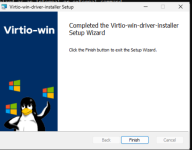
by <1>using virtio win driver install package as shown,
by <2>preinstalling when the hard drive driver is installed,
by <3> and attempting to install from "let's connect you to a network" (your question).

The installation goes no further than "let's connect you to a network"
A reboot goes no further than "let's connect you to a network"
at this point, device manager shows the drivers are installed (as depicted in earlier post)
 
Last edited:
this appears to be the problem

Error code 0xe0000242, "The publisher of an Authenticode signed catalog has not yet been established as trusted," typically occurs during driver installation in Windows, especially on ARM64 systems, indicating the driver's digital signature isn't recognized as fully trusted by the system's Code Integrity policies, blocking installation until the publisher is trusted or test mode is used. It's common with VirtualBox guest additions or specific hardware drivers on newer Windows versions, signaling a stricter enforcement of driver signing than older x64 systems.

Common Causes
 
This seems unusual, and is constant, after getting stuck at network page
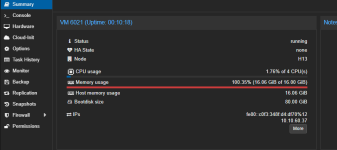
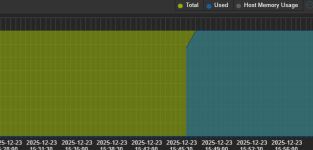
You appear to be referring to the RAM usage - I would ignore that for now.

What I do notice is that the VM already reports a valid IPv4 (& IPv6) address at 10.10.60.37 - so it appears that the VM's vNIC is in fact working.
My guess is that the issue is with internet access on that NW - hence Windows stubborn refusal to proceed.

Check your firewalling etc. Do other VMs on vmbr0 have internet access?
 
  • Like
Reactions: bellaireroad
You appear to be referring to the RAM usage - I would ignore that for now.

What I do notice is that the VM already reports a valid IPv4 (& IPv6) address at 10.10.60.37 - so it appears that the VM's vNIC is in fact working.
My guess is that the issue is with internet access on that NW - hence Windows stubborn refusal to proceed.

Check your firewalling etc. Do other VMs on vmbr0 have internet access?
Thanks
the screenshot referred to was on an earlier VM
since then I have created a new bridge and installed several containers on it
They all recieve iP addresses and access the internet normally
On all the new Win11 VMs created they are not recieving IP addresses
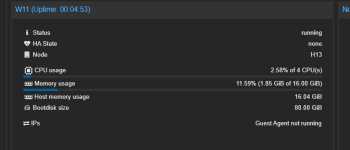
there is an entry "Qemu guest agent not running"
this is in spite running virtio-win-guest-tools during the installation
Screenshot 2025-12-24 131301.png
 
Last edited:
On all the new Win11 VMs created they are not recieving IP addresses
Do the (new) Windows VM's successfully install till the end? Do they have Internet access?

there is an entry "Qemu guest agent not running"
this is in spite running virtio-win-guest-tools during the installation
You need to make sure you have GA enabled in the VM's Options in PVE.
Also, you need to check the (running) services inside Windows to make sure the GA service is running & should be set to start automatically. (Shown here).
 
  • Like
Reactions: bellaireroad
Do the (new) Windows VM's successfully install till the end? Do they have Internet access?


You need to make sure you have GA enabled in the VM's Options in PVE.
Also, you need to check the (running) services inside Windows to make sure the GA service is running & should be set to start automatically. (Shown here).
thank you for your patience in walking me through this. It's appreciated, and I learned a lot.
 
  • Like
Reactions: gfngfn256