Hi everyone,
I'm writing because I started working in a new company and I'm having to diagnose a few issues with their proxmox server, mainly IO Pressure Stall related. The server was installed more as a test than anything even though it now hosts quite a few websites now.
The current setup is two hosts in a cluster (pve1 and pve2). Pve2 and the cluster setup as a whole were a test, there's only a windows 10 vm on pve2 and no HA functionality at the moment.
Pve1 has a Ryzen 9 7950X processor, 64Gb Ram, a Samsung mzvl21t0hclr 1Tb nvme boot drive, 2 wd red sa500 sata 2Tb drives in a zfs mirror for the vms/lxcs. It hosts about 40 lxc (4 CPU, 4GB RAM, 10GB drive), 2 linux based VM (UISP: 2CPU, 2Gb RAM, 50GB Drive; qcenter: 2CPU, 4GB, 8GB drive) . The lxcs host websites, they are not directly managed by us but by a collaborator. I know they use an Ansible playbook to manage updates and HAproxy.
Pve2 has 2 Intel(R) Xeon(R) CPU E5-2420 processors, 72Gb Ram, a KINGSTON SHSS37A240G sata ssd boot drive, 2 KINGSTON SA400S37480G sata ssd not used at the moment and a CT1000BX500SSD1 with zfs for vms/lxcs. It only hosts a win10 vm (4CPU, 4Gb RAM, 80Gb drive).
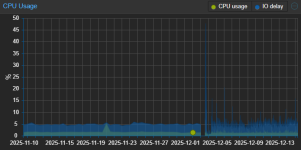
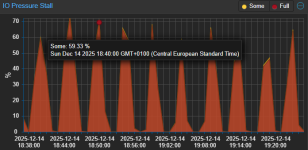
The issues became apparent after the upgrade from 8.4 to 9.1. The upgrade was successful without any errors, but later in the day we saw that one website was offline. At that point we noticed that the IO Pressure Stall graph of pve1 was at about 90% before normalizing after a few hours. Now it's stable, and every 5 minutes nearly on the dot theres a short spike to about 70%. It doesn't look like this metric was present before the upgrade, so I have no way to exclude the possibility that was already present, since in normal use it's not noticeable. CPU IO delay was instead present before the upgrade and I can see that it was roughly similar, it only looks more "spiky", again, a spike every 5 minutes.
The server load is rarely over 5% with around 27Gb of available RAM.
To diagnose the issue I first tried with iostat and iotop. Iostat showed latency during the spikes as expected, iotop on the host showed journald as the most intensive process (but still I wouldn't call it intensive). Journalctl showed several apparmor denies per second on requests by rsyslog coming from the Haproxy lxc, but temporarily disabling apparmor for that container changed nothing. Honestly it doesn't really surprise me because even if the logs were the culprit disabling apparmor only means that the same amount of logs that were blocked are now coming through. I haven't found a way to see this logs though…
Seeing how iotop doesn't show anything relevant I assumed it was related to zfs and possibly already present before the upgrade, but a collegue pointed out that even on pve2 (which shows no spikes and no IO Pressure unless there's some kind of load on the only vm) installing for instance a win11 vm is extremely slow and that cannot be normal. He also said that that host always had similar issues, they tried with different drives but were not able to fix it. In any case according to him it's worse than it was. I checked and he is right, during the installation the IO Pressure raises consistently over 80%. I tried setting up a new host with a similar processor to pve2. I installed directly 9.1. The sata ssd is a Samsung evo 870 250Gb. I tried setting up the drive with zfs and install the win11 vm, then I switched the drive to LVM and tried again. I saw minimal IO Pressure in both cases, but the installation was still really slow.
I then tried to set up one of the unused kingston drives on pve2 as LVM and see if it made a difference. I tried installing win11 again and IO Pressure was considerably lower, but the installation was still slow. I then checked the recommended settings for win11 and by fixing them I got these results:
If I install it on the lvm drive in about 4 minutes the installation is complete with maximum IO Pressure of 17.64.
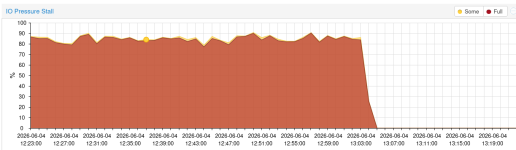
If I install it on the zfs drive it takes 12 minutes to get to 63% (I stopped it after that…) with an IO Pressure of 88.
I also tried messing with the zfs timers, but they did not make a difference.
At the end of the day I have 2 hosts that feel rather sluggish and where IO pressure tends to rise dramatically when there's any load added, wether it's adding a vm or updating one. Since the issue is fixed on pve2 when working on a LVM drive I assume it's related to zfs, and since I'm not aware of any tuning made or attempted on these hosts I assume it's just the standard behaviour that becomes an issue in this hardware configuration. The counterargument by my collegues is that they used to have similar loads and setup with esxi and never noticed any issues. Of course they were not using zfs at the time.
Since this is all a bunch of assumptions I'd like to know if anyone more experienced has any input about this issue.
Thank you in advance.
I'm writing because I started working in a new company and I'm having to diagnose a few issues with their proxmox server, mainly IO Pressure Stall related. The server was installed more as a test than anything even though it now hosts quite a few websites now.
The current setup is two hosts in a cluster (pve1 and pve2). Pve2 and the cluster setup as a whole were a test, there's only a windows 10 vm on pve2 and no HA functionality at the moment.
Pve1 has a Ryzen 9 7950X processor, 64Gb Ram, a Samsung mzvl21t0hclr 1Tb nvme boot drive, 2 wd red sa500 sata 2Tb drives in a zfs mirror for the vms/lxcs. It hosts about 40 lxc (4 CPU, 4GB RAM, 10GB drive), 2 linux based VM (UISP: 2CPU, 2Gb RAM, 50GB Drive; qcenter: 2CPU, 4GB, 8GB drive) . The lxcs host websites, they are not directly managed by us but by a collaborator. I know they use an Ansible playbook to manage updates and HAproxy.
Pve2 has 2 Intel(R) Xeon(R) CPU E5-2420 processors, 72Gb Ram, a KINGSTON SHSS37A240G sata ssd boot drive, 2 KINGSTON SA400S37480G sata ssd not used at the moment and a CT1000BX500SSD1 with zfs for vms/lxcs. It only hosts a win10 vm (4CPU, 4Gb RAM, 80Gb drive).
The issues became apparent after the upgrade from 8.4 to 9.1. The upgrade was successful without any errors, but later in the day we saw that one website was offline. At that point we noticed that the IO Pressure Stall graph of pve1 was at about 90% before normalizing after a few hours. Now it's stable, and every 5 minutes nearly on the dot theres a short spike to about 70%. It doesn't look like this metric was present before the upgrade, so I have no way to exclude the possibility that was already present, since in normal use it's not noticeable. CPU IO delay was instead present before the upgrade and I can see that it was roughly similar, it only looks more "spiky", again, a spike every 5 minutes.
The server load is rarely over 5% with around 27Gb of available RAM.
To diagnose the issue I first tried with iostat and iotop. Iostat showed latency during the spikes as expected, iotop on the host showed journald as the most intensive process (but still I wouldn't call it intensive). Journalctl showed several apparmor denies per second on requests by rsyslog coming from the Haproxy lxc, but temporarily disabling apparmor for that container changed nothing. Honestly it doesn't really surprise me because even if the logs were the culprit disabling apparmor only means that the same amount of logs that were blocked are now coming through. I haven't found a way to see this logs though…
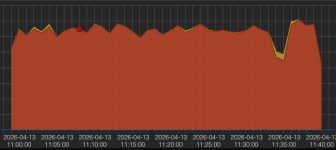
Seeing how iotop doesn't show anything relevant I assumed it was related to zfs and possibly already present before the upgrade, but a collegue pointed out that even on pve2 (which shows no spikes and no IO Pressure unless there's some kind of load on the only vm) installing for instance a win11 vm is extremely slow and that cannot be normal. He also said that that host always had similar issues, they tried with different drives but were not able to fix it. In any case according to him it's worse than it was. I checked and he is right, during the installation the IO Pressure raises consistently over 80%. I tried setting up a new host with a similar processor to pve2. I installed directly 9.1. The sata ssd is a Samsung evo 870 250Gb. I tried setting up the drive with zfs and install the win11 vm, then I switched the drive to LVM and tried again. I saw minimal IO Pressure in both cases, but the installation was still really slow.
I then tried to set up one of the unused kingston drives on pve2 as LVM and see if it made a difference. I tried installing win11 again and IO Pressure was considerably lower, but the installation was still slow. I then checked the recommended settings for win11 and by fixing them I got these results:
If I install it on the lvm drive in about 4 minutes the installation is complete with maximum IO Pressure of 17.64.
If I install it on the zfs drive it takes 12 minutes to get to 63% (I stopped it after that…) with an IO Pressure of 88.
I also tried messing with the zfs timers, but they did not make a difference.
At the end of the day I have 2 hosts that feel rather sluggish and where IO pressure tends to rise dramatically when there's any load added, wether it's adding a vm or updating one. Since the issue is fixed on pve2 when working on a LVM drive I assume it's related to zfs, and since I'm not aware of any tuning made or attempted on these hosts I assume it's just the standard behaviour that becomes an issue in this hardware configuration. The counterargument by my collegues is that they used to have similar loads and setup with esxi and never noticed any issues. Of course they were not using zfs at the time.
Since this is all a bunch of assumptions I'd like to know if anyone more experienced has any input about this issue.
Thank you in advance.