

Can not create snapshot it says already exists
- Thread starter mikiz
- Start date
You are using an out of date browser. It may not display this or other websites correctly.
You should upgrade or use an alternative browser.
You should upgrade or use an alternative browser.
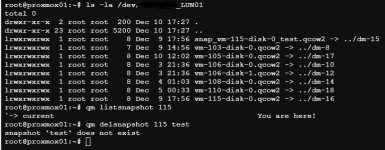

You should start by checking your LVM structure:
lvs
lvdisplay
etc
I am not sure how you got into this state, backtracking your steps may be a good idea. If there is an edge case of snapshots being orphaned, I am sure developers would like to know.
Blockbridge : Ultra low latency all-NVME shared storage for Proxmox - https://www.blockbridge.com/proxmox
lvs
lvdisplay
etc
I am not sure how you got into this state, backtracking your steps may be a good idea. If there is an edge case of snapshots being orphaned, I am sure developers would like to know.
Blockbridge : Ultra low latency all-NVME shared storage for Proxmox - https://www.blockbridge.com/proxmox
I migrated that VM from Vmware to Proxmox.It was windows 7 VM.I migrated VM via proxmox migration tool.I run into this problem i dont know what to doYou should start by checking your LVM structure:
lvs
lvdisplay
etc
I am not sure how you got into this state, backtracking your steps may be a good idea. If there is an edge case of snapshots being orphaned, I am sure developers would like to know.
Blockbridge : Ultra low latency all-NVME shared storage for Proxmox - https://www.blockbridge.com/proxmox
The migration path is not relevant. You should examine the current state of the LVM as suggested previously. Post the results here as text output encoded with CODE tags.
The two primary outcomes are: the snapshot exists on disk and does not exist in the configuration, snapshot no longer exists and there is left-over data. We won't know until you investigate further.
Blockbridge : Ultra low latency all-NVME shared storage for Proxmox - https://www.blockbridge.com/proxmox
The two primary outcomes are: the snapshot exists on disk and does not exist in the configuration, snapshot no longer exists and there is left-over data. We won't know until you investigate further.
Blockbridge : Ultra low latency all-NVME shared storage for Proxmox - https://www.blockbridge.com/proxmox
Last edited:
These problems occur the migrated vm not the reguler vm created in proxmox ve.That's why i specify migrated vm. As soon as vm migrated i took snapshot and made disk conversion from sata/ide to scsi after installing windows virt io drivers.Could the problem be related to this?The migration path is not relevant. You should examine the current state of the LVM as suggested previously. Post the results here as text output encoded with CODE tags.
The two primary outcomes are: the snapshot exists on disk and does not exist in the configuration, snapshot no longer exists and there is left-over data. We won't know until you investigate further.
Blockbridge : Ultra low latency all-NVME shared storage for Proxmox - https://www.blockbridge.com/proxmox
I have similar problem with VM113 as well. Here the code output
lvdisplay code output
--- Logical volume ---
LV Path /dev/LUN01/snap_vm-115-disk-0_test.qcow2
LV Name snap_vm-115-disk-0_test.qcow2
VG Name LUN01
LV UUID Ea09uw-tYP3-bO0Q-tJFg-ivhc-da7G-eqNa4k
LV Write Access read/write
LV Creation host, time proxmox01, 2025-12-09 16:27:46 +0300
LV Status available
# open 1
LV Size <300.05 GiB
Current LE 76812
Segments 1
Allocation inherit
Read ahead sectors auto
- currently set to 256
Block device 252:15
--- Logical volume ---
LV Path /dev/LUN01/vm-115-disk-0.qcow2
LV Name vm-115-disk-0.qcow2
VG Name LUN01
LV UUID pD45mj-xwDk-EKsM-oq8w-qzs8-LwHS-MBJvYf
LV Write Access read/write
LV Creation host, time proxmox01, 2025-12-09 17:50:03 +0300
LV Status available
# open 1
LV Size 300.04 GiB
Current LE 76811
Segments 1
--- Logical volume ---
LV Path /dev/LUN01/snap_vm-113-disk-0_test01.qcow2
LV Name snap_vm-113-disk-0_test01.qcow2
VG Name LUN01
LV UUID nHMLKf-ztJu-l4Wn-nNtY-ESE7-2m0C-o61LGN
LV Write Access read/write
LV Creation host, time proxmox02, 2025-12-08 22:46:12 +0300
LV Status available
# open 1
LV Size <100.02 GiB
Current LE 25604
Segments 1
Allocation inherit
Read ahead sectors auto
- currently set to 256
Block device 252:17
--- Logical volume ---
LV Path /dev/LUN01/vm-113-disk-0.qcow2
LV Name vm-113-disk-0.qcow2
VG Name LUN01
LV UUID I4I4aT-TKlv-FwUs-Csmq-rizn-S2i2-ntGJ8W
LV Write Access read/write
LV Creation host, time proxmox02, 2025-12-08 23:36:36 +0300
LV Status available
# open 1
LV Size <100.02 GiB
Current LE 25604
Segments 1
Allocation inherit
Read ahead sectors auto
- currently set to 256
Block device 252:23
-----------------------------------------------------------------------
lvs output
snap_vm-113-disk-0_test01.qcow2 LUN01 -wi-ao---- <100.02g
snap_vm-115-disk-0_test.qcow2 LUN01 -wi------- <300.05g
vm-113-disk-0.qcow2 LUN01 -wi-ao---- <100.02g
vm-115-disk-0.qcow2 LUN01 -wi------- 300.04g
Is it really unnecessary... that's the question.
Since we migrated without consolidating, the VMDK differences might have been created there, but I suspect those differences contain the latest information.
However, since we've already changed the parent virtual disk, it might be too late now.
*Modifying the parent virtual disk risks corruption because the child virtual disk operates under the assumption that the parent has not been altered.
If the original data still exists, I think it's better to consolidate it in VMware and import it again.
*Furthermore, to maintain the current virtual machines and reflect the changes, it is necessary to meticulously verify the differences in the required information and apply them to the migrated virtual machines after the merge.
Since we migrated without consolidating, the VMDK differences might have been created there, but I suspect those differences contain the latest information.
However, since we've already changed the parent virtual disk, it might be too late now.
*Modifying the parent virtual disk risks corruption because the child virtual disk operates under the assumption that the parent has not been altered.
If the original data still exists, I think it's better to consolidate it in VMware and import it again.
*Furthermore, to maintain the current virtual machines and reflect the changes, it is necessary to meticulously verify the differences in the required information and apply them to the migrated virtual machines after the merge.
Last edited:
The action you took is specific to snapshot, the error message is specific to snapshot, so we can be reasonably certain that the problem is related to snapshot management. However, it is likely not related to the origin of the VM. The fact that a new VM does not experience the same symptoms likely means that you did not execute the same VM management steps for it.As soon as vm migrated i took snapshot and made disk conversion from sata/ide to scsi after installing windows virt io drivers.Could the problem be related to this?
What is the output of "cat /etc/pve/qemu-server/113.conf" ?
Please use CODE tags when pasting the output, it makes it much easier to read.
Blockbridge : Ultra low latency all-NVME shared storage for Proxmox - https://www.blockbridge.com/proxmox
The action you took is specific to snapshot, the error message is specific to snapshot, so we can be reasonably certain that the problem is related to snapshot management. However, it is likely not related to the origin of the VM. The fact that a new VM does not experience the same symptoms likely means that you did not execute the same VM management steps for it.
What is the output of "cat /etc/pve/qemu-server/113.conf" ?
Please use CODE tags when pasting the output, it makes it much easier to read.
Blockbridge : Ultra low latency all-NVME shared storage for Proxmox - https://www.blockbridge.com/proxmox
Code:
root@proxmox02:~# cat /etc/pve/qemu-server/113.conf
agent: 0
bios: seabios
boot: order=scsi0;sata0
cores: 4
cpu: x86-64-v2-AES
machine: pc-i440fx-10.0
memory: 16384
meta: creation-qemu=10.0.2,ctime=1765223172
name: ISTGSSRVTRM1
net0: virtio=00:50:56:A1:EB:E3,bridge=vmbr1,tag=216
onboot: 1
ostype: win8
sata0: local:iso/virtio-win-0.1.285.iso,media=cdrom,size=771138K
scsi0: LUN01:vm-113-disk-0.qcow2,cache=writeback,discard=on,iothread=1,size=100G
scsihw: virtio-scsi-single
smbios1: uuid=4221b56d-f2e2-a36c-6260-e5110f40f78b
sockets: 2
vmgenid: ceaffa02-fc6a-439e-8572-82f1be9dca03
root@proxmox02:~#
Here is the code
Based on the information provided we know that the VM configuration does not have a reference to any snapshots. However, the snapshots exits on the backend. They had to be created by an operator via PVE at some point. How the reference got lost is a longer discovery that requires system log analyses and time commitment.
You will need to delete these snapshots manually, its a multi-step process. Perhaps @spirit can give you the exact commands.
Blockbridge : Ultra low latency all-NVME shared storage for Proxmox - https://www.blockbridge.com/proxmox
You will need to delete these snapshots manually, its a multi-step process. Perhaps @spirit can give you the exact commands.
Blockbridge : Ultra low latency all-NVME shared storage for Proxmox - https://www.blockbridge.com/proxmox