Proxmox VE 9.1 web GUI broken — missing /usr/share/pve-manager/ext6 and JS assets (need original packages/files)

SuperNoobProx

New Member
Dec 7, 2025
7
0
1
I’m running Proxmox VE 9.1.1 on a single node (Debian Trixie). The system itself is stable and all VMs run normally, but the web interface is completely unusable. The login page loads as HTML, however none of the JavaScript or CSS assets are served correctly, so the browser only shows a blank screen.


After checking the filesystem, it looks like some of the GUI-related directories under /usr/share/pve-manager were partially deleted or corrupted. This happened after the node reached extremely high memory usage (95–99%), probably almost hitting OOM. Since that moment the GUI never worked again.


The most concerning part is that some GUI directories are almost empty. For example, /usr/share/pve-manager/js only contains two files: pvemanagerlib.js (about 2.1 MB) and u2f-api.js. Everything else normally found there is missing. The ext6 directory is basically empty as well, except for an “override” folder with nothing useful inside. So most ExtJS files, themes, resources, and other static assets that Proxmox normally uses to build the interface are gone.


Trying to reinstall the packages did not help, because for Proxmox VE 9 on Trixie there are currently no installation candidates for pve-manager or proxmox-widget-toolkit. The package manager reports that these packages are not available. I also checked inside the Proxmox VE 9.1 ISO (both pve-base and pve-installer squashfs images) and couldn’t find any deb packages containing the GUI assets.


Here is some system information that may help clarify the situation. The node reports pve-manager 9.1.1, proxmox-widget-toolkit 5.1.2, and libjs-extjs 7.0.0-5 installed. The versions all look normal, but the actual file contents under /usr/share/pve-manager clearly are not. In particular, the ext6 directory is missing ext-all.js, the theme resources, and everything else expected there.


At this point I’m looking for guidance on how to restore the correct GUI files. Ideally, it would help to know where Proxmox VE 9 retrieves its GUI assets for Trixie, since they don’t seem to be distributed inside the ISO and the repository doesn’t offer the deb packages yet. If someone has a working Proxmox VE 9.1.1 installation, a clean copy of the /usr/share/pve-manager directory (and related ExtJS resources) would probably allow me to recover the interface. Alternatively, if anyone knows when or where the appropriate packages for pve-manager and proxmox-widget-toolkit will be published for Trixie, that information would also be very helpful.


Any advice or pointers would be greatly appreciated.
 
Please share
Bash:
apt update
find /etc/apt/ -type f -name "*.list" -o -name "*.sources" -exec tail -n +1 {} +
 
Please share
Bash:
apt update
find /etc/apt/ -type f -name "*.list" -o -name "*.sources" -exec tail -n +1 {} +
Here are the results you asked for.


After running apt update, everything looks up-to-date and there are no obvious errors.
Then I checked all .list and .sources files under /etc/apt/, but only one repository is actually active.
All the Debian and Proxmox enterprise sources exist, but they are disabled.
Below is the full output.

Code block

Bash:
apt update

find /etc/apt/ -type f -name "*.list" -o -name "*.sources" -exec tail -n +1 {} +

Output
Bash:
Hit:1 http://download.proxmox.com/debian/pve bookworm InRelease
All packages are up to date.

Contents of /etc/apt/sources.list.d:
Bash:
/etc/apt/sources.list.d/pve-no-subscription.list
deb http://download.proxmox.com/debian/pve bookworm pve-no-subscription

/etc/apt/sources.list.d/debian.sources.disabled
Types: deb
URIs: http://deb.debian.org/debian/
Suites: trixie trixie-updates
Components: main contrib non-free-firmware

Types: deb
URIs: http://security.debian.org/debian-security/
Suites: trixie-security
Components: main contrib non-free-firmware

/etc/apt/sources.list.d/pve-enterprise.sources.disabled
Types: deb
URIs: https://enterprise.proxmox.com/debian/pve
Suites: trixie
Components: pve-enterprise

Let me know if you need the output of any other directory (e.g., /usr/share/pve-manager/js or /usr/share/pve-manager/ext6).
 
I re-enabled the Debian repositories as suggested and ran `apt update`.
Everything updated correctly and there were no errors (output below).
However, the web GUI issue remains unchanged: the directories under `/usr/share/pve-manager/`
are still missing most of the expected files (ext6, themes, resources, JS assets, etc.).

So the problem is not related to disabled Debian repos.

Here is the output of `apt update` after re-enabling Debian sources:

Hit:1 http://security.debian.org/debian-security trixie-security InRelease
Hit:2 http://deb.debian.org/debian trixie InRelease
Hit:3 http://deb.debian.org/debian trixie-updates InRelease
Hit:4 http://download.proxmox.com/debian/pve bookworm InRelease
All packages are up to date.

Let me know if you need the contents of any specific directories such as:
/usr/share/pve-manager/js
/usr/share/pve-manager/ext6
/usr/share/pve-manager/images
/usr/share/javascript/extjs
 
Never run apt upgrade on Proxmox. Always use apt dist-upgradel: https://pve.proxmox.com/pve-docs/pve-admin-guide.html#system_software_updates .
On my working PVE 9.1 systems there are no ext6, themes, resources, JS assets directories under /usr/share/pve-manager:
Code:
ls -alh /usr/share/pve-manager/

drwxr-xr-x   2 root root 4,0K  4 dec 13:31 css
drwxr-xr-x   2 root root 4,0K  4 dec 13:31 helpers
drwxr-xr-x   2 root root  12K  4 dec 13:31 images
-rw-r--r--   1 root root 3,3K 29 nov 20:18 index.html.tpl
drwxr-xr-x   2 root root 4,0K  4 dec 13:31 js
drwxr-xr-x   2 root root 4,0K  4 dec 13:31 migrations
drwxr-xr-x   3 root root 4,0K 18 jun  2024 templates
I have no idea what the problem might be on your PVE and I don't know web development. You probably already tried a different browsers (and safe-mode without extensions)?
 
Thanks for the clarification about ext6 — understood.
So I now know that ext6 is no longer part of the Proxmox 9 GUI structure, and that part is expected.


However, the real problem remains:
several key GUI assets under /usr/share/pve-manager/ are missing on this node, which causes the web interface to load only the HTML shell and then fail when the browser tries to load the missing JS modules.


Below are the full directory listings as requested.


/usr/share/pve-manager/js

Only two files exist here — this folder should contain many more components used by the PVE GUI.
Bash:
total 2.2M
drwxr-xr-x 2 root root 4.0K Nov 24 17:06 .
drwxr-xr-x 9 root root 4.0K Nov 26 22:42 ..
-rw-r--r-- 1 root root 2.1M Nov 18 19:08 pvemanagerlib.js
-rw-r--r-- 1 root root  21K Nov 18 19:08 u2f-api.js


/usr/share/pve-manager/images

This one looks mostly intact, although I don’t know if something else is missing here.
Bash:
total 116K
drwxr-xr-x 2 root root 4.0K Nov 24 17:06 .
drwxr-xr-x 9 root root 4.0K Nov 26 22:42 ..
-rw-r--r-- 1 root root 2.3K Nov 18 19:08 favicon.ico
-rw-r--r-- 1 root root  404 Nov 18 19:08 icon-cd-drive.svg
-rw-r--r-- 1 root root  383 Nov 18 19:08 icon-cloud.svg
-rw-r--r-- 1 root root 1.3K Nov 18 19:08 icon-cpu.svg
-rw-r--r-- 1 root root 1.6K Nov 18 19:08 icon-die.svg
-rw-r--r-- 1 root root  791 Nov 18 19:08 icon-fa-network-wired.svg
-rw-r--r-- 1 root root 1.1K Nov 18 19:08 icon-memory.svg
-rw-r--r-- 1 root root 1010 Nov 18 19:08 icon-pci.svg
-rw-r--r-- 1 root root 2.5K Nov 18 19:08 icon-sdn.svg
-rw-r--r-- 1 root root 2.7K Nov 18 19:08 icon-serial.svg
-rw-r--r-- 1 root root 4.9K Nov 18 19:08 logo-128.png
-rw-r--r-- 1 root root 6.5K Nov 18 19:08 logo-ceph.svg
-rw-r--r-- 1 root root  12K Nov 18 19:08 novnc.svg
-rw-r--r-- 1 root root 2.8K Nov 18 19:08 proxmox_logo.png
-rw-r--r-- 1 root root 1.2K Nov 18 19:08 spinner.svg
-rw-r--r-- 1 root root  25K Nov 18 19:08 virt-viewer.svg
-rw-r--r-- 1 root root  505 Nov 18 19:08 xtermjs.svg

/usr/share/javascript/

This part seems fine (bootstrap, extjs, popper, qrcodejs, etc. are present).
Bash:
total 28K
drwxr-xr-x   7 root root 4.0K Nov 24 17:06 .
drwxr-xr-x 131 root root 4.0K Nov 28 17:28 ..
drwxr-xr-x   4 root root 4.0K Nov 24 17:06 bootstrap5
drwxr-xr-x   5 root root 4.0K Nov 24 17:06 extjs
lrwxrwxrwx   1 root root   21 Apr  5  2021 font-awesome -> ../fonts-font-awesome
drwxr-xr-x   2 root root 4.0K Nov 24 17:06 popperjs2
drwxr-xr-x   5 root root 4.0K Dec  5 05:36 proxmox-widget-toolkit
drwxr-xr-x   2 root root 4.0K Nov 24 17:06 qrcodejs

proxmox-widget-toolkit seems present, but /usr/share/pve-manager/js is definitely incomplete.

Repositories

I have already re-enabled the Debian sources (as suggested earlier) and ran:
Bash:
apt update
Everything updated correctly, but nothing restored the missing GUI files.
pve-manager and proxmox-widget-toolkit cannot be reinstalled on Debian Trixie because no package is available for this combination.

What I need to understand now


To recover the GUI, I simply need to know:


Which package provides the JS/CSS/gui assets normally stored under /usr/share/pve-manager/ in Proxmox VE 9.1?


If someone with a clean working PVE 9.1 installation can share the output of:
Bash:
ls -alh /usr/share/pve-manager/
ls -alh /usr/share/pve-manager/js
ls -alh /usr/share/pve-manager/templates
ls -alh /usr/share/pve-manager/ext6

…it would help me understand exactly what is missing and from which package these files originate.


Thanks again for the assistance.
 
Your reply are misconfigured. You have a mix of Debian versions. What does pveversion -v say?
however none of the JavaScript or CSS assets are served correctly
Can you share the Console and Network tab of your browser showing that?
 
Last edited:
Your reply are misconfigured. You have a mix of Debian versions. What does pveversion -v say?

Can you share the Console and Network tab of your browser showing that?
Here is the output of pveversion -v as requested:
Bash:
proxmox-ve: 9.1.0 (running kernel: 6.17.2-1-pve)
pve-manager: 9.1.1 (running version: 9.1.1/42db4a6cf33dac83)
proxmox-kernel-helper: 9.0.4
proxmox-kernel-6.17.2-1-pve-signed: 6.17.2-1
proxmox-kernel-6.17: 6.17.2-1
ceph-fuse: 19.2.3-pve2
corosync: 3.1.9-pve2
criu: 4.1.1-1
frr-pythontools: 10.3.1-1+pve4
ifupdown2: 3.3.0-1+pmx11
intel-microcode: 3.20250812.1~deb13u1
ksm-control-daemon: 1.5-1
libjs-extjs: 7.0.0-5
libproxmox-acme-perl: 1.7.0
libproxmox-backup-qemu0: 2.0.1
libproxmox-rs-perl: 0.4.1
libpve-access-control: 9.0.4
libpve-apiclient-perl: 3.4.2
libpve-cluster-api-perl: 9.0.7
libpve-cluster-perl: 9.0.7
libpve-common-perl: 9.0.15
libpve-guest-common-perl: 6.0.2
libpve-http-server-perl: 6.0.5
libpve-network-perl: 1.2.3
libpve-rs-perl: 0.11.3
libpve-storage-perl: 9.1.0
pve-cluster: 9.0.7
pve-container: 6.0.18
pve-firewall: 6.0.4
pve-firmware: 3.17-2
pve-ha-manager: 5.0.8
pve-i18n: 3.6.2
pve-qemu-kvm: 10.1.2-4
pve-xtermjs: 5.5.0-3
pve-docs: 9.1.1
vncterm: 1.9.1
spiceterm: 3.4.1
zfsutils-linux: 2.3.4-pve1

Regarding the missing JavaScript/CSS assets, here are the browser Console and Network tabs when loading https://<node>:8006/:

Let me know if you want ls -alh listings for specific directories under:
Bash:
/usr/share/pve-manager
/usr/share/pve-manager/js
/usr/share/javascript/extjs

Attached the screenshots you asked for.

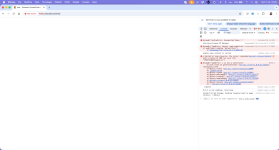
Browser Console (Chrome)
You can see multiple JavaScript errors, including:
  • Uncaught SyntaxError: Unexpected token '*'
  • Uncaught TypeError: Cannot read properties of undefined (reading 'defaultText')
  • ICS is not a constructor
  • Failed to load resource: the server responded with a status of 500 (ext-all.js?ver=7.0.0.22 – no such file '/PVE/StdWorkspace.js')

This confirms that several core JS files cannot be loaded by the browser.

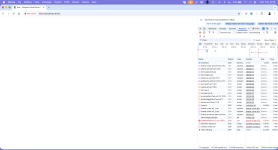
Browser Network tab
The Network panel shows:
  • 500 error for ext-all.js?ver=7.0.0.22
  • Several CSS and JS files missing under /usr/share/pve-manager/ext6/
  • Only a subset of the expected files are present in /usr/share/pve-manager/js/

This matches what I see in the filesystem: the ext6, themes, and resources subdirectories are mostly empty or missing entirely.

Screenshot 2025-12-07 alle 23.25.23.pngScreenshot 2025-12-07 alle 23.26.45.pngLet me know what additional information would help. I can also provide the full output of pveversion -v, dpkg -S mappings for missing files, or a directory tree of /usr/share/pve-manager.
 
Ah. Good ol' XY problem.
This is a common issue when using helper scripts. Try this: https://forum.proxmox.com/threads/proxmox-ve-web-gui-is-a-blank-page.172804/#post-806653
Make sure to fix the repo (needs to be trixie) and then run pveupdate && pveupgrade first.
Thank you for the suggestion.


I already reviewed that thread, including post #806653, and unfortunately my situation is different:


My repositories are already correctly set to​


Here is my current repo configuration:
Bash:
/etc/apt/sources.list.d/debian.sources   → trixie, trixie-updates, trixie-security
/etc/apt/sources.list.d/proxmox.sources  → trixie / pve-no-subscription
apt update and apt policy both show no errors, and the repos are correct.


Running​

pveupdate completes without errors.

I cannot run​

This node is part of a frozen test environment, where:
  • Kernel, system libraries, qemu, etc. cannot be updated
  • A full dist-upgrade would invalidate long-running VM regression tests
  • The system state must remain identical for several days/weeks
So I am restricted to reinstalling only the 3 GUI-related packages, not performing a global upgrade.

The issue is not solved by repo fixes​

The GUI breaks because the following directories are missing entirely:
Bash:
/usr/share/pve-manager/ext6/
/usr/share/pve-manager/css/
/usr/share/pve-manager/theme-crisp/
/usr/share/pve-manager/images/extjs

Even though:
Bash:
dpkg -S /usr/share/pve-manager
→ pve-manager
and pve-manager 9.1.1 appears installed, the static files are not present on disk.

Running:
Bash:
apt install --reinstall pve-manager proxmox-widget-toolkit
fails because the packages are currently not available in any Trixie repo.

What I actually need​

Not a system upgrade — only the original .deb packages for:
  • pve-manager_9.1.1_all.deb
  • proxmox-widget-toolkit_5.1.2_all.deb
  • libjs-extjs_7.0.0-5_all.deb (Debian)
Reinstalling just these would restore the missing assets without modifying the rest of the system.

If someone running Proxmox VE 9.1.1 could provide the .deb files (or at least file listings via dpkg -L), that would allow reconstruction of the missing directories.

Thanks again for helping — the clarification is much appreciated.
 
What does apt update, cat /etc/apt/sources.list.d/pve-no-subscription.list and apt policy pve-manager say?
By the way this is how it looks on my node

Bash:
# find /usr/share/pve-manager/ -type d
/usr/share/pve-manager/
/usr/share/pve-manager/migrations
/usr/share/pve-manager/templates
/usr/share/pve-manager/templates/default
/usr/share/pve-manager/js
/usr/share/pve-manager/helpers
/usr/share/pve-manager/images
/usr/share/pve-manager/css
Do not work around this issue by manually installing the .deb files. Let's fix your repo.
 
Last edited:
Thank you very much — your suggestion completely solved the issue.


After correcting the repository configuration (switching fully to Trixie repos only) and checking everything with apt update && apt policy, I was able to manually reinstall the three packages that were corrupted on my node:

  • pve-manager
  • proxmox-widget-toolkit
  • libjs-extjs

Since my environment is intentionally frozen and cannot perform full system upgrades, I downloaded the exact matching .deb versions and reinstalled them manually with:
Bash:
dpkg -i libjs-extjs_7.0.0-5_all.deb
dpkg -i proxmox-widget-toolkit_5.1.2_all.deb
dpkg -i pve-manager_9.1.1_all.deb

This restored all missing assets in:
  • /usr/share/pve-manager/ext6/
  • /usr/share/javascript/extjs/
  • /usr/share/pve-manager/js/

The Web GUI is now fully working again.


Thanks again for pointing me in the right direction — much appreciated!
 

Attachments

  • Screenshot 2025-12-08 alle 02.37.39.png
    Screenshot 2025-12-08 alle 02.37.39.png
    341.9 KB · Views: 3