Feature request: VM configuration toggle for 4k block device sector size

msi1

Active Member
Jan 30, 2020
6
0
41
38
Greetings.
I would like to place a feature request to allow using 4k sector size for block storage
In the configuration interface for VM, eg machine settings to configure the default. This would lead to adding "args: -global scsi-hd.physical_block_size=4k -global scsi-hd.logical_block_size=4k" to the corresponding VM configuration file.
Optionally, if this would be of interest, one could provide equivalent defaults in host storage / volume configurations or individual VM disk configurations.
 
Out of curiosity, what additional value would this bring compared to the existing --args option?

Also, I’ve been running benchmarks with various logical and physical block sizes, but they seem to have no effect on performance -- only on the sizes reported to the guest OS.

I'll post the results soon.
 
I’m evaluating Proxmox for potential use in a professional environment to host Windows VMs. Current production setup runs on Microsoft Hyper-V Server.

Results follow:


1) Using
--scsi0 "$VM_STORAGE:$VM_DISKSIZE,discard=on,iothread=1,ssd=1":

Code:
C:\> fsutil fsinfo sectorInfo C:
LogicalBytesPerSector :                                 512
PhysicalBytesPerSectorForAtomicity :                    512
PhysicalBytesPerSectorForPerformance :                  512
FileSystemEffectivePhysicalBytesPerSectorForAtomicity : 512
Device Alignment :                                      Aligned (0x000)
Partition alignment on device :                         Aligned (0x000)
No Seek Penalty
Trim Supported
Not DAX capable
Is Thinly-Provisioned, SlabSize :                       4,096 bytes (4.0 KB)

Code:
------------------------------------------------------------------------------
CrystalDiskMark 9.0.1 x64 (C) 2007-2025 hiyohiyo
                                  Crystal Dew World: https://crystalmark.info/
------------------------------------------------------------------------------
* MB/s = 1,000,000 bytes/s [SATA/600 = 600,000,000 bytes/s]
* KB = 1000 bytes, KiB = 1024 bytes

[Read]
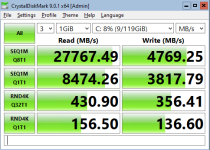
  SEQ    1MiB (Q=  8, T= 1): 27767.491 MB/s [  26481.1 IOPS] <   261.24 us>
  SEQ    1MiB (Q=  1, T= 1):  8474.260 MB/s [   8081.7 IOPS] <   123.38 us>
  RND    4KiB (Q= 32, T= 1):   430.900 MB/s [ 105200.2 IOPS] <    32.57 us>
  RND    4KiB (Q=  1, T= 1):   156.498 MB/s [  38207.5 IOPS] <    25.86 us>

[Write]
  SEQ    1MiB (Q=  8, T= 1):  4769.246 MB/s [   4548.3 IOPS] <  1744.31 us>
  SEQ    1MiB (Q=  1, T= 1):  3817.791 MB/s [   3640.9 IOPS] <   272.73 us>
  RND    4KiB (Q= 32, T= 1):   356.408 MB/s [  87013.7 IOPS] <    48.21 us>
  RND    4KiB (Q=  1, T= 1):   136.599 MB/s [  33349.4 IOPS] <    29.65 us>

Profile: Default
   Test: 1 GiB (x3) [C: 8% (9/119GiB)]
   Mode: [Admin]
   Time: Measure 5 sec / Interval 5 sec 
   Date: 2025/12/04 21:29:04
     OS: Windows Server 2022 Server Standard 21H2 [10.0 Build 20348] (x64)

1764896288540.png


2) Using
--scsi0 "$VM_STORAGE:$VM_DISKSIZE,discard=on,iothread=1,ssd=1" \
--args "-global scsi-hd.physical_block_size=4096 -global scsi-hd.logical_block_size=4096"

Code:
C:\> fsutil fsinfo sectorInfo C:
LogicalBytesPerSector :                                 4096
PhysicalBytesPerSectorForAtomicity :                    4096
PhysicalBytesPerSectorForPerformance :                  4096
FileSystemEffectivePhysicalBytesPerSectorForAtomicity : 4096
Device Alignment :                                      Aligned (0x000)
Partition alignment on device :                         Aligned (0x000)
No Seek Penalty
Trim Supported
Not DAX capable
Is Thinly-Provisioned, SlabSize :                       4,096 bytes (4.0 KB)

Code:
------------------------------------------------------------------------------
CrystalDiskMark 9.0.1 x64 (C) 2007-2025 hiyohiyo
                                  Crystal Dew World: https://crystalmark.info/
------------------------------------------------------------------------------
* MB/s = 1,000,000 bytes/s [SATA/600 = 600,000,000 bytes/s]
* KB = 1000 bytes, KiB = 1024 bytes

[Read]
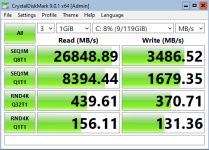
  SEQ    1MiB (Q=  8, T= 1): 26848.890 MB/s [  25605.1 IOPS] <   273.71 us>
  SEQ    1MiB (Q=  1, T= 1):  8394.444 MB/s [   8005.6 IOPS] <   124.57 us>
  RND    4KiB (Q= 32, T= 1):   439.610 MB/s [ 107326.7 IOPS] <    32.42 us>
  RND    4KiB (Q=  1, T= 1):   156.111 MB/s [  38113.0 IOPS] <    25.93 us>

[Write]
  SEQ    1MiB (Q=  8, T= 1):  3486.522 MB/s [   3325.0 IOPS] <  1777.70 us>
  SEQ    1MiB (Q=  1, T= 1):  1679.348 MB/s [   1601.6 IOPS] <   623.50 us>
  RND    4KiB (Q= 32, T= 1):   370.713 MB/s [  90506.1 IOPS] <    50.52 us>
  RND    4KiB (Q=  1, T= 1):   131.360 MB/s [  32070.3 IOPS] <    30.85 us>

Profile: Default
   Test: 1 GiB (x3) [C: 8% (9/119GiB)]
   Mode: [Admin]
   Time: Measure 5 sec / Interval 5 sec 
   Date: 2025/12/04 21:42:41
     OS: Windows Server 2022 Server Standard 21H2 [10.0 Build 20348] (x64)

1764896503010.png


3) Using
--scsi0 "$VM_STORAGE:$VM_DISKSIZE,discard=on,iothread=1,ssd=1" \
--args "-global scsi-hd.physical_block_size=4096 -global scsi-hd.logical_block_size=512"

Code:
C:\> fsutil fsinfo sectorInfo C:
LogicalBytesPerSector :                                 512
PhysicalBytesPerSectorForAtomicity :                    4096
PhysicalBytesPerSectorForPerformance :                  4096
FileSystemEffectivePhysicalBytesPerSectorForAtomicity : 4096
Device Alignment :                                      Aligned (0x000)
Partition alignment on device :                         Aligned (0x000)
No Seek Penalty
Trim Supported
Not DAX capable
Is Thinly-Provisioned, SlabSize :                       4,096 bytes (4.0 KB)

Code:
------------------------------------------------------------------------------
CrystalDiskMark 9.0.1 x64 (C) 2007-2025 hiyohiyo
                                  Crystal Dew World: https://crystalmark.info/
------------------------------------------------------------------------------
* MB/s = 1,000,000 bytes/s [SATA/600 = 600,000,000 bytes/s]
* KB = 1000 bytes, KiB = 1024 bytes

[Read]
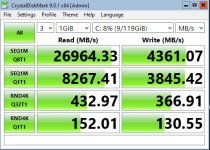
  SEQ    1MiB (Q=  8, T= 1): 26964.330 MB/s [  25715.2 IOPS] <   272.93 us>
  SEQ    1MiB (Q=  1, T= 1):  8267.413 MB/s [   7884.4 IOPS] <   126.46 us>
  RND    4KiB (Q= 32, T= 1):   432.969 MB/s [ 105705.3 IOPS] <    32.67 us>
  RND    4KiB (Q=  1, T= 1):   152.006 MB/s [  37110.8 IOPS] <    26.63 us>

[Write]
  SEQ    1MiB (Q=  8, T= 1):  4361.074 MB/s [   4159.0 IOPS] <  1144.96 us>
  SEQ    1MiB (Q=  1, T= 1):  3845.416 MB/s [   3667.3 IOPS] <   271.88 us>
  RND    4KiB (Q= 32, T= 1):   366.912 MB/s [  89578.1 IOPS] <    47.63 us>
  RND    4KiB (Q=  1, T= 1):   130.553 MB/s [  31873.3 IOPS] <    31.05 us>

Profile: Default
   Test: 1 GiB (x3) [C: 8% (9/119GiB)]
   Mode: [Admin]
   Time: Measure 5 sec / Interval 5 sec 
   Date: 2025/12/04 21:56:48
     OS: Windows Server 2022 Server Standard 21H2 [10.0 Build 20348] (x64)

1764896556608.png


Test system:
- Proxmox 9.1.1 running on AMD EPYC 4585PX
- Storage: 4x1.92TB Samsung PM9A3
Code:
# lsblk -o NAME,FSTYPE,LABEL,MOUNTPOINT,SIZE,MODEL,ALIGNMENT,STATE,OPT-IO,PHY-SEC,LOG-SEC,MIN-IO,OPT-IO
NAME        FSTYPE            LABEL          MOUNTPOINT   SIZE MODEL                      ALIGNMENT STATE   OPT-IO PHY-SEC LOG-SEC MIN-IO   OPT-IO
nvme3n1                                                   1.7T SAMSUNG MZQL21T9HCJR-00A07         0 live    131072    4096     512 131072   131072
├─nvme3n1p1 linux_raid_member                             511M                                    0         131072    4096     512 131072   131072
│ └─md1     vfat              EFI_SYSPART    /boot/efi  510.9M                                    0         131072    4096     512 131072   131072
├─nvme3n1p2 linux_raid_member md2                           1G                                    0         131072    4096     512 131072   131072
│ └─md2     ext4              boot           /boot       1022M                                    0         131072    4096     512 131072   131072
├─nvme3n1p3 linux_raid_member md3                          20G                                    0         131072    4096     512 131072   131072
│ └─md3     ext4              root           /             20G                                    0         131072    4096     512 131072   131072
├─nvme3n1p4 swap              swap-nvme1n1p4 [SWAP]         1G                                    0         131072    4096     512 131072   131072
└─nvme3n1p5 zfs_member        data                        1.7T                                    0         131072    4096     512 131072   131072
nvme1n1                                                   1.7T SAMSUNG MZQL21T9HCJR-00A07         0 live    131072    4096     512 131072   131072
├─nvme1n1p1 zfs_member        spool                       1.7T                                    0         131072    4096     512 131072   131072
└─nvme1n1p9                                                 8M                                    0         131072    4096     512 131072   131072
nvme2n1                                                   1.7T SAMSUNG MZQL21T9HCJR-00A07         0 live    131072    4096     512 131072   131072
├─nvme2n1p1 zfs_member        spool                       1.7T                                    0         131072    4096     512 131072   131072
└─nvme2n1p9                                                 8M                                    0         131072    4096     512 131072   131072
nvme0n1                                                   1.7T SAMSUNG MZQL21T9HCJR-00A07         0 live    131072    4096     512 131072   131072
├─nvme0n1p1 linux_raid_member                             511M                                    0         131072    4096     512 131072   131072
│ └─md1     vfat              EFI_SYSPART    /boot/efi  510.9M                                    0         131072    4096     512 131072   131072
├─nvme0n1p2 linux_raid_member md2                           1G                                    0         131072    4096     512 131072   131072
│ └─md2     ext4              boot           /boot       1022M                                    0         131072    4096     512 131072   131072
├─nvme0n1p3 linux_raid_member md3                          20G                                    0         131072    4096     512 131072   131072
│ └─md3     ext4              root           /             20G                                    0         131072    4096     512 131072   131072
├─nvme0n1p4 swap              swap-nvme0n1p4 [SWAP]         1G                                    0         131072    4096     512 131072   131072
├─nvme0n1p5 zfs_member        data                        1.7T                                    0         131072    4096     512 131072   131072
└─nvme0n1p6 iso9660           config-2                      2M                                40960         131072    4096     512 131072   131072

Code:
zpool list -o name,size,alloc,free,ckpoint,expandsz,frag,cap,dedup,health,altroot,ashift
NAME    SIZE  ALLOC   FREE  CKPOINT  EXPANDSZ   FRAG    CAP  DEDUP    HEALTH  ALTROOT  ASHIFT
data   1.72T  21.5G  1.70T        -         -     0%     1%  1.00x    ONLINE  -            12
spool  1.73T  20.5G  1.71T        -         -     1%     1%  1.00x    ONLINE  -            12

The data zpool is a 2-disk mirror used for the operating system, and the spool zpool is a 2-disk mirror dedicated to the VMs.

According to the SSD specifications, the drive physical page size is 16 KB. I plan to rerun the tests tomorrow using ashift=13 and ashift=14.

Comments are welcome.
 
but they seem to have no effect on performance -- only on the sizes reported to the guest OS.

A minor correction: Using scsi-hd.logical_block_size=4096 had a measurable (negative) impact on sequential write performance.
The remaining results appear to be within statistical tolerance.
 
Last edited:
For reference, the existing Hyper-V Server deployment (on identical hardware) yields the following results:

Code:
C:\> fsutil fsinfo sectorInfo C:
LogicalBytesPerSector :                                 512
PhysicalBytesPerSectorForAtomicity :                    4096
PhysicalBytesPerSectorForPerformance :                  4096
FileSystemEffectivePhysicalBytesPerSectorForAtomicity : 4096
Device Alignment :                                      Aligned (0x000)
Partition alignment on device :                         Aligned (0x000)
Performs Normal Seeks
Trim Supported
Not DAX capable
Is Thinly-Provisioned, SlabSize :                       1.048.576 bytes (1,0 MB)

Code:
------------------------------------------------------------------------------
CrystalDiskMark 9.0.1 x64 (C) 2007-2025 hiyohiyo
                                  Crystal Dew World: https://crystalmark.info/
------------------------------------------------------------------------------
* MB/s = 1,000,000 bytes/s [SATA/600 = 600,000,000 bytes/s]
* KB = 1000 bytes, KiB = 1024 bytes

[Read]
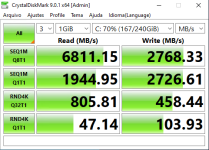
  SEQ    1MiB (Q=  8, T= 1):  6811.150 MB/s [   6495.6 IOPS] <  1230.51 us>
  SEQ    1MiB (Q=  1, T= 1):  1944.947 MB/s [   1854.8 IOPS] <   538.76 us>
  RND    4KiB (Q= 32, T= 1):   805.810 MB/s [ 196731.0 IOPS] <   148.90 us>
  RND    4KiB (Q=  1, T= 1):    47.140 MB/s [  11508.8 IOPS] <    86.79 us>

[Write]
  SEQ    1MiB (Q=  8, T= 1):  2768.327 MB/s [   2640.1 IOPS] <  3026.41 us>
  SEQ    1MiB (Q=  1, T= 1):  2726.607 MB/s [   2600.3 IOPS] <   384.29 us>
  RND    4KiB (Q= 32, T= 1):   458.443 MB/s [ 111924.6 IOPS] <   274.98 us>
  RND    4KiB (Q=  1, T= 1):   103.928 MB/s [  25373.0 IOPS] <    39.33 us>

Profile: Default
   Test: 1 GiB (x3) [C: 70% (167/240GiB)]
   Mode: [Admin]
   Time: Measure 5 sec / Interval 5 sec 
   Date: 2025/12/04 22:17:20
     OS: Windows Server 2022 Server Standard 21H2 [10.0 Build 20348] (x64)

1764897435151.png
 
At first glance, Proxmox appears to offer substantial improvements over the old setup, with a few important observations:

1) According to Samsung’s official specifications this model is rated for 6800 MB/s sequential read and 2700 MB/s sequential write -- both numbers closely matching the Hyper-V results.

2) I can’t account for the large performance difference shown in the Proxmox results, especially considering I’m using cache=None. Given the manufacturer’s specs, I’m starting to think the results aren’t telling the whole story -- or I’m doing something blatantly wrong.

3) I also don’t yet understand why Hyper-V delivers significantly better performance in the RND4K Q32T1 test.
 
Last edited:
> Out of curiosity, what additional value would this bring compared to the existing --args option?

right...i dont want to go into detail on that one... however, it seems to be a subset of "why does sth like proxmox even exist if we got qemu... ?". You probably should stick with qemu.

on your tests for clarfiication... are the results on (post 3) 1 VM on proxmox vs (post 5) 1 VM on Hyper V ?
 
Last edited:
on your tests for clarfiication... are the results on (post 3) 1 VM on proxmox vs (post 5) 1 VM on Hyper V ?
Exactly.

Results of Post #3 come from running CrystalDiskMark on guest VMs hosted on Proxmox 9.1.1. This was done on a test system with no other load.

Results in Post #5 come from running CrystalDiskMark on guest VMs hosted on Hyper-V Server 2019 (fully updated). The Hyper-V environment is a production system, so it normally has some workload, but the tests were performed during off-hours to minimize interference.
 
Exactly.

Results of Post #3 come from running CrystalDiskMark on guest VMs hosted on Proxmox 9.1.1. This was done on a test system with no other load.

Results in Post #5 come from running CrystalDiskMark on guest VMs hosted on Hyper-V Server 2019 (fully updated). The Hyper-V environment is a production system, so it normally has some workload, but the tests were performed during off-hours to minimize interference.
what is your cpu usage during the bench ? currently iothread use only 1core, so you could be cpu limited in rand4k. (I'm working on it to add support for the new multithreading feature ). It could explain the difference, if hyper-v is able to use multiple cores by disk.