Mini Resource screen in Proxmox

ettill

New Member
Nov 22, 2025
12
11
3
Greeting,

I was wondering if there is any way to connect a Mini 5" screen like the WOWNOVA 5" Computer Temp Monitor screen to Proxmox, I know they are are mainly designed for Windows.
There are many different types of mini screen resource monitoring hardware. I have looked are the Console based HTOP command .... and also install the sensors add in.

Just curious to see if there is a way to use a mini screen to display the CPU %, Ram % and Network % on some graphical type mini screen.

Even if there was a way to just have an open serial port to have it send out this info as a constant flow, cause i have a HMI screen from a older industrial machine that I salvaged that i could build an GUI to show these in, but i need to have a controllable serial input ..... like
"c1=25,ct1=30,r1=54,ni=04,no=26"
That would be Core1 25%, Core 1 temp 30c, RAM = 54%, Net in =04 kb/s, Net out 24kb/s

OR any other way to have a external mini screen that can display the resources ....

Any thoughts ?

Thanks in advance
 
That's a monitor that connects to USB-C, I am not sure Proxmox VE (or Debian/Linux) will be able to output display to it out of the box.

Similar monitors exist with VGA or HDMI connectivity, just grab one of those and you can easily configure a startup script to display whatever you want contonuously.


Fabián Rodríguez | Le Goût du Libre Inc. | Montreal, Canada | Mastodon
Proxmox Silver Partner, server and desktop enterprise support in French, English and Spanish
 
@MagicFab

Thanks for your reply ... .. I was hoping to keep everything internal, and only have to connect to the usb on the motherboard headers.
Also there is only 1 HDMI port so I would like to leave it open in case I have some issue and need to trouble shoot locally.

I don't know if I could use the HTOP command and have the video only display the "graphical" section ... not the PID stuff.

Heck I would almost accept a not graphical type of older alpha numeric LCD screen if I could get a addon or script to output the data in the correct format to display.

Anyone else have suggestions

Thanks again.
 
SOLVED !!!

Had to go a total different way .. BUT it does the basics at least.
I installed snmpd and set up some scrips for each of the resources (CPU %, MEM%, and CPU_temp) and setup up the snmpd.conf to support udp port.
got the proxmox set up ...
Then had to write the code in arduino IDE to have a ESP32c6 connect via WiFi , and request the SNMP OID for each , then convert it to integers to be able to disply it on a small .9" OLED via I2C ....

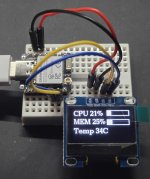
it displays three lines

CPU xx% & (BAR Graph)
MEM xx% & (BAR Graph)
CPU temp in C

Now to find a place on the Case to display it ...
WOAh ... what a journey learning SNMP basics.....

Let me know if anyone wants more details ...
 
Heres a pic on the ESP32 with the old lcd and the Ardunio C Code.

I'll post the scripts in another post

cropped esp32.jpg
C:
#include <WiFi.h>        // ESP32 Core WiFi Library   
#include <WiFiUdp.h>
#include <Arduino_SNMP_Manager.h>
#include <Wire.h>
#include <U8g2lib.h>

//************************************
//* Your WiFi info                   *
//************************************
const char *ssid = "YOUR_NETWORK";
const char *password = "password";
//************************************
// .9" OLED settings
//#define SCREEN_WIDTH 128
//#define SCREEN_HEIGHT 64
//#define OLED_RESET    -1
//Adafruit_SSD1306 display(SCREEN_WIDTH, SCREEN_HEIGHT, &Wire, OLED_RESET);

//************************************
// 1.54" ch1116 Oled setting
U8G2_SH1106_128X64_NONAME_F_HW_I2C u8g2(U8G2_R0, /* reset=*/ U8X8_PIN_NONE);
//************************************
//* SNMP Device Info                  *
//************************************
IPAddress proxmox(x.x.x.x);
const char *community = "public";
const int snmpVersion = 1; // SNMP v1=0, v2c=1

// OIDs from Proxmox snmpget outputs
const char *oidcputemp  = ".1.3.6.1.4.1.8072.1.3.2.3.1.1.8.99.112.117.95.116.101.109.112";
const char *oidmemusage = ".1.3.6.1.4.1.8072.1.3.2.3.1.2.9.109.101.109.95.117.115.97.103.101";
const char *oidcpuusage = ".1.3.6.1.4.1.8072.1.3.2.3.1.1.9.99.112.117.95.117.115.97.103.101";

//************************************
//* SNMP Objects and UDP              *
//************************************
WiFiUDP udp;
SNMPManager snmp(community);
SNMPGet snmpRequest(community, snmpVersion);

// Storage buffers for string values
char cpu_temp_buf[32];
char mem_usage_buf[32];
char cpu_usage_buf[32];

char *cpu_temp_ptr = cpu_temp_buf;
char *mem_usage_ptr = mem_usage_buf;
char *cpu_usage_ptr = cpu_usage_buf;

// Callback pointers
ValueCallback *callbackcpu_temp;
ValueCallback *callbackmem_usage;
ValueCallback *callbackcpu_usage;

// Polling interval
unsigned long lastPoll = 0;
int pollInterval = 2000; // 2 seconds

// Convert SNMP string to int
int toInt(char *s) {
  if (!s) return 0;
  return atoi(s);
}

// Draw horizontal bar graph
void drawBar(int x, int y, int w, int h, int percent) {
  int fill = (w * percent) / 100;
  u8g2.drawFrame(x, y, w, h);    // border
  u8g2.drawBox(x, y, fill, h);   // fill
}
void setup() {
  Serial.begin(115200);
  WiFi.begin(ssid, password);

  Serial.print("Connecting to WiFi");
  while (WiFi.status() != WL_CONNECTED) {
    delay(300);
    Serial.print(".");
  }
  Serial.println("\nConnected!");
  Serial.print("IP address: ");
  Serial.println(WiFi.localIP());

  /*// Init OLED
  if(!display.begin(SSD1306_SWITCHCAPVCC, 0x3C)) {
    Serial.println("SSD1306 allocation failed");
    while(true);
  }
  display.clearDisplay();
  display.display();
  */

  // Setup SNMP
  snmp.setUDP(&udp);
  snmp.begin();

  // Register string handlers for each OID
  callbackcpu_temp  = snmp.addStringHandler(proxmox, oidcputemp,  &cpu_temp_ptr);
  callbackcpu_temp->overwritePrefix = true;

  callbackmem_usage = snmp.addStringHandler(proxmox, oidmemusage, &mem_usage_ptr);
  callbackmem_usage->overwritePrefix = true;

  callbackcpu_usage = snmp.addStringHandler(proxmox, oidcpuusage, &cpu_usage_ptr);
  callbackcpu_usage->overwritePrefix = true;

// Init .9" mini OLED
/*  if(!display.begin(SSD1306_SWITCHCAPVCC, 0x3C)) { // 0x3C is common I2C address
    Serial.println(F("SSD1306 allocation failed"));
    for(;;);
  }
  display.clearDisplay();
  display.display();
  display.setTextSize(1);
  display.setCursor(0,0);
  display.setTextColor(SSD1306_WHITE);
}*/
// Init OLED  sh1116, 128x64
  u8g2.begin();
  u8g2.clearBuffer();
  u8g2.setFont(u8g2_font_ncenB10_tr);
  u8g2.drawStr(0, 12, "Initializing...");
  u8g2.sendBuffer();
}
void loop() {
  // SNMP manager loop to receive responses
  snmp.loop();

  // Poll interval check
  if (millis() - lastPoll >= pollInterval) {
    lastPoll = millis();

    // Build SNMP request
    snmpRequest.addOIDPointer(callbackcpu_temp);
    snmpRequest.addOIDPointer(callbackmem_usage);
    snmpRequest.addOIDPointer(callbackcpu_usage);

    snmpRequest.setIP(proxmox);  // target SNMP server
    snmpRequest.setUDP(&udp);
    snmpRequest.setRequestID(random(1000, 60000));
    snmpRequest.sendTo(proxmox);
    snmpRequest.clearOIDList();

    // Convert string values to int
    int cpu_temp_val  = toInt(cpu_temp_ptr);
    int mem_usage_val = toInt(mem_usage_ptr);
    int cpu_usage_val = toInt(cpu_usage_ptr);

    // Print values
    Serial.printf("CPU TEMP  : %d\n", cpu_temp_val);
    Serial.printf("Mem Usage : %d\n", mem_usage_val);
    Serial.printf("CPU Usage : %d\n", cpu_usage_val);
    Serial.println("------------------------");

    // Update OLED .9" mini display
    /* -----------------------------
    display.clearDisplay();

    // Line 1: CPU Usage
    display.setCursor(0,0);
    display.setTextSize(1);
    display.printf("CPU %d%%", cpu_usage_val);
    drawBar(60, 0, 68, 12, cpu_usage_val); // taller bar for 128x64

    // Line 2: MEM Usage
    display.setCursor(0,20);
    display.printf("MEM %d%%", mem_usage_val);
    drawBar(60, 20, 68, 12, mem_usage_val);

    // Line 3: CPU Temp
    display.setCursor(0, 40);
    display.printf("Temp %dC", cpu_temp_val);

    display.display();
    */
    // -----------------------------
    // Update 1.54" OLED sh1116 128x28 display
    // -----------------------------
    u8g2.clearBuffer();

    // Line 1: CPU Usage
    u8g2.setCursor(1, 12);
    u8g2.print("CPU ");
    u8g2.print(cpu_usage_val);
    u8g2.print("%");
    drawBar(75, 0, 50, 12, cpu_usage_val);

    // Line 2: MEM Usage
    u8g2.setCursor(1, 30);
    u8g2.print("MEM ");
    u8g2.print(mem_usage_val);
    u8g2.print("%");
    drawBar(75, 20, 50, 12, mem_usage_val);

    // Line 3: CPU Temp
    u8g2.setCursor(1, 50);
    u8g2.print("Temp ");
    u8g2.print(cpu_temp_val);
    u8g2.print("C");

    u8g2.sendBuffer();
  }


}

 
In my attempt of this, had to figure out a bunch of things, the one thing that took the longest was to get the two devices to send the data in the same format ...
As with ESP32 im use to using raw integers not strings. found out the hard way that SNMP sends Strings in ASCII. At first I was trying to get the SNMP OIC data to be an Integer and got only a little progress.... and the CPU_Temp Integer was always 0 but the String was "30"... and after fighting for 4 hours I went on and tried with CPU_Usage and MEM_Usage ... but was only able to get CPU_Usage to show an Integer.... so after a day of struggles, I switched sides .. and decided to see if I could convert the ASCII to an Integer on the ESP32 .... and after another 1/2 a day i was FINALLY able to get it to talk nice to each other.

Here are the scripts that I used to make Proxmox snmpd active. ...

I still have some more ideas I want to try ... as right now this is on the General WIFI node ... i would like to possible put in a USB -> WIFI dongle and isolate it for safety & to keep the traffic off of the main.
Then was thinking of expanding this ... larger screen and more data points, Network Kps, Drive usages, possibly I/O , even some sort of indicator if a VM or CT had to restart or other notification ... like the screen would invert ... so this was just a proof of concept I guess..

I was REALLY surprised on the total LACK of DIY'ers that have not gone down this rabbit hole... and the total lack of hardware/software options for simple external resource monitoring for Proxmox in general. I understand that everything is WEB accessible, but in my case my Proxmox box will be in a separate room and thought it would be good to have just some simple external display that let me know the status of it.

Feel free to let me know if I am doing anything bad or risky ... as I still learning and this is just my first attempt ...

Knowledge is ever growing..

Thanks
 

Attachments

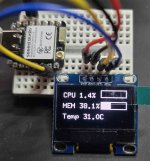
***** UPDATE ****** ... If anyone is interested ... i switch from using SNMP to using Glances... and just reading the web interface.
The SNMP bases unit started to fluctuate the readings ... mainly on the CPU usage..... it would show 20-50% .. when there was only 1-5% ... so ... not giving me accurate info ...

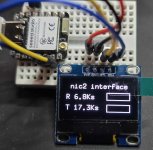
the Newest one provides 1 decimal point and reads more accurately ... and i was able to add another page that is switches between that shows the 'nic' interface average up & down link speed with auto ranging k,m,g .... I can provide more info if you want. Im liking this newer setup....

pg 1-sm.jpgpg 2-small.jpg
 
I could add a third page ... but these are the primary things i was interested in monitoring .. and the nice thing is that since this is WiFi connected .. i can have multiple of them one on the unit .. .and one on my desk to directly monitor (since the scree is small , just need a different mounting.

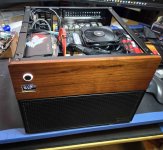
This has a ZimaBlade7700 build in running off the 12V rail. to provide a Local maintenance access if needed because the unit will be in a protected location, as either a bugout box, with all my backups. or just a incase primary backups get damaged.

It's build on a I3-n355 8core motherboard with 4 2.5Gb and 6 SATA for NAS... the only down side is the second M.2 shares it's 1 lane with the only PCIE port. but so far so good.

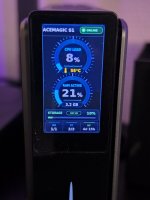
here a pic of the case with screen .. I repurposed the front USB&USB-C area for the scree as the MB did not have connections for Front Panel USB-C .

In case sm.jpg
 
  • Like
Reactions: Onslow