PBS Limited to 1Gb

Ranger_Vzla

Member
Jan 19, 2021
8
1
23
37
Hello everyone,

I need some help with my Proxmox Backup Server (PBS) backup and restore speeds. My setup includes three HP ProLiant DL360 servers with 10Gb network cards. The PBS itself is running on a custom PC with the following specifications:

  • CPU: Ryzen 7 8700G
  • RAM: 128GB DDR5
  • Storage: 4x 14TB HDDs in a RAIDZ2 ZFS pool, and 3x 128GB NVMe SSDs for cache
  • Motherboard: ASUS X670E-E
  • Network: 10Gb Ethernet card
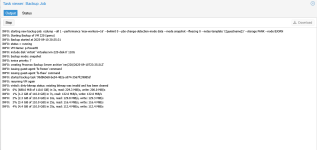
The issue I'm facing is that my backups are running at a very curious speed of 133MB/s. This speed seems to be capped at what you would expect from a 1Gb link, yet my entire internal Proxmox network is running at 10Gb.

Currently, the PBS is not in production, so I have the flexibility to run further tests with my ZFS setup.

Versions:

  • Proxmox: 8.4.13
  • PBS: 4.0.14
Tests Performed:I have already created a separate ZFS pool using only the NVMe drives to rule out any HDD bottlenecks, but the speeds remain the same at 133MB/s. I'm looking for guidance on what could be causing this 1Gb speed cap in a 10Gb network environment.

I currently have a Debian-based NAS with a PC and RAID cards for my standard vzdump backups. These are already in production, and the copy speed consistently stays around 430MB/s. This makes me believe the problem is not a network performance issue, but rather something related to the PBS configuration

Thank you in advance for your help!

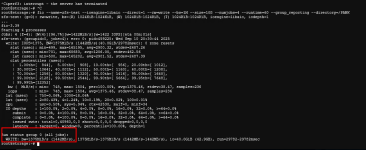
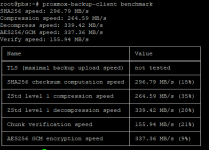
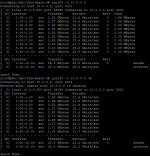
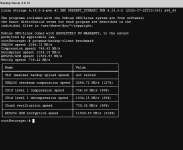
PD: PBS Benchmarks results attached
 

Attachments
  • pbs-bench.png
    pbs-bench.png
    59.1 KB · Views: 20
  • pbs-bench3.png
    pbs-bench3.png
    142.7 KB · Views: 18
  • pbs-bench2.png
    pbs-bench2.png
    43.5 KB · Views: 12
  • pbs-bench4.png
    pbs-bench4.png
    39.9 KB · Views: 18
Last edited:
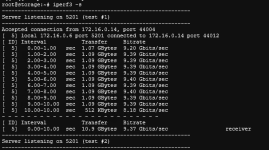
I created an account just to say me too! I'm currently seeing the same bottleneck during backup and restore. Ive been searching for hours to track down what the issue is and found your post. However i'm running linux bridge for internal comms between VM-VM and VM-host. (truenas and PBS) When i run iperf3, I hit my cpu single core limit(32Gbps). When i run a restore I'm seeing a transfer rate of 1 to 1.5Gbps max. There definitely seems like something in PCT/qmrestore or even on PBS that is stopping it, Not ethernet related Please let me know if you found anything that might help. Stuck in the same boat.
  • CPU: e5-2618L
  • RAM: 128GB DDR4
  • Storage: 12x10TB in 2 VDEV RaidZ2 pool
  • Proxmox: 8.4.9
  • PBS: 3.4.2
 

Attachments

  • Screenshot 2025-11-28 143522.png
    Screenshot 2025-11-28 143522.png
    20.8 KB · Views: 6
  • Screenshot 2025-11-28 144030.png
    Screenshot 2025-11-28 144030.png
    59.9 KB · Views: 6
PVE 9 got:
Backup/Restore
  • Increase concurrency when restoring VM disks from Proxmox Backup Server.
Restoring from Proxmox Backup Server now fetches multiple chunks concurrently in each worker thread.​
This can improve the restore performance in setups with fast network connections and disks.​
The number of concurrently fetched chunks and worker threads can be customized using environment variables.​
https://pve.proxmox.com/wiki/Roadmap#Proxmox_VE_9.0

https://pve.proxmox.com/wiki/Upgrade_from_8_to_9
(https://pbs.proxmox.com/wiki/Upgrade_from_3_to_4)
 
  • Like
Reactions: EggsLan
12x10TB in 2 VDEV RaidZ2 pool

RaidZ2 (in this context) is... crazy - or at least "suboptimal". PBS needs IOPS as it handles your large amount of data in (max) 4 MiB chunks. (This has been discussed multiple times.)

It would be better to go for six mirrors - you would get three times the IOPS from it - each and every vdev counts.

But my main point is: whatever you do with rotating rust in the PVE or PBS context: add a fast "Special Device", using mirrored SSD or NVMe. Note that the same redundancy level in all vdevs is recommended. For RaidZ a normal mirror is sufficient, for being added to a RaidZ2 pool a triple mirror is it!

A Special Device will increase IOPS by a factor of 3 to 10 to 30, depending on the current task, at least on my PBS's.


Good luck :-)
 
PVE 9 got: [...] The number of concurrently fetched chunks and worker threads can be customized using environment variables.
Out of curiosity I've just tried to find the way how to do that.
But I have failed to find it in the links from that post and in the official up-to-date documentation PDFs
https://pbs.proxmox.com/docs/proxmox-backup.pdf and
https://pve.proxmox.com/pve-docs/pve-admin-guide.pdf

I've searched using various strings, like chunk, concurr, environment.

Does anyone know where exactly this is documented?
 
Out of curiosity I've just tried to find the way how to do that.
But I have failed to find it in the links from that post and in the official up-to-date documentation PDFs
https://pbs.proxmox.com/docs/proxmox-backup.pdf and
https://pve.proxmox.com/pve-docs/pve-admin-guide.pdf

I've searched using various strings, like chunk, concurr, environment.

Does anyone know where exactly this is documented?
https://forum.proxmox.com/threads/abysmally-slow-restore-from-backup.133602/
If im reading the post correctly(im still pretty new to this), The feature is enabled by default in PVE9. It has 4 threads and 16 chunks in parallel as default. You can use environment variables to adjust these in shell using the following directly with qmrestore.
PBS_RESTORE_FETCH_CONCURRENCY=16
PBS_RESTORE_MAX_THREADS=4
I was able to increase my VM restore speed from 3.9Gbit to 4.3Gb by changing those to 32 and 8 respectively. I'm probably limited by drive speed myself. The only unfortunate part is i forgot to get a screen shot of the restore speed on pve8 so i have no idea what kind of increase it made but its plenty fast for restores. Backup on the other hand is still 1/5 the speed of restore.
 
PBS_RESTORE_FETCH_CONCURRENCY=16
PBS_RESTORE_MAX_THREADS=4
@EggsLan , congrats on finding these variables :) .

At the moment I've searched Google for PBS_RESTORE_FETCH_CONCURRENCY and it displayed miserable 5 (five) results only. I've checked again the official PDFs and they don't mention these variables at all.

I'm surprised that Proxmox failed to document the things which it proudly included in the changelog at https://pve.proxmox.com/wiki/Roadmap#Proxmox_VE_9.0