

Hi Everyone,
New to Proxmox and the forum...
My current setup is below
I have PVE (PVE01) on my Dell R640 host that runs production windows and linux VM's.
I have a Dell Optiplex that runs PVE (PVE02) and that runs PBS (I did it that way if I ever wanted to run some tiny containers as well)
I have a Synology DS423+ (4x WD40EFAX drives in RAID 5) as backup storage for Proxmox Backup Server.
I'm experiencing repeated Input/output error messages when I try to back up to my PBS that has the LUN to my NAS as a datastore, it ultimately fails, the max it ever went to was 14%.
The strange thing is that PBS becomes completely unresponsive and so does PVE on my Optiplex. The only way to resolve it is to unplug or disable the port on my Unifi switch that is connected to the Optiplex for about 1-2 minutes, then re-enable and I can access PVE02 and PBS.
I also consistently encountered fio test failures under load. SMART tests on all drives report as healthy. I attempted tuning Synology's performance settings (e.g. smaller stripe cache size), but no improvement was seen.
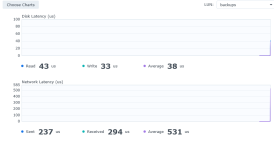
Attached is a picture from my NAS as soon as the backup begins (it stopped about 2-5 seconds after the snip)
But I also tried running PBS on it directly, with the same result...
ChatGPT recommends adding an SSD cache or switching to SMB or NFS but before doing that I wanted to know if anyone else has this issue and how did you resolve it ?
Any help is appreciated!
New to Proxmox and the forum...
My current setup is below
I have PVE (PVE01) on my Dell R640 host that runs production windows and linux VM's.
I have a Dell Optiplex that runs PVE (PVE02) and that runs PBS (I did it that way if I ever wanted to run some tiny containers as well)
I have a Synology DS423+ (4x WD40EFAX drives in RAID 5) as backup storage for Proxmox Backup Server.
I'm experiencing repeated Input/output error messages when I try to back up to my PBS that has the LUN to my NAS as a datastore, it ultimately fails, the max it ever went to was 14%.
The strange thing is that PBS becomes completely unresponsive and so does PVE on my Optiplex. The only way to resolve it is to unplug or disable the port on my Unifi switch that is connected to the Optiplex for about 1-2 minutes, then re-enable and I can access PVE02 and PBS.
I also consistently encountered fio test failures under load. SMART tests on all drives report as healthy. I attempted tuning Synology's performance settings (e.g. smaller stripe cache size), but no improvement was seen.
Attached is a picture from my NAS as soon as the backup begins (it stopped about 2-5 seconds after the snip)
But I also tried running PBS on it directly, with the same result...
ChatGPT recommends adding an SSD cache or switching to SMB or NFS but before doing that I wanted to know if anyone else has this issue and how did you resolve it ?
Any help is appreciated!
Attachments
Last edited:
