

Virtual Machines randomly going nuts

cosmicat84

New Member
Jun 7, 2025
3
1
3
This is my first post, hi everyone!

I have a 3 node PVE cluster which works very well except for one single thing: VM are randomly going crazy.
What I mean with crazy?
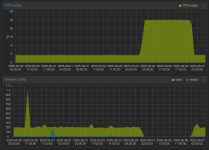
- Lost of IP address (and network traffic)
- No more disk activity
- CPU goes up to 25% and stay fixed at that value
(see attachment)

Considerations
- PVE hosts are not logging anything about the event
- the VM has nothing about the event in the logs because it's like the storage has ben pulled from the machine, so no chance to write anything about it
- this happens with any kind of backend I tried (Ceph, ZFS, local LVM on EXT4)
- it's totally random, can happen twice in a week as well as once in 3 months
- all the affected VM are based on Debian 12 (various releases, it' happening since 6+ months, last time this week, and I'm updating the OS every month more or less)
- I started the cluster with 8.2.x I think (maybe even 8.1.x), but updating to newer version never helped, I'm now at 8.3.2
- the cluster uses mixed nodes: #1 EPYC Rome, #2 XEON Scalable Gen. 2 #3 Xeon 22xx and it's happening to VM on all of them...

My question is not much a request of help to investigate this, but just a general question to understand if this is something kind of known?
Is it happening only to me or others have experienced a similar problem?
Because it's kind of a non-negligible problem I think...
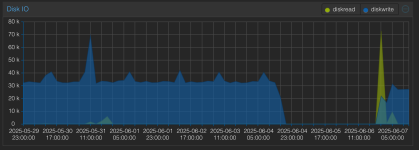
 

Attachments

  • disk.png
    disk.png
    119.8 KB · Views: 6
  • cpu-net.png
    cpu-net.png
    212.3 KB · Views: 7
Hello,

This is not a known issue.

- Lost of IP address (and network traffic)
- No more disk activity

The first sounds like there might be two hosts in the same network with the same IP or MAC. Is it possible the disk activity stops because the lose of network connectivity of the VM?

- I started the cluster with 8.2.x I think (maybe even 8.1.x), but updating to newer version never helped, I'm now at 8.3.2

What exact command are you using to upgrade the machine?


- PVE hosts are not logging anything about the event
How exactly are you reading the system logs?
 
This is my first post, hi everyone!
A warm welcome!

I must tell you - I have pondered for about 20 minutes on your thread & cannot come up with one single point-of-failure to explain your scenario.

Maybe some additional info can help here:

  • Do you use HA on the cluster.
  • How is general NW connectivity between the nodes.
  • During an incident, do the host nodes behave properly, have NW accessibility etc.
  • During an incident, do other independent devices on the NW behave normally.
  • After an incident, how do you recover from it. From your graphs - no reboot is apparent.
  • From your graphs; it appears an incident lasted ~3 days, how come this went unnoticed.
  • What use-case/workload is supposed to be going on in those VMs.
  • When were these nodes last rebooted.
  • How many incidents in total have there been.
  • Has all the HW been thoroughly checked; RAM, Disks, Thermals, Nics, switches etc.

My question is not much a request of help to investigate this
I'm perplexed why you find the issue trivial enough not to request help.

Because it's kind of a non-negligible problem I think...
If you are not being sarcastic, I'm perplexed again.
 
Hello,

This is not a known issue.

The first sounds like there might be two hosts in the same network with the same IP or MAC. Is it possible the disk activity stops because the lose of network connectivity of the VM?

What exact command are you using to upgrade the machine?
How exactly are you reading the system logs?

Hello Maximiliano,

All VMs have a fixed IP; I have experienced IP duplication issues, they usually mess with network connectivity but they don't broke (irreparably) the whole machine

I usually upgrade debian with apt update and the apt dist-upgrade
As for the logs I use journalctl (-f , -k etc.) and dmesg -T


A warm welcome!

I must tell you - I have pondered for about 20 minutes on your thread & cannot come up with one single point-of-failure to explain your scenario.

Maybe some additional info can help here:

  • Do you use HA on the cluster.
  • How is general NW connectivity between the nodes.
  • During an incident, do the host nodes behave properly, have NW accessibility etc.
  • During an incident, do other independent devices on the NW behave normally.
  • After an incident, how do you recover from it. From your graphs - no reboot is apparent.
  • From your graphs; it appears an incident lasted ~3 days, how come this went unnoticed.
  • What use-case/workload is supposed to be going on in those VMs.
  • When were these nodes last rebooted.
  • How many incidents in total have there been.
  • Has all the HW been thoroughly checked; RAM, Disks, Thermals, Nics, switches etc.


I'm perplexed why you find the issue trivial enough not to request help.


If you are not being sarcastic, I'm perplexed again.

Thank you :)

Yep it's a very strange problem

Do you use HA on the cluster.
no
How is general NW connectivity between the nodes.
All servers have an intel X550, connected in 10G through an Ubiquiti USW-Flex-XG. No management network, all shared,
During an incident, do the host nodes behave properly, have NW accessibility etc.
Yep all fine on host level and also on other VMs running on the host(s)
During an incident, do other independent devices on the NW behave normally.
Yes no other issues observed
After an incident, how do you recover from it. From your graphs - no reboot is apparent.
I have to hard stop the VM (Shutdown --> Stop and then Start)
From your graphs; it appears an incident lasted ~3 days, how come this went unnoticed.
hehe this is my home lab and had a quite intensive week at work, so not much time for the rest (and yes I'm missing a central monitoring and alarming system, it's on todo)
What use-case/workload is supposed to be going on in those VMs.
Of the last two that crashed, one is running GitLab, the other Portainer.
When were these nodes last rebooted.
30 days ago as of today
How many incidents in total have there been.
I'd say this happened around 10 times till now
Has all the HW been thoroughly checked; RAM, Disks, Thermals, Nics, switches etc.
Temps are under control (I have AC), no hw issues reported nor at IPMI or OS level

In past I was kind of able to trigger the issue (it appears to happen within 24hr) after live migrating a VM from shared storage to local and then back.
I will have host and vm logs/dmesg in follow mode and try to catch one "live"
 
I'm perplexed why you find the issue trivial enough not to request help.

If you are not being sarcastic, I'm perplexed again.

Forgot these two

The thing is that, before start digging seriously into the problem, I wanted to be sure I haven't hit something known
You know things like "ah yes you need to disable/enable this kernel module" or "you just need to make sure this pkg is installed because of reason"

My "it's kind of a non-negligible problem I think" was not sarcastic, but just to underline that, if this is happening to others, it should be known, also because I haven't done anything exotic, just installed Proxmox, configured usual things and created->installed the VM :confused:
 
  • Like
Reactions: gfngfn256
Has all the HW been thoroughly checked; RAM, Disks, Thermals, Nics, switches etc.
Temps are under control (I have AC), no hw issues reported nor at IPMI or OS level
So in short; those are untested. At a minimum, run a MemTest on the RAM & some sort of physical disk check.

Maybe provide a <vmid>.conf output of an effected VM - so that maybe someone can shed some light on this issue.