

[SOLVED] Node HD Space (Summary Tab) and Node Device Total Storage (Disks Tab) Do Not Match
- Thread starter edd189
- Start date
You are using an out of date browser. It may not display this or other websites correctly.
You should upgrade or use an alternative browser.
You should upgrade or use an alternative browser.
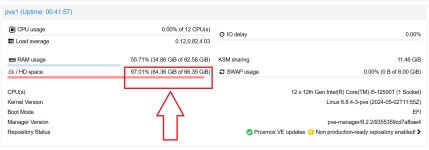


The '/ HD space' is the root filesystem, which is only a (small) part of the LVM on your NVMe.
You are probably putting the VM virtual disks as files on the root filesystem instead of putting them on the LVM(-Thin) or the ZFS, which is a common mistake (for people coming from other hypervisors). Lots of threads on this forum about the root filesystem becoming full due to backups or VM disks as files being put there by accident.
You are probably putting the VM virtual disks as files on the root filesystem instead of putting them on the LVM(-Thin) or the ZFS, which is a common mistake (for people coming from other hypervisors). Lots of threads on this forum about the root filesystem becoming full due to backups or VM disks as files being put there by accident.

Just to add to leesteken, if you want to get a general overview of what storage/s are available/usage/quantity; look at the bottom (drop-down) of the node (left-column GUI) & they will be listed there, together with all pertinent info.
Just one thing to add - that consumer-grade CT4000MX500SSD1 seems to have a ~0.14 DWPD (over 5 years), that is pretty low for server storage (+ ZFS, but seemingly you have no raid). I notice you are showing n/a on Wearout, I'm not sure if this is concerning - but maybe you should check the actual smart values.
Your 250GB 960 EVO fairs a little better at ~0.22 DWPD (over 5 years) - but even that is not very good.
Even in a home server, you had better make sure you have full (external) backups of all your data, if you intend keeping it!
Your 250GB 960 EVO fairs a little better at ~0.22 DWPD (over 5 years) - but even that is not very good.
Even in a home server, you had better make sure you have full (external) backups of all your data, if you intend keeping it!
Looks like it may have been a setup mistake on my part. I used only a portion of my 250GB NMVe for the system/root. The rest I had at one point provisioned for an LVM-thin disk, but had since deleted it since it was unused.
Could not find a thing on the rest of the disk in use (VMs are on the ZFS disk and backups are on an SMB share). So I ran the below code and am able to use the whole disk.
Code:
lvextend -l +100%FREE /dev/pve/root
resize2fs /dev/pve/root
Could not find a thing on the rest of the disk in use (VMs are on the ZFS disk and backups are on an SMB share). So I ran the below code and am able to use the whole disk.
Code:
lvextend -l +100%FREE /dev/pve/root
resize2fs /dev/pve/root
This is surprising as 64.36 GiB for just the Proxmox OS/root is a colossal amount. (Mine for example is 14G & I believe that is on the "big" side).Could not find a thing on the rest of the disk in use
I suspect you missed something - maybe a backup was done when that SMB was unavailable? Some ISOs Templates etc.
Maybe try running
Code:
du -h -x -d1 /Exactly! I unmounted the SMB share, rebooted, and found several backup files in the same directory name, but they were local and not shares. Good call. Cleaned those up and now I have:I suspect you missed something - maybe a backup was done when that SMB was unavailable? Some ISOs Templates etc.
HD space 3.06% (6.73 GiB of 219.81 GiB
That looks more like it!6.73 GiB
Maybe mark this thread as Solved. At the top of the thread, choose the
Edit thread button, then from the (no prefix) dropdown choose Solved.
Don't do this. There's a reason some space is unallocated. You will have a hard(er) time fixing your system if you ever make a mistake in overallocation and your thin pool reaches 100%.I ran the below code
lvextend -l +100%FREE /dev/pve/root
resize2fs /dev/pve/root
Last edited: