

[SOLVED] Windows display broken up

cdsJerry

Renowned Member
Sep 12, 2011
222
9
83
I have a Windows 7 VM that's been running for years. A couple of months ago I did an update to Proxmox and ever since, the display screen on the Windows 7 machine is messed up when using Windows Remote Desktop to access the machine. The display has gaps and lines all over it and you constantly have to zoom in or out to make it re-draw the screen to see what you're doing. That's not handy when trying to do graphics.

It's the only VM that seems to have been effected making me think it must be something in the VM configuration. When I look at Device Manager I see there's an unknown device that looks like it's related to the video display but I don't know enough about this to know exactly what I need to do to correct this.

I have tried changing the Display from "default" to "standard VGA" but that made no difference.

I'm running Proxmox 8.3.5. This VM has 16GB RAM, 12 cores, default (SeaBIOS).
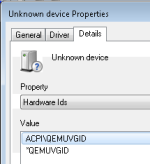
1742310490011.png
 
have you tried updating the virtio drivers in the vm? maybe newer qemu versions needs newer virtio drivers.

https://pve.proxmox.com/wiki/Windows_VirtIO_Drivers
I tried but there are no Windows7 files in the new download. It appears that W7 isn't supported any longer which isn't shocking. My problem is that I have a program that's licensed on this VM and I can't re-install the software again. Corel isn't very friendly when it comes to that. When I first moved the software to a VM they said I'd used my maximum number of installations. I'm only running it on 1 machine but I guess they limit how many times you're allowed to re-install it which is why I never updated that OS.
 
My problem is that I have a program that's licensed on this VM and I can't re-install the software again.
I have a similar problem with my Win7. I have specialized ham-radio software that would be very painful to port to Win10 or Win11 (not to mention Win7-only scanner software, an on and on, so I have every incentive to stay with Win7. I'm basically trying to "wrap" Proxmox around my bare-metal Win7.

To do that, I installed a fresh 1TB SSD to install/boot Proxmox. I am passing though my existing old Nvidia card and using it and the existing hi-res monitors for Win7 (like it ran before Proxmox). I've set my BIOS up to drive on-board VGA for Proxmox boot up and BIOS/Boot selection. I've also bought a PCI-sata card to IOMMU-isolate my optical drives for dedicated Win7 usage.

Note, that even though I have some dedicated pass-thru hardware for Win7, I don't run Win7 all the time, so when it's down, I can use that hardware for other VMs and LXCs. It's not all done yet (I'm waiting for some other things to get done first), but I'm crossing my fingers.
 
I have a similar problem with my Win7. I have specialized ham-radio software that would be very painful to port to Win10 or Win11 (not to mention Win7-only scanner software, an on and on, so I have every incentive to stay with Win7. I'm basically trying to "wrap" Proxmox around my bare-metal Win7.

To do that, I installed a fresh 1TB SSD to install/boot Proxmox. I am passing though my existing old Nvidia card and using it and the existing hi-res monitors for Win7 (like it ran before Proxmox). I've set my BIOS up to drive on-board VGA for Proxmox boot up and BIOS/Boot selection. I've also bought a PCI-sata card to IOMMU-isolate my optical drives for dedicated Win7 usage.

Note, that even though I have some dedicated pass-thru hardware for Win7, I don't run Win7 all the time, so when it's down, I can use that hardware for other VMs and LXCs. It's not all done yet (I'm waiting for some other things to get done first), but I'm crossing my fingers.
That sounds overly complicated, but I don't want to venture down that rabbit hole. I need to focus on my existing problem.
 
Was able to update the VM to Windows 10 without losing the license to CorelDraw. After the update the screen displays correctly. Don't know what the issue between Windows 7 and the updated version of Proxmox but this will get me around the problem.
 
  • Like
Reactions: stoneware