Can’t uninstall

Juzt4me

New Member
Mar 4, 2025
1
0
1
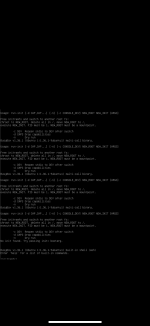
So an Ubuntu VM gave me an error and I cannot for the life of me restart it. I decided to re-flash Ubuntu server on it but every time I get to the password field, I get an error that kicks up. For now, promos loads and lets me use the GUI but my VM also remains off line.

https://postimg.cc/gallery/Zm2zM9f
 

Attachments

  • IMG_4638.png
    IMG_4638.png
    288 KB · Views: 13
So an Ubuntu VM gave me an error and I cannot for the life of me restart it. I decided to re-flash Ubuntu server on it but every time I get to the password field, I get an error that kicks up. For now, promos loads and lets me use the GUI but my VM also remains off line.

https://postimg.cc/gallery/Zm2zM9f
The issue is likely caused by disk corruption, ISO file issues, or VM misconfiguration. Try the following solutions:

1️ Verify VM Disk Configuration

Run:
Code:
qm config <vmid>

If the disk path is incorrect or missing, reattach the disk or create a new one.

2️ Use a Different Ubuntu ISO

Download the latest Ubuntu Server ISO from Ubuntu Official Site, then upload it to Proxmox and reattach it:
Code:
qm set <vmid> --cdrom local:iso/<new-ubuntu.iso>
Try using Ubuntu 22.04 LTS instead of the latest version.

3️ Check Storage Type and Change to VirtIO

If using SATA, switch to VirtIO:
Code:
qm set <vmid> --scsihw virtio-scsi-pci
If already using VirtIO, try SCSI instead of SATA.

4️ Increase VM Memory

If the VM has less than 2GB RAM, increase it to 4GB:
Code:
qm set <vmid> --memory 4096

Ubuntu installations may fail if memory is insufficient.

5️ Check Proxmox Logs

Run:
Code:
journalctl -xe | grep -i error

This will help identify issues related to disk access, memory, or CPU settings.