SSD Migration Options

encryptid

New Member
Feb 11, 2025
4
3
3
I've read through all the related posts I can find, and haven't been able to identify a clear path to escape my situation safely.

  • I have an SSD (1.86 TB) that is dying. My whole proxmox install is on this SSD.
  • I have backups of all my VMs on another drive which is safe.
  • I have a full drive image of the ailing SSD.
  • My replacement SSD is 1.82 TB - sadly it is smaller. so I cannot restore the drive image to it, nor do I want to spend more to get a bigger one.
  • Gparted is a no go, as the LVM thin pool consumed the whole disk and I cannot reduce the partition by enough to fit on the new drive
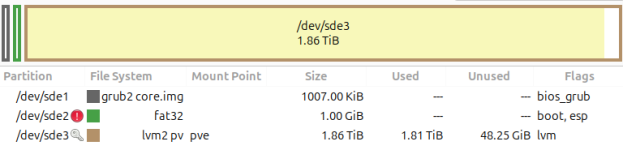
So I am trying to work out how to get my proxmox install onto the new drive, without losing any of my OS changes, proxmox changes, etc. I can restore the VMs once I get everything transferred. It is not possible to reduce thin volumes, which is super painful - otherwise I would just do that. My disk looks like this (I have it mounted as a USB device in Ubuntu at the moment):

Code:
sde                            8:64   0   1.9T  0 disk
├─sde1                         8:65   0  1007K  0 part
├─sde2                         8:66   0     1G  0 part
└─sde3                         8:67   0   1.9T  0 part
  ├─pve-swap                 252:0    0     8G  0 lvm 
  ├─pve-root                 252:1    0    96G  0 lvm 
  ├─pve-data_tmeta           252:2    0  15.9G  0 lvm 
  │ └─pve-data-tpool         252:4    0   1.7T  0 lvm 
  │   ├─pve-data             252:5    0   1.7T  1 lvm 
  │   ├─pve-vm--100--disk--1 252:6    0    64G  0 lvm 
  │   ├─pve-vm--100--disk--0 252:7    0     4M  0 lvm 
  │   ├─pve-vm--100--disk--2 252:8    0     4M  0 lvm 
  │   ├─pve-vm--102--disk--0 252:9    0    32G  0 lvm 
  │   ├─pve-vm--102--disk--1 252:10   0   100G  0 lvm 
  │   ├─pve-vm--103--disk--0 252:11   0   100G  0 lvm 
  │   ├─pve-vm--101--disk--1 252:12   0    50G  0 lvm 
  │   ├─pve-vm--101--disk--0 252:13   0     4M  0 lvm 
  │   ├─pve-vm--101--disk--2 252:14   0     4M  0 lvm 
  │   ├─pve-vm--104--disk--1 252:15   0   100G  0 lvm 
  │   └─pve-vm--103--disk--1 252:16   0    50G  0 lvm 
  └─pve-data_tdata           252:3    0   1.7T  0 lvm 
    └─pve-data-tpool         252:4    0   1.7T  0 lvm 
      ├─pve-data             252:5    0   1.7T  1 lvm 
      ├─pve-vm--100--disk--1 252:6    0    64G  0 lvm 
      ├─pve-vm--100--disk--0 252:7    0     4M  0 lvm 
      ├─pve-vm--100--disk--2 252:8    0     4M  0 lvm 
      ├─pve-vm--102--disk--0 252:9    0    32G  0 lvm 
      ├─pve-vm--102--disk--1 252:10   0   100G  0 lvm 
      ├─pve-vm--103--disk--0 252:11   0   100G  0 lvm 
      ├─pve-vm--101--disk--1 252:12   0    50G  0 lvm 
      ├─pve-vm--101--disk--0 252:13   0     4M  0 lvm 
      ├─pve-vm--101--disk--2 252:14   0     4M  0 lvm 
      ├─pve-vm--104--disk--1 252:15   0   100G  0 lvm 
      └─pve-vm--103--disk--1 252:16   0    50G  0 lvm

Can anyone recommend a strategy to transfer this to the new 40G smaller SSD?
 
The recommended strategy for replacing (non-redundant) drives with problems is to reinstall and restore from known-to-be-good backups. Who knows that data might have already been corrupted by a"dying" drive.
 
  • Like
Reactions: Kingneutron
The drive integrity is 100%. I am not replacing it because I suspect bad data. How do you back up a proxmox install?
 
The drive integrity is 100%. I am not replacing it because I suspect bad data.
I must have misinterpreted "dying". Please be aware that our fileysstem/block storage has not checksums or integrity checks, so we can't be sure.
How do you back up a proxmox install?
There are many threads about this on the forum and I'm not sure if there is a consensus; maybe keep a copy of /etc (including /etc/pve separately) for reference.
I would just install fresh and manually reconfigure it as before (as it's uncommon to install stuff on the hypervisor itself).
VMs and CTs can be backed up via Proxmox to some (shared) storage: https://pve.proxmox.com/pve-docs/pve-admin-guide.html#chapter_vzdump
 
  • Like
Reactions: Kingneutron
Or you could live dangerously and experiment by booting up GParted Live and see if you can resize the pve-root LV (which seems unnecessarily large) and then copy everything to the smaller drive. I have little experience with LVM(-Thin), though.
 
Thanks for that idea!

I reduced the size of the pve-root volume by doing the following:

Code:
e2fsck -f /dev/pve/root
resize2fs /dev/pve/root 62G
lvreduce --size 64G /dev/pve/root
resize2fs /dev/pve/root
reboot now

lsblk looked good after that. Gparted sees that there is now free space in the partition:

1739365560377.png
BUT When I tried to resize that with gparted it failed, and gave an error saying the data isn't really free:
Code:
lvm pvresize -v  --yes --setphysicalvolumesize 1952905216K '/dev/sde3'

WARNING: /dev/sde3: Pretending size is 3905810432 not 3998698127 sectors.
Resizing volume "/dev/sde3" to 3905810432 sectors.
Resizing physical volume /dev/sde3 from 488122 to 476783 extents.
/dev/sde3: cannot resize to 476783 extents as later ones are allocated.

I installed partitionmanager instead, and it resized the partition successfully. It appears to be much more aware of LVMs and seemed to take more time to move the partitions around.

I then took a new image of the drive and was able to restore it to the new SSD.
I haven't test booted it yet, but the drive layout looks totally sound.

Once I can test it, I'll report back.
Definite progress though, very much appreciate the help.