Unable to mount NFS share from a Windows VM

makerC

New Member
Feb 2, 2025
4
0
1
Hi all,

In my home Proxmox Server, I have a 4TB Nvme drive that I want to share among some VMs. I have a Debian 12 based VM set up as a file server (192.168.68.62), the Nvme drive is exported from the file server as an NFS share. Other Linux VMs can mount and access this drive just fine. However, I'm unable to access it from a Windows 10 VM (192.168.68.64). I've looked at a number of guides on how to set up NFS on windows (for example this guide), and followed the instructions. The Windows NFS services are running properly as far as I can tell.

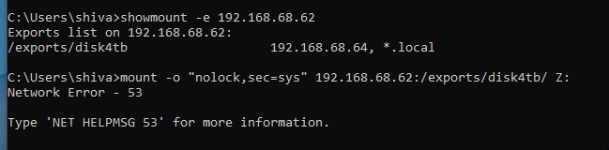
I can run showmount -e 192.168.68.62 from the Windows VM and it can see the exports from the file server, but when I try to mount, it fails, as in the picture below.
win_error.png

/etc/exports on the file server looks like this:
/exports/disk4tb *.local(rw,sync,no_root_squash,no_subtree_check) 192.168.68.64(rw,sync,no_root_squash,no_subtree_check)

Permissions on /exports and /exports/disk4tb are 777.

Neither VM has any firewall active. Debian doesn't have any active firewall, and I've disabled Windows Defender.

Any tips on how to debug this would be most appreciated. I realize that NFS isn't the best choice for windows, but it's my only option right now, so please don't suggest using SMB, that wouldn't help me.

Thanks.
 
Last edited:
Hi ... with Windows this is a error-prone topic which could indeed quite a while with debugging. As you are right this is 99% a Windows-Security/ACL issue. What i would try for the sake of time? I would skip my "bespoke" Debian VM and would try to use e.g. Openmediavault (OMV) or another "proven" NAS distribution which might have solved the special needed parameters for the Win NFS-Mount already - or, i read you do not want it, with e.g. OMV you could share the same folder ("Shared Folders") both with NFS and SMB - "nice and cozy" via GUI. (P.S: even here the SMB1-3 issue might come up ... :-/)

[Virtualization Support for SME and NGOs | DLI Solutions ]
 
/exports/disk4tb
Things I would try:
1. Try removing trailing slash in the mount command so maybe mount ..... /exports/disk4tb Z:
2. Try using Windows style backslash so maybe : mount ..... \\192.168.68.62:\exports\disk4tb Z: (maybe try with & without trailing \).
3. Windows (10?) can be finicky on NFS version, maybe add v2/3 also on NFS side?
 
Don't to forget the windows user is a SID and your files in linux are UID+GID based.
 
Things I would try:
1. Try removing trailing slash in the mount command so maybe mount ..... /exports/disk4tb Z:
2. Try using Windows style backslash so maybe : mount ..... \\192.168.68.62:\exports\disk4tb Z: (maybe try with & without trailing \).
3. Windows (10?) can be finicky on NFS version, maybe add v2/3 also on NFS side?
Tried each of these, no luck...
 
Disclaimer: I don't use any of the above.

In all the examples I've seen, the following is used when trying to access an NFS share from Windows 10:
mount -o anon ...................

So maybe try adding that anon option with:

Code:
mount - o anon \\192.168.68.62:\exports\disk4tb Z:

# or possibly with your other options:

mount - o "anon,nolock,sec=sys" \\192.168.68.62:\exports\disk4tb Z:
 
Disclaimer: I don't use any of the above.

In all the examples I've seen, the following is used when trying to access an NFS share from Windows 10:
mount -o anon ...................

So maybe try adding that anon option with:

Code:
mount - o anon \\192.168.68.62:\exports\disk4tb Z:

# or possibly with your other options:

mount - o "anon,nolock,sec=sys" \\192.168.68.62:\exports\disk4tb Z:
Yeah, I saw references to anon, and have tried it, with no success. But thanks for the idea.