

Hello all and apologies in advance (beginner) but I'd require some guidance from you fine lads!
I've successfully installed proxmox on a intel n100 (Beelink S12 Pro) on a 2.5" ssd and added a new Crucial P3 Plus 2TB nvme. (Note: that I already formatted the nvme to ext4 before physically connecting it in the machine and I also enabled IOMMU).
Checked in bios and can confirm that the nvme is visible yet I can't use it in proxmox:

How can I make it usable across LXCs (or VMs for that matter)?
My only goal for this nvme is to use it in Open Media Vault, Jellyfin, qbittorrent (seedbox).
All will be LXCs. I don't use HA, I only use one "node" until I can learn more.
Probably not useful but I'll leave this info here just in case:
I haven't touched/ modified any "LVM", "LVM-Thin" or "Directory" settings in the general "Disks" tab on my "Node" and they are as follows (if it helps as info):
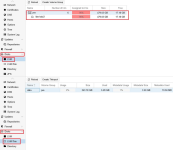
To note that the "Node" is not called by the default "pve" prefix nor did I do anything with the "pve" Vol. Group (kept default from initial proxmox system install)I haven't touched/ modified any "LVM", "LVM-Thin" or "Directory" settings in the general "Disks" tab on my "Node" and they are as follows (if it helps as info):To note that the "Node" is not called by the default "pve" prefix nor did I do anything with the "pve" Vol. Group (kept default from initial proxmox system install)
I've successfully installed proxmox on a intel n100 (Beelink S12 Pro) on a 2.5" ssd and added a new Crucial P3 Plus 2TB nvme. (Note: that I already formatted the nvme to ext4 before physically connecting it in the machine and I also enabled IOMMU).
Checked in bios and can confirm that the nvme is visible yet I can't use it in proxmox:
How can I make it usable across LXCs (or VMs for that matter)?
My only goal for this nvme is to use it in Open Media Vault, Jellyfin, qbittorrent (seedbox).
All will be LXCs. I don't use HA, I only use one "node" until I can learn more.
Probably not useful but I'll leave this info here just in case:
I haven't touched/ modified any "LVM", "LVM-Thin" or "Directory" settings in the general "Disks" tab on my "Node" and they are as follows (if it helps as info):
To note that the "Node" is not called by the default "pve" prefix nor did I do anything with the "pve" Vol. Group (kept default from initial proxmox system install)I haven't touched/ modified any "LVM", "LVM-Thin" or "Directory" settings in the general "Disks" tab on my "Node" and they are as follows (if it helps as info):To note that the "Node" is not called by the default "pve" prefix nor did I do anything with the "pve" Vol. Group (kept default from initial proxmox system install)
