So as a test, I've setup PBS as a VM on my Synology NAS (it makes sense, it only runs backup at night and it uses almost no resources during the day). However, my question is regarding the location for the storage of the backups. Right now, I have the datastore as the local disk of the PBS VM. I've seen other people have the PBS VM write to a NFS share. Isn't it "extra work" to have it write to NFS share when it can just backup to local disk that is part of the PBS VM, or am I missing something?


Running PBS as a VM on my Synology - Backup to NFS share or the PBS VM's own disk?
- Thread starter inlinexmr
- Start date
You are using an out of date browser. It may not display this or other websites correctly.
You should upgrade or use an alternative browser.
You should upgrade or use an alternative browser.

Although it is possible to re-create the PBS VM on the Synology from scratch you may wish to back it up. In this case you usually do NOT want to backup also the whole backup data but only the functionality of the VM. This is possible only if the actual backup data store is "somewhere else", not in the (single?) virtual disk of the VM. (Can you backup a VM in Synology whith selecting which virtual drives to get included in the backup? What happens on restore of the VM?)
The long way through the network stack (twice!) reduces the IOPS drastically. And we all know PBS wants the performance of SSDs for the datastore!
That said I am doing exactly this. The only necessary tweak was to add some (mirrored, expensive) SSDs for Btrfs metadata on the Synology.
To repeat again: this construction is NOT recommended. But it may work...
The long way through the network stack (twice!) reduces the IOPS drastically. And we all know PBS wants the performance of SSDs for the datastore!
That said I am doing exactly this. The only necessary tweak was to add some (mirrored, expensive) SSDs for Btrfs metadata on the Synology.
To repeat again: this construction is NOT recommended. But it may work...
You can run PBS in docker on synology nas. https://github.com/ayufan/pve-backup-server-dockerfiles
(i made an own docker image, and it works good!)
(i made an own docker image, and it works good!)

Thank you, these were some good points!Although it is possible to re-create the PBS VM on the Synology from scratch you may wish to back it up. In this case you usually do NOT want to backup also the whole backup data but only the functionality of the VM. This is possible only if the actual backup data store is "somewhere else", not in the (single?) virtual disk of the VM. (Can you backup a VM in Synology whith selecting which virtual drives to get included in the backup? What happens on restore of the VM?)
The long way through the network stack (twice!) reduces the IOPS drastically. And we all know PBS wants the performance of SSDs for the datastore!
That said I am doing exactly this. The only necessary tweak was to add some (mirrored, expensive) SSDs for Btrfs metadata on the Synology.
To repeat again: this construction is NOT recommended. But it may work...

PBS needs IOPS performance. So yes, virtual disk instead of NFS should perform better.Isn't it "extra work" to have it write to NFS share when it can just backup to local disk that is part of the PBS VM, or am I missing something?
As i guess, you should be able to use volume mapping directly from docker to the synostore itself - this should be the best way to get most IOPS as possible.How would you create this virtual disk, in the case of putting the PBS on the Synology?
The only thing i was thinking about to use PBS in docker on the syno - The recommendations for CPU/RAM for garbage collection and deduplication are relatively high. Someone has experience how this is performing on different models?
Using a 1618+ with an intel x540 here.Someone has experience how this is performing on different models?
Tried out ayufan's docker container after using an SMB extend for years. It works with only a few adjustments to the composefile but the stress it imposes on it's feeble atom cpu is brutal to say the least when deduplicating. Strongly recommend performing the initial seeding and backup jobs during the night because SMB performance might suffer.
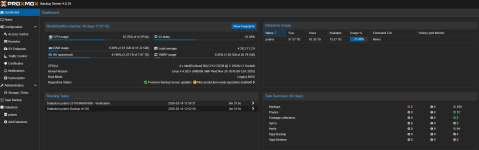
Is it worth it? In my case it definitely is as the space savings by the deduplication is massive (initial factor of 2.11 and now 4.08).
Some notes:
- Doublecheck that you pointed the datastore to a named volume, this is case-sensitive and if you get it wrong then PBS will happily dump everything in an anonymous volume which will get destroyed if you happen to remove the container for any reason.
- The suggested RawIO access in the compose might introduce a security hazard as PBS will expose the formatting buttons alongside the SMART readouts, and you probably don't want yourself or anyone with access to actually do disk partitioning on the NAS
 .
. - It won't update itself and shell access is unreliable. This is a docker container after all.
- This probably goes without saying but if anything happens you're on your own. (the datastore should be salvagable if you mapped the datastore to a named volume and remember the keys). I'm sure if you contact proxmox support about the PBS running inside a docker container running inside an 8 year old synology box you'll get a good chuckle out of them.
YAML:
version: '2.1'

services:
  pbs:
    image: ${IMAGE:-ayufan/proxmox-backup-server:${TAG:-latest}}
    ports:
      - 8007:8007
    mem_limit: 4G #you can go as low as 2G, but more might relieve performance cap if de-duping on a more powerful CPU
    volumes:
      - pbs_etc:/etc/proxmox-backup
      - pbs_logs:/var/log/proxmox-backup
      - pbs_lib:/var/lib/proxmox-backup
      - backups:/backups
    tmpfs:
      - /run
    cap_add:
      - SYS_RAWIO # smartctl support, will cause PBS to gain ability to mess with partitions if you're not careful
    devices: # add every harddrive you want PBS to monitor
      - /dev/sda
      - /dev/sdb
      - /dev/sdc
      - /dev/sdd
      - /dev/sde
      - /dev/sdf
    restart: unless-stopped
    stop_signal: SIGHUP
    environment:
        TZ: Europe/Amsterdam

volumes: # make a named volume for every important folder
  pbs_etc:
    driver: local
    driver_opts:
      type: ''
      o: bind
      device: /volume2/docker/pbs/etc
  pbs_logs:
    driver: local
    driver_opts:
      type: ''
      o: bind
      device: /volume2/docker/pbs/logs
  pbs_lib:
    driver: local
    driver_opts:
      type: ''
      o: bind
      device: /volume2/docker/pbs/lib
  backups: # remember that datastores are case-sensitive and PBS will silently make a datastore in an ephemeral volume if you get this wrong
    driver: local
    driver_opts:
      type: ''
      o: bind
      device: /volume2/docker/pbs/b
Last edited: