Booting is stuck, no files in /etc/pve, how to mount it?

michaeljackson

New Member
Nov 27, 2023
12
0
1
When I’m booting my Proxmox server it is stuck at Loading internal ramdisk. Rescue boot also is stuck, so I booted live cd Debian.

It had happened after I made PCIE passthrough to one of my VMs.

For now I mounted PVE-root to Debian, but in /etc/pve there isn’t any files.
My idea is to revert adding PCIE device in VM config file. I have access to proxmox’s database, but I don’t know how to mount it. As far I know it is in the pve folder.

Please let me know, if there is a way to access the file and edit it or I need to install proxmox again.
 
Last edited:
The DB file is just an sqlite3 database. You can access it with any tool that supports SQLite, like the sqlite cli command
 
My idea is to revert adding PCIE device in VM config file.
If you did not change anything else and the only problem is that the VM starts autmatically, then it might be easier to temporarily disable IOMMU/VT-d/AMD-Vi in the motherboard BIOS to prevent the VM from starting (and you can edit the VM configuration from the Proxmox host).
Or maybe press e in the boot loader menu and add amd_iommu=off intel_iommu=off to boot Proxmox once with IOMMU disable (to prevent the VM from starting).
 
If you did not change anything else and the only problem is that the VM starts autmatically, then it might be easier to temporarily disable IOMMU/VT-d/AMD-Vi in the motherboard BIOS to prevent the VM from starting (and you can edit the VM configuration from the Proxmox host).
Or maybe press e in the boot loader menu and add amd_iommu=off intel_iommu=off to boot Proxmox once with IOMMU disable (to prevent the VM from starting).
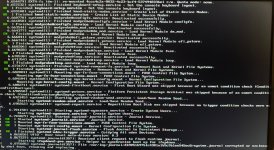
No success, last lines of recovery mode boot until it stucks:
 

Attachments

  • IMG_4364.jpeg
    IMG_4364.jpeg
    514.6 KB · Views: 21
No success, last lines of recovery mode boot until it stucks:
If changing the BIOS setting did not help, then you must have changed more than just the VM config. What else did you change that could break Proxmox? Or maybe your system has other problems that prevent booting? I cannot read the last line(s) of the screen in your photo.
 
If changing the BIOS setting did not help, then you must have changed more than just the VM config. What else did you change that could break Proxmox? Or maybe your system has other problems that prevent booting? I cannot read the last line(s) of the screen in your photo.
I didn’t change anything that could broke it. A few months ago I also tried to passthrough AMD IGPU, but the system didn’t boot. Then the simple command repaired it and I gave up. Now I’m trying to passthrough PCIe network interface.

The last lines are:
Code:
VFIO - User Level meta-driver version: 0.3
[6.867337] systemd-journald[357]: Received client request to flush runtime journal.
Starting ifupdown2-pre.service
- Helper to synchronize boot up for ifupdown...
[6.875685] systemd-journald(357]: File /var/log/journal/db9051697b14301a1b5c9blee545ec8/system. journal corrupted or uncleanly shut down, renaming and replacing.
 
The DB file is just an sqlite3 database. You can access it with any tool that supports SQLite, like the sqlite cli command

I've copied database to my PC and deleted lines with PCIe device. I also physically removed the network interface that I was trying to passthrough, but the issue persists. I think there is something wrong with journald or VFIO, because booting always freezes when they starts.
 
Last edited:
Hello,

The cluster file system should be automatically mounted. Could you please send us the output of

Code:
journalctl -t pmxcfs -b

so we can see if there are any errors?

What about

Code:
systemctl status --failed
?
 
Hello,

The cluster file system should be automatically mounted. Could you please send us the output of

Code:
journalctl -t pmxcfs -b

so we can see if there are any errors?

What about

Code:
systemctl status --failed
?
Sure, but where do I need to type it when proxmox won’t boot? Live iso debian?
 
Last edited:
You could use a live iso for example, yes. In such a case, you need to point journalctl to the right directory with the `--file` flag. I don't think the systemd command would help there though.
 
Sure, but where do I need to type it when proxmox won’t boot? Live iso debian?
Code:
-- No entries --

If you mean system.journal —file which returned error. I’ve also added whole journal - -directory, without result. Deleting logs also didn’t work.
 
Last edited:
Maybe I’ll reinstall proxmox, because I don’t have much time. Is it possible to disable journald from autostart in GRUB?