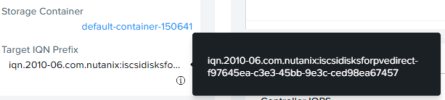
Hello dear Proxmox Developers, Support Engineers and Comminuty Members.
I'm trying to add storage as User Mode iSCSI Backend (iscsidirect).
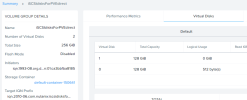
But unfortunately I can't select a device on VM creation.
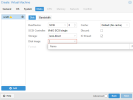
Even though I can get LUNs listed with iscsiadm.
What additional information should I provide to get some advices?
Thanks!
I'm trying to add storage as User Mode iSCSI Backend (iscsidirect).
Code:
/etc/pve/storage.cfg
iscsidirect: iscsi-direct
        portal 172.24.132.152
        target iqn.2010-06.com.nutanix:iscsidisksforpvedirect-f97645ea-c3e3-45bb-9e3c-ced98ea67457
But unfortunately I can't select a device on VM creation.
Even though I can get LUNs listed with iscsiadm.
Code:
# iscsiadm --mode discovery --type sendtargets --portal 172.24.132.152
172.24.132.152:3260,1 iqn.2010-06.com.nutanix:iscsidisksforpvedirect-f97645ea-c3e3-45bb-9e3c-ced98ea67457
172.24.132.153:3260,1 iqn.2010-06.com.nutanix:iscsidisksforpvedirect-f97645ea-c3e3-45bb-9e3c-ced98ea67457
172.24.132.154:3260,1 iqn.2010-06.com.nutanix:iscsidisksforpvedirect-f97645ea-c3e3-45bb-9e3c-ced98ea67457
172.24.132.155:3260,1 iqn.2010-06.com.nutanix:iscsidisksforpvedirect-f97645ea-c3e3-45bb-9e3c-ced98ea67457
What additional information should I provide to get some advices?
Thanks!
Code:
# iscsi-ls -i iqn.1993-08.org.debian:01:ca3bbfba8185 -s iscsi://172.24.132.152
Target:iqn.2010-06.com.nutanix:iscsidisksforpvedirect-f97645ea-c3e3-45bb-9e3c-ced98ea67457 Portal:172.24.132.155:3260,1
Lun:1    Type:DIRECT_ACCESS (Size:127G)
Lun:0    Type:DIRECT_ACCESS (Size:127G)
Target:iqn.2010-06.com.nutanix:iscsidisksforpvedirect-f97645ea-c3e3-45bb-9e3c-ced98ea67457 Portal:172.24.132.154:3260,1
Lun:1    Type:DIRECT_ACCESS (Size:127G)
Lun:0    Type:DIRECT_ACCESS (Size:127G)
Target:iqn.2010-06.com.nutanix:iscsidisksforpvedirect-f97645ea-c3e3-45bb-9e3c-ced98ea67457 Portal:172.24.132.153:3260,1
Lun:1    Type:DIRECT_ACCESS (Size:127G)
Lun:0    Type:DIRECT_ACCESS (Size:127G)
Target:iqn.2010-06.com.nutanix:iscsidisksforpvedirect-f97645ea-c3e3-45bb-9e3c-ced98ea67457 Portal:172.24.132.152:3260,1
Lun:1    Type:DIRECT_ACCESS (Size:127G)
Lun:0 Type:DIRECT_ACCESS (Size:127G)proxmox-ve: 8.1.0 (running kernel: 6.5.11-8-pve)
pve-manager: 8.1.4 (running version: 8.1.4/ec5affc9e41f1d79)
proxmox-kernel-helper: 8.1.0
proxmox-kernel-6.5: 6.5.11-8
proxmox-kernel-6.5.11-8-pve-signed: 6.5.11-8
ceph: 18.2.1-pve2
ceph-fuse: 18.2.1-pve2
corosync: 3.1.7-pve3
criu: 3.17.1-2
glusterfs-client: 10.3-5
ifupdown2: 3.2.0-1+pmx8
ksm-control-daemon: 1.4-1
libjs-extjs: 7.0.0-4
libknet1: 1.28-pve1
libproxmox-acme-perl: 1.5.0
libproxmox-backup-qemu0: 1.4.1
libproxmox-rs-perl: 0.3.3
libpve-access-control: 8.1.1
libpve-apiclient-perl: 3.3.1
libpve-common-perl: 8.1.0
libpve-guest-common-perl: 5.0.6
libpve-http-server-perl: 5.0.5
libpve-network-perl: 0.9.5
libpve-rs-perl: 0.8.8
libpve-storage-perl: 8.0.5
libspice-server1: 0.15.1-1
lvm2: 2.03.16-2
lxc-pve: 5.0.2-4
lxcfs: 5.0.3-pve4
novnc-pve: 1.4.0-3
proxmox-backup-client: 3.1.4-1
proxmox-backup-file-restore: 3.1.4-1
proxmox-kernel-helper: 8.1.0
proxmox-mail-forward: 0.2.3
proxmox-mini-journalreader: 1.4.0
proxmox-offline-mirror-helper: 0.6.4
proxmox-widget-toolkit: 4.1.3
pve-cluster: 8.0.5
pve-container: 5.0.8
pve-docs: 8.1.3
pve-edk2-firmware: 4.2023.08-4
pve-firewall: 5.0.3
pve-firmware: 3.9-1
pve-ha-manager: 4.0.3
pve-i18n: 3.2.0
pve-qemu-kvm: 8.1.5-2
pve-xtermjs: 5.3.0-3
qemu-server: 8.0.10
smartmontools: 7.3-pve1
spiceterm: 3.3.0
swtpm: 0.8.0+pve1
vncterm: 1.8.0
zfsutils-linux: 2.2.2-pve1
pve-manager: 8.1.4 (running version: 8.1.4/ec5affc9e41f1d79)
proxmox-kernel-helper: 8.1.0
proxmox-kernel-6.5: 6.5.11-8
proxmox-kernel-6.5.11-8-pve-signed: 6.5.11-8
ceph: 18.2.1-pve2
ceph-fuse: 18.2.1-pve2
corosync: 3.1.7-pve3
criu: 3.17.1-2
glusterfs-client: 10.3-5
ifupdown2: 3.2.0-1+pmx8
ksm-control-daemon: 1.4-1
libjs-extjs: 7.0.0-4
libknet1: 1.28-pve1
libproxmox-acme-perl: 1.5.0
libproxmox-backup-qemu0: 1.4.1
libproxmox-rs-perl: 0.3.3
libpve-access-control: 8.1.1
libpve-apiclient-perl: 3.3.1
libpve-common-perl: 8.1.0
libpve-guest-common-perl: 5.0.6
libpve-http-server-perl: 5.0.5
libpve-network-perl: 0.9.5
libpve-rs-perl: 0.8.8
libpve-storage-perl: 8.0.5
libspice-server1: 0.15.1-1
lvm2: 2.03.16-2
lxc-pve: 5.0.2-4
lxcfs: 5.0.3-pve4
novnc-pve: 1.4.0-3
proxmox-backup-client: 3.1.4-1
proxmox-backup-file-restore: 3.1.4-1
proxmox-kernel-helper: 8.1.0
proxmox-mail-forward: 0.2.3
proxmox-mini-journalreader: 1.4.0
proxmox-offline-mirror-helper: 0.6.4
proxmox-widget-toolkit: 4.1.3
pve-cluster: 8.0.5
pve-container: 5.0.8
pve-docs: 8.1.3
pve-edk2-firmware: 4.2023.08-4
pve-firewall: 5.0.3
pve-firmware: 3.9-1
pve-ha-manager: 4.0.3
pve-i18n: 3.2.0
pve-qemu-kvm: 8.1.5-2
pve-xtermjs: 5.3.0-3
qemu-server: 8.0.10
smartmontools: 7.3-pve1
spiceterm: 3.3.0
swtpm: 0.8.0+pve1
vncterm: 1.8.0
zfsutils-linux: 2.2.2-pve1
Last edited: