[SOLVED] Proxmox installation inside Synology Virtual Machine Manager

Brdru

New Member
Feb 3, 2022
3
2
1
53
Hello,
I tried to reinstall a Proxmox node inside a Synology Virtual Machine Manager on DS1621+ hardware.
Installation is fine, nested virtualization is detected, but at first reboot, I get a freeze on :

1643890032209.png

I tried different hardware for storage, virtio, ide, sata...

A year I remember doing the same thing without encountering any problem.

An idea ?
 
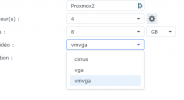
Found the problem, It's the vmvga driver from Synology Virtual Machine Manager and noVNC. It's ok with vga .
1643900726762.png
You can close this thread, thanks again.
 
Thank you for posting the solution. I marked the thread as "solved". It might help other people in the future :)
 
Found the problem, It's the vmvga driver from Synology Virtual Machine Manager and noVNC. It's ok with vga .
View attachment 33877
You can close this thread, thanks again.

Sorry for posting in an old post, but I'm trying to run Proxmox in a VMM VM on a ds1823xs+...I can install Proxmox, nested virtualization works, LXCs works, but all VMs in Proxmox hangs after a few seconds, sometimes I can start the installation of an OS in a VM, but VM always freezes with 100% CPU long before the installation can finish.

I have tried to restore backups and start several VMs from another Proxmox...all freezes during boot with 100% CPU. Did your VMs work? The ds1621+ like the ds1823xs+ are using an AMD CPU.

Im on DSM 7.2.1-4

I would really appreciate your input.
 
is very slow for VM.
LXC works flawlessy because it use Proxmox Kernel virtualized once.
How slow?
My use-case is to live migrate a couple of VMs(one of them my primary fw) from my primary Proxmox node(running on a Intel nuc 12) the few times I have to reboot it, and I dont need top-notch performance.