[SOLVED] Web GUI stopped suddenly... (Caused by to much "unavailable storage")

LooneyTunes

Active Member
Jun 1, 2019
203
26
38
Hi guys,

I started up my PVE (pve-manager/7.4-3/9002ab8a (running kernel: 5.15.104-1-pve) today and it immediately started spamming me with message about missing storage... It is off-line, and on purpose. PVE should not have any reason to fail on that. But then it got worse. I restarted again, and this time it would not load the web-GUI...

So started with the usual; clearing web caches, restarting browser and computer, the tried accessing on IP instead of host name, checked that port 8006 still was open (it was), restarted router...

After that I have been googling and trying all sorts of solutions ppl suggest in posts all over the net (almost), to no avail. Server is responsive on SSH and DNS, seems to see all it needs to, including vlan-tags now.

I have reconfigured to now have PVE using vlan-tags, could that somehow block the GUI??? All else on same subnet works fine...

I don't know what else to try, please assist...

Thanks
 
Last edited:
Thanks, I realize I was wrong, sorry. SSH is not setup, so cannot easily post output, but hope below will suffice.

What is the output of the following commands as run from PVE:
- systemctl status pveproxy
This one showed pveproxy in running state, but there was a permission denied on '/var/log/pveproxy/access.log', so I removed it, touched a new one and restarted pveproxy. Now running without remarks

- journalctl -b -u pveproxy
This shows a bunch of same error above, the access log, nothing else

- curl -sk https://localhost:8006|grep -i title
- curl -sk https://$PVE_IP:8006|grep -i title
Of these the first returned anything (the second didn't);
<title>pve - Proxmox Virtual Environment</title>
Blockbridge : Ultra low latency all-NVME shared storage for Proxmox - https://www.blockbridge.com/proxmox
 
Did you replace $PVE_IP with an actual public IP of the PVE host?
I did not. I assumed it was a variable. But replacing it with the IP it returned the same as the other command.

Did you deliberately disable it or is it not reachable over the network as well?
I suspect that you misconfigured something in IP layer if neither SSH or GUI is available.
Well, SSH as such works, just haven't fixed the keys yet after the crash. It is not impossible IP config needs something. I have internet connectivity from PVE. Today I thought I should attend the VM's, but never got to them, so don't know if they'll get IP's either, but for later I suppose. GUI first.

I'll look into the SSH config, I've just had much overall, so should be easy (knock on wood)

Blockbridge : Ultra low latency all-NVME shared storage for Proxmox - https://www.blockbridge.com/proxmox
 
So, what we know:
- PVE GUI is responding when accessed locally from the same host. This means the service is up and running and at the very least you should be presented with a login screen in your browser.
- You have internet access from PVE so underlying network to the router is functioning.

Next step is for you to figure out why a remote host is unable to get the same response from port 8006 that you get locally. The application layer is fine, its the transport/presentation that is suspect. Start from basics - ping, traceroute, firewall checks, etc.

Good luck


Blockbridge : Ultra low latency all-NVME shared storage for Proxmox - https://www.blockbridge.com/proxmox
 
  • Like
Reactions: LooneyTunes
Also keep in mind that PVE can't handle too much missing storages. The storage poller gets stuck, the webUI will become totally unusable because of timeouts and even the login might fail. You then need to login using SSH or local console and use pvesm to disable the unavailable storages to get PVE responsive again.

See here:
https://forum.proxmox.com/threads/unavailable-storage-will-make-the-webui-unusable.119107/
Well this is interesting and what I'd like to start investigating really since it all started with it screaming for storage that was not online. No idea why it did, but of lesser importance to start with perhaps. One can never be too sure, but I will not be surprised if this is it... Briefly checking the link and pictures tells me this may well be it. Looks exactly as mine did before it died completely (GUI that is)
 
Unluckly no progress so far fixing that, according to the bug tracker. Looks like it is not that easy to fix...
i think it's not easy to resolve, as it needs major code change / architectural change in pvestatd
...in case pvestatd is the problem here because of an unavailable storage.
 
This was it! :) So I disabled all but minimal storage for PVE itself, and rebooted. Worked like a charm.
Thanks both of you! :)
 
Unluckly no progress so far fixing that, according to the bug tracker. Looks like it is not that easy to fix...

...in case pvestatd is the problem here because of an unavailable storage.
True, read the bug too. It talks about CIFS though. I use NFS normally, so any storage seems to cause this
 
But there still is a Gremlin in my system... When logging in now it starts all over again... :(
1682536086167.png
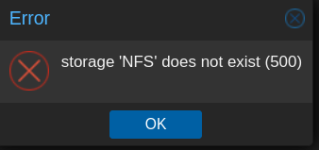
If I hit OK, it pops right back up. And last I managed to restart from GUI, it hung. Any suggestions to how this can be disabled for good? I only edited the file /etc/pve/storage.cfg, but must perhaps use the cli command I just found too...


This is peculiar...

The error I get is for storage called "NFS". That one was not present in the file. There were two other though which I commented out; "PBS" & "PVE_NFS". So what may be triggering this error, or more to the point, from where is it getting this non-existent name? I have used it, but it malfunctioned prior to all this. The NFS server is still fine though.

Doing a
Code:
pvesm set NFS --disable 1

yields an error;

update storage failed: storage 'NFS' does not exist
Which is consistent with the config file at least...
 

Attachments

  • 1682536376590.png
    1682536376590.png
    15.7 KB · Views: 4
Last edited:
Well, perhaps this is another issue, but... I found that when I reboot, my VMs want to boot???! And caused the storage issue I just had. This is not what I have configured, as my storage clearly is in no condition (unconfigured) right now.

I checked all files in /etc/pve/qemu-server/ for not having the 'ONBOOT' parameter set. And rebooted. But despite this is not set, all my VMs now try to start, which causes havoc...

Edit:
I found that my VM disk config had a reference to "NFS". So commented that out and rebooted. This turned out to be stable. I then reconnected "NFS" storage, uncommented in my VMs, and tried booting one. It worked nicely luckily. So I how this thread is done for now. Enough exitement for one day... Thanks all who helped out :)
 
Last edited: