


Hi,
Did someone else upgraded a OPNsense VM from 21.7.8 to 22.1? After upgrading to 22.1 I can't shutdown the VM anymore because the VM gets stuck with 100% CPU utilization and I need to hard "Stop" that VM. Console then looks like this until I forcefully Stop it:
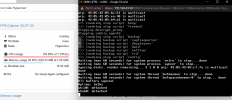
VM Config is this:
Would be nice to hear if that is working on your servers. Not sure if that is just a problem with the guest itself or a general problem with KVM and FreeBSD 13.
I also asked in the OPNsense forum, but no one answers me there so far.
Did someone else upgraded a OPNsense VM from 21.7.8 to 22.1? After upgrading to 22.1 I can't shutdown the VM anymore because the VM gets stuck with 100% CPU utilization and I need to hard "Stop" that VM. Console then looks like this until I forcefully Stop it:
VM Config is this:
Code:
agent: 0
boot: order=ide2;scsi0
cores: 1
cpu: host,flags=+pcid;+spec-ctrl;+ssbd;+aes
ide2: none,media=cdrom
memory: 1024
name: FFR
net0: virtio=22:9B:DF:3D:37:C6,bridge=vmbr3
net1: virtio=8E:CF:D7:09:2F:C1,bridge=vmbr47
numa: 0
ostype: other
rng0: max_bytes=2048,source=/dev/urandom
scsi0: VMpool_VLT_VM:vm-119-disk-0,discard=on,iothread=1,size=16G,ssd=1
scsi1: VMpool_VLT_VM:vm-119-disk-1,size=4G,ssd=1
scsihw: virtio-scsi-single
smbios1: uuid=6d4811cc-60ab-4630-bed2-679a4c3f44a7
sockets: 1
startup: order=1
vmgenid: 9d8f6f94-ff56-4fdc-b37e-fceec6de16e8
vmstatestorage: VMpool7_VMSS
Would be nice to hear if that is working on your servers. Not sure if that is just a problem with the guest itself or a general problem with KVM and FreeBSD 13.
I also asked in the OPNsense forum, but no one answers me there so far.
Last edited:
