

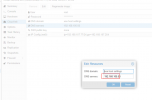
Cloud-init setting DNS_server is invalid

uranus12

New Member
Jun 22, 2021
20
0
1
41
Hello!
My system is centos7.6
1624354764138.png
But I am reboot system, Cat /etc/resolv.conf ,The changed DNS has not changed.

Then manually add the module configuration in /etc/cloud/cloud.cfg

Code:
/etc/cloud/cloud.cfg

cloud_config_modules:
 - locale
 - set-passwords
 - resolv_conf
 - puppet
 - chef
 - timezone
 - runcmd

#cloud-config
manage_resolv_conf: true
resolv_conf:
  nameservers: ['114.114.114.114', '8.8.8.8']
  options:
    rotate: true
    timeout: 1

But I am reboot system, Cat /etc/resolv.conf ,The changed DNS has not changed.
At present, changing the IP and username and password in cloud-init is effective, only DNS_server is invalid
 
Last edited:
This way the DNS servers are only configured on the first boot, not on every instance change.
Try running `cloud-init clean` and then rebooting. The `clean` command removes every info about the boot and instance settings and leads to everything being run again on the next boot.

Is your /etc/resolv.conf managed by NetworkManager? If so, you may have to disable it for DNS so that it doesn't conflict with cloud-init.
 
This way the DNS servers are only configured on the first boot, not on every instance change.
Try running `cloud-init clean` and then rebooting. The `clean` command removes every info about the boot and instance settings and leads to everything being run again on the next boot.

Is your /etc/resolv.conf managed by NetworkManager? If so, you may have to disable it for DNS so that it doesn't conflict with cloud-init.
Yes, My /etc/resolv.conf managed by NetworkManager.
Code:
/etc/NetworkManager/conf.d/99-cloud-init.conf
[main]
dns = none

How to disable it for DNS?thank you!
 
That looks fine then.
Which cloud-init version are you using?
 
How does your /etc/resolv.conf look like?
Check your NetworkManager.conf file in /etc/NetworkManager/ to see if it interferes with cloud-init.
 
How does your /etc/resolv.conf look like?
Check your NetworkManager.conf file in /etc/NetworkManager/ to see if it interferes with cloud-init.
/etc/NetworkManager/NetworkManager.conf
Code:
# Configuration file for NetworkManager.
#
# See "man 5 NetworkManager.conf" for details.
#
# The directories /usr/lib/NetworkManager/conf.d/ and /var/run/NetworkManager/conf.d/
# can contain additional configuration snippets installed by packages. These files are
# read before NetworkManager.conf and have thus lowest priority.
# The directory /etc/NetworkManager/conf.d/ can contain additional configuration
# snippets. Those snippets are merged last and overwrite the settings from this main
# file.
#
# The files within one conf.d/ directory are read in asciibetical order.
#
# If /etc/NetworkManager/conf.d/ contains a file with the same name as
# /usr/lib/NetworkManager/conf.d/, the latter file is shadowed and thus ignored.
# Hence, to disable loading a file from /usr/lib/NetworkManager/conf.d/ you can
# put an empty file to /etc with the same name. The same applies with respect
# to the directory /var/run/NetworkManager/conf.d where files in /var/run shadow
# /usr/lib and are themselves shadowed by files under /etc.
#
# If two files define the same key, the one that is read afterwards will overwrite
# the previous one.

[main]
plugins = ifcfg-rh,
#plugins=ifcfg-rh,ibft


[logging]
# When debugging NetworkManager, enabling debug logging is of great help.
#
# Logfiles contain no passwords and little sensitive information. But please
# check before posting the file online. You can also personally hand over the
# logfile to a NM developer to treat it confidential. Meet us on #nm on freenode.
# Please post full logfiles except minimal modifications of private data.
#
# You can also change the log-level at runtime via
#   $ nmcli general logging level TRACE domains ALL
# However, usually it's cleaner to enable debug logging
# in the configuration and restart NetworkManager so that
# debug logging is enabled from the start.
#
# You will find the logfiles in syslog, for example via
#   $ journalctl -u NetworkManager
#
# Note that debug logging of NetworkManager can be quite verbose. Some messages
# might be rate-limited by the logging daemon (see RateLimitIntervalSec, RateLimitBurst
# in man journald.conf).
#
#level=TRACE
#domains=ALL
I am find /etc/resolv.conf there is a problem with the permission of the file attribute, which prevents modification.
lsattr /etc/resolv.conf
----i--------------- /etc/resolv.conf
chattr -i /etc/resolv.conf is work!
 
And the content of the resolv.conf?
Also check for issues with setting DNS in /var/log/cloud-init.log
 
And the content of the resolv.conf?
Also check for issues with setting DNS in /var/log/cloud-init.log
/etc/resolv.conf
Code:
; Created by cloud-init on instance boot automatically, do not edit.
;
# Generated by NetworkManager
search hll.net
nameserver 192.168.105.50
~

Code:
[root@prd-centos7-6 ~]# tail -f /var/log/cloud-init.log
2021-06-23 06:28:28,985 - helpers.py[DEBUG]: config-power-state-change already ran (freq=once-per-instance)
2021-06-23 06:28:28,985 - handlers.py[DEBUG]: finish: modules-final/config-power-state-change: SUCCESS: config-power-state-change previously ran
2021-06-23 06:28:28,985 - main.py[DEBUG]: Ran 10 modules with 0 failures
2021-06-23 06:28:28,985 - atomic_helper.py[DEBUG]: Atomically writing to file /var/lib/cloud/data/status.json (via temporary file /var/lib/cloud/data/tmp21w1xlz_) - w: [644] 598 bytes/chars
2021-06-23 06:28:28,986 - atomic_helper.py[DEBUG]: Atomically writing to file /var/lib/cloud/data/result.json (via temporary file /var/lib/cloud/data/tmp6jfhff0p) - w: [644] 96 bytes/chars
2021-06-23 06:28:28,986 - util.py[DEBUG]: Creating symbolic link from '/run/cloud-init/result.json' => '../../var/lib/cloud/data/result.json'
2021-06-23 06:28:28,986 - util.py[DEBUG]: Reading from /proc/uptime (quiet=False)
2021-06-23 06:28:28,986 - util.py[DEBUG]: Read 12 bytes from /proc/uptime
2021-06-23 06:28:28,986 - util.py[DEBUG]: cloud-init mode 'modules' took 0.078 seconds (0.08)
2021-06-23 06:28:28,986 - handlers.py[DEBUG]: finish: modules-final: SUCCESS: running modules for final