Latest activity
-
Uutkonos replied to the thread [SOLVED] Nonstop EDID block 0 is all zeroes on console.Yes, thank you for that correction. I have edited my last comment to make sure that this is termed a workaround. Unfortunately, I don't have cycles to contact the board manufacturer, but thanks for pointing out that avenue.
-
SSpiceGuy replied to the thread [SOLVED] How do I list the directories/file on my local drive?.Do you think it's a good idea if /mnt/tmp exists on most PVE installs so that there is a quick way to do a check for mis-stored data? Seems to me thiis could come in handy in the future. Thoughts?
-
Hhouser posted the thread [SOLVED] A fix for "QEMU Guest Agent is Not Running" on HA VE? in Proxmox VE: Installation and configuration.This morning my Home Assistant VE installed via the community script under Proxmox 9 did not start. After some fixing and deleting other VE.s it starts again but I now get the dreaded “QEMU Guest Agent is Not Running”. I assume the VE is...
-
SSpiceGuy replied to the thread [SOLVED] How do I list the directories/file on my local drive?.the gdu / and df -hT after unmounting are here. #23 As of now (remounted) they are: df -hT / Filesystem Type Size Used Avail Use% Mounted on /dev/mapper/pve-root ext4 65G 18G 44G 29% / gdu -x /
-
-
Ccelemine1gig replied to the thread [SOLVED] Nonstop EDID block 0 is all zeroes on console.There is a difference between a real solution and a workaround. From what you describe, it sounds like the board manufacturer (probably both Asrock and Supermicro, as mentioned in this thread) botched the VBIOS/VBT settings that get integrated in...
-
JJohnnyD replied to the thread PVE 8 to 9 In-place Upgrade.Many thanks indeed Leesteken, I did read many posts once that message popped up after the dist upgrade and some of them scared me, especially when I saw I was using systemd-boot for booting the machine. It was some hours before I had the courage...
-
 UdoB reacted to Threaded's post in the thread Feature Request: Datacenter Manager installer option for IPv6 with
 Like.
Added "enhancement" bug report: "Datacenter Manager installer - add option to install with IPv6" https://bugzilla.proxmox.com/show_bug.cgi?id=8035
Like.
Added "enhancement" bug report: "Datacenter Manager installer - add option to install with IPv6" https://bugzilla.proxmox.com/show_bug.cgi?id=8035 -
TThreaded replied to the thread Feature Request: Datacenter Manager installer option for IPv6.Added "enhancement" bug report: "Datacenter Manager installer - add option to install with IPv6" https://bugzilla.proxmox.com/show_bug.cgi?id=8035
-
Rrbremer posted the thread Kubernetes CSI with shared FC luns (LVM storage, snapshot as a chain) in Proxmox VE: Installation and configuration.Note: in order to keep the other thread clean (https://forum.proxmox.com/threads/proxmox-in-enterprice-environments-with-shared-fc-storage.186319/page-2#post-869245) I have moved the conversation over here. @bbgeek17 as a reply to your message...
-
KThat being said, and doing some guesswork @Notaria, FAT32 doesn't support sparse files. Check which filesystem are you using in the destination disk.
-
Ccyruspy replied to the thread copia de VM a un disco externo.That being said, and doing some guesswork @Notaria, FAT32 doesn't support sparse files. Check which filesystem are you using in the destination disk.
-
 The usual approach for a small box with a single NIC is this: https://pve.proxmox.com/pve-docs/pve-admin-guide.html#_default_configuration_using_a_bridge If your setup differs then you need to describe the differences in detail - to allow...
 -
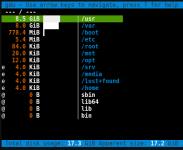
delete iso to recover space. then apt install ncdu with ncdu / you can browse to find other big files.
-
 LnxBil replied to the thread proxmox summary enhancement project to add cpu/dram watt, cpu/gpu temp and vgpu info.You could try to add this upstream instead of using out-of-band patches. I also don't think that this display scales will with any enterprise hardware. Limited to one GPU and one CPU
 -
Kkawano-y replied to the thread copia de VM a un disco externo.Yes, it could be related to sparse files. You can compare the apparent size and the actual disk usage with: ls -lh vm-100-disk-0.qcow2 du -h vm-100-disk-0.qcow2
-
Uutkonos replied to the thread [SOLVED] Nonstop EDID block 0 is all zeroes on console.Yes, this is exactly the same as the workaround that I posted, but you did not isolate the one of the three that is causing the issue. I am running Proxmox on bare metal. The message I posted about is from the host OS.
-
JJohnnyD replied to the thread PVE 8 to 9 In-place Upgrade.Well I have rebooted without removing the package and the system boots OK, do I still need to remove it, what I dont understand is if I remove it, how will the system boot successfully when my boot drives use systemd-boot to boot up. It seems to...
-
Ggunterwa replied to the thread [SOLVED] PVE 9.0.3 firewall does not work, but same configuration work well in PVE 8.4.14 & 8.2.4.I checked the status of daemon pve-firewall, it's running well without any warning or error as below (I also restart pve-firewall but no help...) : root@PVE01:/home/gunterwa# systemctl status pve-firewall ● pve-firewall.service - Proxmox VE...
-
Rrcw88 reacted to Johannes S's post in the thread Cloned VMs from template receive the same DHCP IP address with Like.
aarons answer is spot on, at least for recent Debian and Ubuntu systems. To actually reset the machine-id start the vm you want to use as a template, login to it, then enter cloud-init clean --logs --reset -c all
-
Rrcw88 reacted to aaron's post in the thread Cloned VMs from template receive the same DHCP IP address with Like.
Because on Linux, usually the machine ID is used to identify against the DHCP server. Windows usually takes the MAC address. Lookup how you can prepare a Debian based system (which Proxmox VE is) to be a template. You usually need to empty the...