Latest activity
-
 shanreich replied to the thread SDN EVPN zone stuck "pending" on a single node.Can you post your configuration files from the offending node? cat /etc/network/interfaces cat /etc/network/interfaces.d/sdn
 -
 and why shut this work with two interface names on one vmbr0? what about a nic0, nic1 -> bondX -> vmbr0 setup with some bond mode? # https://pve.proxmox.com/wiki/Network_Configuration
 -
UdoB replied to the thread ProxMox SDN.I do not use SDN, so I can not help. For "risky" experiments (originally with Ceph, in my case) I've setup a virtual PVE cluster. Inside that cluster one can run dangerous experiments without the fear to destroy something important - just create...
-
 dakralex reacted to t.lamprecht's post in the thread Proxmox Virtual Environment 9.2 available! with
 Like.
Even then, AMD <-> Intel live migrations can break due to too many subtle differences and vendor-specific optimizations to guarantee that this could work independent of the used vCPU type; some types (like host) will make breakage much more...
Like.
Even then, AMD <-> Intel live migrations can break due to too many subtle differences and vendor-specific optimizations to guarantee that this could work independent of the used vCPU type; some types (like host) will make breakage much more... -
Look at Datacenter --> HA --> Affinity Rules --> HA Node Affinity Rules. Read about the "Strict" flag shown there. Probably you can create two rules, one with the AMD nodes and one with the Intel nodes. Select the VMs to be "in" the...
-
When using iSCSI with Proxmox, it is generally used as LVM over iSCSI. In this case, LVM is provisioned using Thick provisioning, not Thin provisioning. Note that Snapshots are provided as snapshot-as-volume-chain, which differs from typical...
-
UdoB replied to the thread PVE9.2 Mount ISCSI.See also: https://pve.proxmox.com/pve-docs/chapter-pvesm.html#_storage_types for a top level overview.
-
Dd.oishi replied to the thread PVE9.2 Mount ISCSI.When using iSCSI with Proxmox, it is generally used as LVM over iSCSI. In this case, LVM is provisioned using Thick provisioning, not Thin provisioning. Note that Snapshots are provided as snapshot-as-volume-chain, which differs from typical...
-
 fiona replied to the thread Updated to 8.2 - DMA error.Oh, so I don't count as an actual developer? In fact, most of the devs do read and answer in the forum regularly ;)
 -
 news replied to the thread No internet in new LXCs.and why shut this work with two interface names on one vmbr0? what about a nic0, nic1 -> bondX -> vmbr0 setup with some bond mode? # https://pve.proxmox.com/wiki/Network_Configuration
 -
Rrprengel replied to the thread Benchmark für Windows-VMs gesucht.Du müsstest schon beschreiben was die VM funktional liefern soll. Persönlich empfehle ich synthetische Tests mit z.B. RobotMK um User-Interaktionen zu simulieren. Da sieht man dann zügig ob Wunsch und Wirklichkeit zueinander passen,
-
GGrueziwoll beinand, sagt mal, wenn Ihr auf einem neuen System eine VM aufsetzt, prüft Ihr das ganze auch auf Geschwindigkeit? Ich meine, nur rumklicken auf der Oberfläche verrät ja nichts über die Geschwindigkeit einer VM und damit, ob sie...
-
MMadscientist replied to the thread ProxMox SDN.very few article is available in details .... all are like over the counter type ....... only thing visiable is "contact us" https://www.virtualizationhowto.com/2024/03/proxmox-sdn-configuration-step-by-step/...
-
PPr_Minix replied to the thread Übersichtsanzeige.Aah, ok, dann ist das eben so. Vielen Dank.
-
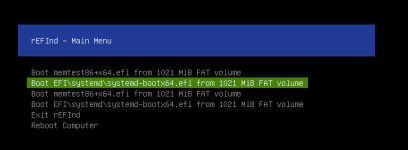
MMichalCirrus posted the thread Memtest as default rEFInd option after upgrade to PVE 9.2 in Proxmox VE: Installation and configuration.Server with: pve-manager/9.2.3/d0fde103346cf89a (running kernel: 7.0.6-2-pve) when booted goes into memtest. Main menu looks like this: How to remove memtest from this menu or move memtest under systemd-bootx64?
-
-
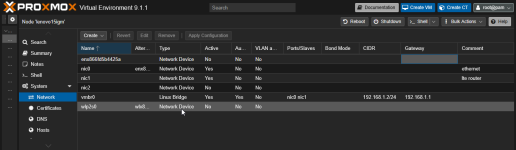
news replied to the thread No internet in new LXCs.Please show your network Setup, because you don't use the bond Setup
-
Wwoma replied to the thread No internet in new LXCs.If you can ping your gateway 192.168.1.1 your LXC is OK as gateway is already located outside of PVE. So if your routers do not block anything of this client / IP you should be fine. Maybe some old entries that belong to this IP?
-
news replied to the thread No internet in new LXCs.Please show you lxc configuration.
-
Aanna_pve_berlin replied to the thread Promox Oberfläche und Plex LXC nicht erreichbar, VMs aber schon.Wenn die Windows-VM auf derselben NIC weiter erreichbar ist, würde ich zuerst trennen zwischen „Netzwerk weg“ und „Host-Dienste hängen“. Beim nächsten Auftreten per vPro/Console prüfen: - ist der PVE-Host noch per ping/ssh erreichbar? - laufen...