Latest activity
-
MMarkku replied to the thread Proxmox (as a company) - what the HELL are you doing? Kernel update to 7 broke networking IN A VM.I still don't see any specifics about renaming of interfaces happening in this thread, there is just hinting that it could be the reason why someone had issues. Can you help us finding out some more facts about the issue you mention? Like what...
-
Rrulezz replied to the thread Proxmox (as a company) - what the HELL are you doing? Kernel update to 7 broke networking IN A VM.well, it seems like half of the thread is about this issue, isn't it? It started with complaint that kernel got updated and network connectivity was lost as interfaces were renamed. Previously users encountered this issue during pve 7 -> 8...
-
Bboisbleu reacted to jim_os's post in the thread nicht vergessen: UEFI-Zertifikate Eurer EFI-Disk Instanzen 06.2026! with
 Like.
Ich meinte die Einstellung für SecureBoot in dem BIOS meiner Fujitsu Kiste hier auf der der Proxmox Host läuft. Aber mit "Übersichtsseite" meinst Du ja vermutlich das und wenn ja wäre meine Frage ja geklärt. VG Jim
Like.
Ich meinte die Einstellung für SecureBoot in dem BIOS meiner Fujitsu Kiste hier auf der der Proxmox Host läuft. Aber mit "Übersichtsseite" meinst Du ja vermutlich das und wenn ja wäre meine Frage ja geklärt. VG Jim -
Bboisbleu replied to the thread nicht vergessen: UEFI-Zertifikate Eurer EFI-Disk Instanzen 06.2026!.Meinst du ob die Kiste mit SecureBoot läuft oder ob die Zertifikate schon im Bios hinterlegt sind? Ersteres siehst du auf der Übersichtsseite, dort steht dann z.B. EFI (SecureBoot) oder eben nur EFI, wenn SecureBoot deaktiviert ist. Letzteres...
-
WCongrats on the new release! Great to see new security functionality! Blockbridge : Ultra low latency all-NVME shared storage for Proxmox - https://www.blockbridge.com/proxmox
-
HHamlet replied to the thread [SOLVED] Cannot access WebGUI.Thank you, I have mounted a USB drive to the MiniPC, but I am ashamed to say I don't know how to copy the outputs on the terminal without a mouse. I searched but couldn't find the solution. If you can kindly indicate me how to do it I would be...
-
-
DDexter23 replied to the thread PBS Local Sync to Remote PBS Stuck.It has always worked, we had to delete and recreate the VM due to software problems and so now it has to reload the full backup but the available bandwidth has always been the same even before when it worked, only it is not normal that I do not...
-
-
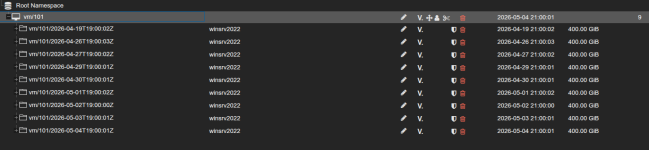
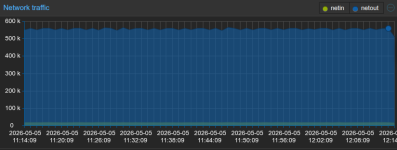
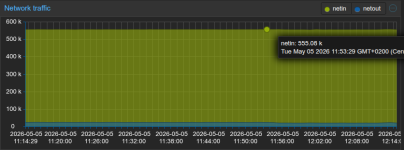
DDexter23 replied to the thread PBS Local Sync to Remote PBS Stuck.The bandwidth available on the local PBS is 20 Mbit/s Download and 6Mbit/s Upload. This is the local datastore to sync to the remote: This is the datastore from the remote PBS: Network Traffic PBS Local: Network Traffic PBS Remote:
-
-
Bbobdvb reacted to mikekgr's post in the thread TL;DR for getting noVNC copy/paste clipboard sharing working with Ubuntu 24 guest with Like.
From Windows PC or Laptop, the copy / paste can be very easily done using a helper program see here: https://github.com/Collective-Software/ClickPaste It is working perfectly fine to all cases
-
HYou could take a picture with your phone of what you see. I'm afraid a partial description is not very helpful. You should not use apt upgrade for the node. It can break things. Use the GUI's update button or pveupdate && pveupgrade instead...
-
HYou can :) In the PVE create a text file with the commands and their output. Mount a USB stick in the PVE. Copy that file into the stick. Mount the stick in the laptop.
-
Ddompro replied to the thread PBS parallel backups & PBS performance.Uploaded 187 chunks in 5 seconds. Time per request: 27121 microseconds. TLS speed: 154.65 MB/s SHA256 speed: 318.66 MB/s Compression speed: 358.02 MB/s Decompress speed: 502.67 MB/s AES256/GCM speed: 1150.99 MB/s Verify speed: 203.95 MB/s...
-
DDexter23 replied to the thread PBS Local Sync to Remote PBS Stuck.Nothing has changed at the moment no new entries in the task viewer is the same as the two screenshot above, it seems stuck as before, is there a log file to analyze to understand what it is doing?
-
JJohannes S replied to the thread Dell VxRail converted to ProxMox+Ceph?.This question can only be answered by DELL support.
-
OOnslow replied to the thread [SOLVED] Cannot access WebGUI.You can :) In the PVE create a text file with the commands and their output. Mount a USB stick in the PVE. Copy that file into the stick. Mount the stick in the laptop.
-
Ddompro replied to the thread PBS parallel backups & PBS performance.Interesting. Network throughput during backup is strangely close to 1gbit. VM's have a different bond. while true; do T1=$(cat /sys/class/net/bond0/statistics/tx_bytes); sleep 1; T2=$(cat /sys/class/net/bond0/statistics/tx_bytes); echo...
-
DDenary replied to the thread ha-manager and VM's with host passthrough.Hi Daniel (Finally spotting your name is in your footer) OK I'll give that a test tonight but from how you've explained it, it does sound like the best of both worlds. Although node maintenance will still be a faff! :) I appreciate the time...
-
Pproxuser77 replied to the thread nicht vergessen: UEFI-Zertifikate Eurer EFI-Disk Instanzen 06.2026!.Ich würde sagen ja, denn BIOS unterstützt ja gar kein SecureBoot, das geht nur mit UEFI.
-
JJohannes S reacted to jim_os's post in the thread nicht vergessen: UEFI-Zertifikate Eurer EFI-Disk Instanzen 06.2026! with Like.
Moin zusammen Mit Euren Diskussionen hier habt Ihr es tatsächlich geschafft das ich jetzt den Überblick verloren habe was nun wirklich wann und wo bei welcher VM notwendig ist. :D Ganz konkret: Bei mir gibt es lediglich 8 VMs, wovon 7 halt...
-
 Moayad replied to the thread Backup speed regression: 2h20m → 8h39m after PVE 8→9 / QEMU 9.2→10.1 / Ceph 18→19 upgrade.Thank you for the output! The pool can perform well, but the affected VM image itself is slow. That is the important distinction. For the recreate, I would a temporary second RBD storage ID pointing to the same pool. That avoids direct manual...