Latest activity
-
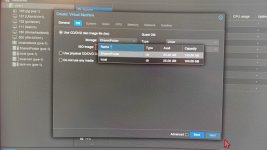
 bbgeek17 replied to the thread storgae configuration.@Impact is right on - you are on ISO selection screen, not disk. Select "Do not use any media" and then Next. You can come back later to add an ISO, if you need one. Blockbridge : Ultra low latency all-NVME shared storage for Proxmox -...
 -
Sshlomi replied to the thread storgae configuration.HI, content is marked for both images+root dir. vm creation screenshot attached picture. Thanks, Shlomi
-
-
Bbufalla replied to the thread Win 2025 Installation.Ok, dann lasse ich den CPU-Typ einfach auf x86-64-v2-AES stehen.
-
bbgeek17 replied to the thread Proxmox 9.1.4 import SUSE VM from ESXi.As I mentioned, I am not a SLES expert. I don't know whether you properly booted into Rescue mode. I am not sure whether the disk of the VM is still there, is it? Perhaps you need to execute a few more commands to make the Rescue mode usable...
-
Ddrwtsn32 replied to the thread High network throughput causes high CPU usage in VM.Guessing the added virtualization overhead is just too much for the modest N100 processor. I might try doing NIC passthrough to see if it helps.
-
Jjeffgott replied to the thread Proxmox 9.1.4 import SUSE VM from ESXi.lsblk returns 'No such sile....' and there are no files in /dev:
-
-
bbgeek17 replied to the thread Proxmox 9.1.4 import SUSE VM from ESXi.Run "lsblk" from the rescue mode, then replace UUID=uuid within the file with a /dev/sdX type keyword. Or, if you can figure out the new UUID, with that. Blockbridge : Ultra low latency all-NVME shared storage for Proxmox -...
-
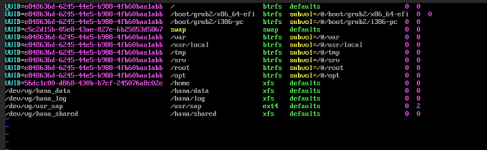
Jjeffgott replied to the thread Proxmox 9.1.4 import SUSE VM from ESXi.You'll have to forgive me - I am not a Linux expert by any means. ls -l /dev/disk/by-path returns 'No such file or directory'. There are no files in /dev - ls command only shows 'null'. Attached is the contents for fstab.
-
-
Bbufalla replied to the thread Win 2025 Installation.Sorry, ich bin nun mal die Anleitung durch, von EFI und TPM steht nichts, vermutlich wird das auf den zfs-pool (DATA) wo die VM gespeichert wird ablegt. Ich habe zfs-pool (local) und zfs-pool (Data) mit 16TB. Discard habe ich aktiviert. Was...
-
bbgeek17 replied to the thread proxmox 8 - how migrate vm without shared storage ?.Have you tried to use PVE CLI yet? qm migrate <vmid> <target> [OPTIONS] qm migrate <vmid> <target> [OPTIONS] Migrate virtual machine. Creates a new migration task. <vmid>: <integer> (100 - 999999999) The...
-
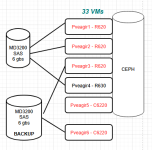
Ccarnyx.io replied to the thread proxmox 8 - how migrate vm without shared storage ?.hello world :) Funny that my thread interested you The cluster has effectively 6 pve nodes and i try to migrate some VMs from node 2 to node 6, which i named previously "pve2" and "pve6" to simplify. The real names are "pveagir1" to...
-
-
bbgeek17 replied to the thread [SOLVED] local fs full: ghost files edition.The backup was configured to store files in a folder /mnt/usb/dump. It does not know whether that folder is backed by USB, NVMe, or Cloud drive. At some point when the backup was executed the USB was either not present or not recognized. The...
-
KThank you so much Impact. That fixed my problem. Like I said a newbie mistake :oops:
-
KPlease use code blocks so the formatting is preserved. For LVM you want to use pvs and lvs too. Your LV is only 100G and can be resized like this: https://forum.proxmox.com/threads/vm-is-not-showing-all-disk-space.166433/#post-772165 You should...
-
EEcksteinU replied to the thread [SOLVED] local fs full: ghost files edition.Thanks a lot. I found the files in /mnt/usb/dump/vzdump*. I did remove the files and was able to install ncdu. This hopefully helps me in future to analyze such problems myself. What i don't understand is why the backups were stored on my local...
-
bbgeek17 replied to the thread Proxmox 9.1.4 import SUSE VM from ESXi.Can you find out the context of your /etc/fstab ? Blockbridge : Ultra low latency all-NVME shared storage for Proxmox - https://www.blockbridge.com/proxmox
-
KKingneutron replied to the thread Proxmox 9.1.4 import SUSE VM from ESXi.Boot into a recovery CD and chroot to SUSE rootfs, check /etc/fstab and ls -l /dev/disk/by-path to see if the disk mentioned is even there, it may have changed. Grep recursively /etc and /lib/systemd for that /dev/disk, there's no time limit...
-
JJohannes S replied to the thread Cross cluster migration should have option to automatically re-VMID to range config on target cluster.Feature requests or bug reports should be filed on bugzilla.proxmox.com since there is no guarantee the developers read everything in this community forum.
-
JJohannes S reacted to UdoB's post in the thread Cross cluster migrate should have option to automatically re-VMID a VM to the range of target cluster with
 Like.
Just put a link to the correct post here. --> https://forum.proxmox.com/threads/cross-cluster-migration-should-have-option-to-automatically-re-vmid-to-range-config-on-target-cluster.179140/
Like.
Just put a link to the correct post here. --> https://forum.proxmox.com/threads/cross-cluster-migration-should-have-option-to-automatically-re-vmid-to-range-config-on-target-cluster.179140/ -
JJohannes S reacted to Falk R.'s post in the thread [SOLVED] Emulator in Windows VM will nicht... with Like.
NUMA hat bei dir keinen Effekt. Ich hätte auch die VMXNet Nic belassen wie beim ESXi. Auch mal den VMware Paravirtual SCSI Controller getestet? Sonst mit einer 2003 kompatiblen Virtio CD die Treiber nachinstallieren und Virtio SCSI testen...