Latest activity
-
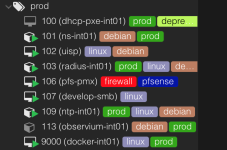
 That is intentional. You do not want your UI cluttered with too many tags. These tags are not ment to replace your inventory management :) Also, you can use the vertical bar to the right of your tags to extend the visible area:
 -
Jjoew replied to the thread Keyboard issue: AltGr seems to hang after typing \).Problem is: the KEYBOARD is broken, not the display. There is NO WAY to type any sensible command. Typing "echo C-v M-c" (in emacs-notation) results in: as if somebody would hold the AltGr key and there is no way to release this damn AltGr...
-
-
EErikPVE replied to the thread [SOLVED] PVE8 freeze (stuck) with kernel > 6.2 during backup job.Changing the storage server on OMV from type=NFS to type=SMB/CIFS seems to solve (or bypass) the problem :):cool:, no stalls/freezes any more. Happy I can proceed with the 6.14.8-3-bpo12-pve kernel at PVE8, so migration to PVE9 looks more feasible.
-
 Translate and take a look at this.
 -
Vendor Specific SMART Attributes with Thresholds: ID# ATTRIBUTE_NAME FLAG VALUE WORST THRESH TYPE UPDATED WHEN_FAILED RAW_VALUE 1 Raw_Read_Error_Rate 0x0032 100 100 050 Old_age Always - 0 5...
-
Ppromoxer replied to the thread zfs has @migrate.How do I identify the operation I ran?
-
Kkejar31 replied to the thread Issues after upgrading to 6.17.4-1-pve.I see there was a new kernel release… don’t think the changes will make a difference but i will give it a test in a bit and report back.
-
Cchrise7 replied to the thread Proxmox node name change.I ran everything @DvdNwk and you mentioned. It worked like a charm on 9.1.4 on 3 nodes. But they were all standalone. Could anyone verify if this renaming process would work, or not, on nodes that are part of a cluster?
-
Aalexskysilk replied to the thread Bond & Bridge Interfaces - Undesired Behavior.lets back way up. 1. you have 4 physical interfaces. what are the physically connected to? 2. describe your vlan plan, and which physical interfaces you want to have those vlans travel over 3. describe what traffic you want to use the vlans for...
-
 fstrankowski replied to the thread Display bug in the left VM / CT list.That is intentional. You do not want your UI cluttered with too many tags. These tags are not ment to replace your inventory management :) Also, you can use the vertical bar to the right of your tags to extend the visible area:
 -
-
Dann lies dich hier mal ein : https://pve.proxmox.com/wiki/VNC_Client_Access
-
Hallo, zeige bitte deine IPv4 Einstellungen und auch von deinem Default Router/ Gateway.
-
Mm-electronics posted the thread Display bug in the left VM / CT list in Proxmox VE: Installation and configuration.I think I have found a bug since PVE 8.4.16 and also in PVE 9.1.2: In the left bar / list, where all VMs are listed, the tags are not displayed well when they are too long to the actual width. No scroll bar appears and they are cut off and 3...
-
-
JJimLS posted the thread Audio access from LXC container on Optiplex in Proxmox VE: Installation and configuration.Wanting to play some short wav files from the container. I tried installing alsa-base but package was not found: root@proxmox1:~# apt install alsa-base Reading package lists... Done Building dependency tree... Done Reading state information...
-
Jjanus57 replied to the thread Error to Import VMDK to PVE9.Hi, You miss a files, you should have 2 files : Prod1g5_1-flat.vmdk Prod1g5_1.vmdk Put the 2 files in the same directory and try to import again. Cf : https://pve.proxmox.com/wiki/Migrate_to_Proxmox_VE#Import_Disk Best regards,
-
Mm-electronics replied to the thread Windows 11 boot stucks on PVE 9.1 with x86_64-v2-AES.I have played around a little bit now and I use Q35 for the machine type... And when I use: CPU Type: x86-64-v2-AES Machine Type: Q35-10.0 it works. But I want to understand what is the problem :)
-
Mm-electronics replied to the thread Windows 11 boot stucks on PVE 9.1 with x86_64-v2-AES.Hey Sivat, Sorry for the long reply time (silvester and new year are not good in my family for doing IT things...) My node have an Intel i5-8279U CPU and I do not touch any configuration of the VM. I have tested x86-64-v4, there I got failure...
-
Uuzumo replied to the thread zfs has @migrate.How about judging based on the date it was created? According to my prediction, it will display August 2025, and the cause is an operation you performed yourself. zfs list rpool -t snapshot -o name,creation Snapshots are only created when...
-
 herzkerl replied to the thread sync group filed - connection closed because of a broken pipe.At some point it just worked without any issues. Might have been another update in 2023 or early 2024.
 -
fstrankowski reacted to Johannes S's post in the thread Storage / View confusion / icon upgrade suggestion with
 Like.
Bug reports and feature requests ahould be filed on bugzilla.proxmox.com
Like.
Bug reports and feature requests ahould be filed on bugzilla.proxmox.com