Latest activity
-
 UdoB replied to the thread Move Disk hangs forever in version 8.2.4.I am not convinced! 4 binary TB (correct: 4 TiB) is 4398046511104 Bytes. And it is 4294967296 KILOBytes. The last one is possibly used to show wrongly 4.2 TB...
 -
Ddompro replied to the thread Move Disk hangs forever in version 8.2.4.On this NAS are multiple VMDK disks over 4TB. Moved there with VMware. That makes me confident that the NAS does not have an issue with files over 4TB. And the PURE-Fibre-Thick-LVM volumes also have multiple disks over 4TB. It is a bit curious...
-
 Perhaps a maximum filesize limit is hit somewhere? Compare: https://en.wikipedia.org/wiki/Comparison_of_file_systems#Limits
 -
Xxmoxer replied to the thread Severe system freeze with NFS on Proxmox 9 running kernel 6.14.8-2-pve when mounting NFS shares.Hi! I have the same problem and it looks like I found a solution. NFS shares from the Truenas scale virtual machine are mounted to unprivileged LXC via the host. In /etc/fstab, I added vers=3 and lookupcache=none to the NFS parameters. One day...
-
UdoB replied to the thread Move Disk hangs forever in version 8.2.4.Perhaps a maximum filesize limit is hit somewhere? Compare: https://en.wikipedia.org/wiki/Comparison_of_file_systems#Limits
-
news replied to the thread Move Disk hangs forever in version 8.2.4.ask your nas again and check big filetransver from your desktop pc to your nas. Maybe you have a big video file? i use e.g. rsync to my zfs nas based an Proxmox VE and store there all my raw video files.
-
Ddompro replied to the thread Move Disk hangs forever in version 8.2.4.Hey, did you ever find a solution for that? Because I'm just stuck with a pretty similar issue. After exactly 4.2TB the transfer seemingly stops. Going from 400mb/s from the NAS NFS share to 0.
-
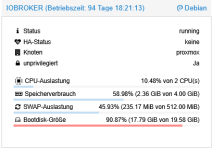
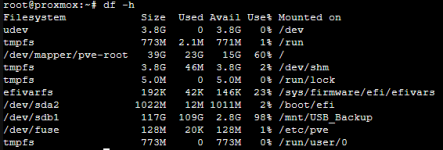
root, data, und swap sind LVM Volumes denen ein fixer Platz in der Volume Group zugewiesen ist. Das hier bedeutet einfach nur, dass 88% des Speichers der Volume Group (vgs) vergeben ist. Dieser muss nicht belegt sein. Du kannst dir das etwas wie...
-
Uuzumo reacted to jaminmc's post in the thread Hookscript with 'post-stop' when the VM was shutdown from the VM itself with
 Like.
I encountered a similar issue. I desired to execute a hook script that would reinitialize the AMD GPU after a virtual machine (VM) shutdown. The script functioned correctly when the VM was shut down via the web interface. However, if I initiated...
Like.
I encountered a similar issue. I desired to execute a hook script that would reinitialize the AMD GPU after a virtual machine (VM) shutdown. The script functioned correctly when the VM was shut down via the web interface. However, if I initiated... -
Nnoidea replied to the thread Speicherverteilung (Bootdisk-Größe).Vielen Dank für deine Rückmeldung. Das ganze ich für mich nicht so richtig zu packen. Es ist also nicht so, wie bei Windows, wo ich z.B. einer Partition 20GB fest zuordne, sondern ich habe in diesem Fall hier z.B.dem Container vm-106-disk-0...
-
-
BBamsefar posted the thread Use USB for network (without a USB to Ethernet dongle) - is it possible? in Proxmox VE: Networking and Firewall.So I am thinking of creating a ProxMox cluster, three (3) nodes, and use direct network between the nodes (no switch). Now that requires two network ports dedicated just for this. Plus the normal ports. I don't think I will be able to get small...
-
UdoB replied to the thread New Proxmox box w/ ZFS - R730xd w/ PERC H730 Mini in “HBA Mode” - BIG NO NO?.That's surprising and not expected, of course. How did you create that pool? What gives "zpool status" before reboot and "zpool import" after it? We are talking "write cache", right? It tells ZFS that data has been written to disk while it...
-
Mmiro-zamiro replied to the thread PGs incomplete.I managed to fix it using these steps: https://medium.com/opsops/recovering-ceph-from-reduced-data-availability-3-pgs-inactive-3-pgs-incomplete-b97cbcb4b5a1 DO THAT ONLY IF INACTIVE PGs ARE EMPTY (MEANING OBJECTS = 0, seen using command ceph pg...
-
Ffertig replied to the thread New Proxmox box w/ ZFS - R730xd w/ PERC H730 Mini in “HBA Mode” - BIG NO NO?.this is exactly my hardware, but I did not disable the cache. The zpool completely disapears after each reboot. Is this the cache? Do I need to disable it?
-
EEduardo Taboada replied to the thread Question on PBS setup and hardware.You can try to use the NFS as a removable storage in PBS, if the PBS host dies, you can create a new one, and add the storage again as a removable existent media. If you use this trick you can access again to your backups.
-
EEduardo Taboada replied to the thread Proxmox stuck in boot loop after restart.Then try to check why is not booting, check dmesg and journalctl. Have you updated the kernel?, if so, try to go back to a older kernel version
-
Jjeenam reacted to asfasty's post in the thread [TUTORIAL] HOWTO - Proxmox VE 8-1.2 Wifi w/ SNAT with Like.
Signed up because of you and your HowTo I am super thankful for this, since I could not figure it out in the previous posts. Followed your how to and have an old laptop up an running with wireless. This is only for POC and once I have figured...
-
SShockinator608 replied to the thread Proxmox stuck in boot loop after restart.As i stated in the post i do not have anywhere to temporarly store terebytes worth of data besides the drives they are currently stored on.
-
EEduardo Taboada replied to the thread Import of esxi vm fails.Yo have already checked the original disk? qemu-img check -f vmdk /path-to-original-vmdk
-
EEduardo Taboada replied to the thread Proxmox stuck in boot loop after restart.You can try to boot with a live debian image, and do a copy of the disks in the lvm volume to a external usb or via rsync to a new machine. To find the disks you can use: pvesm list local-lvm Then for example: qemu-img convert -O qcow2...