

ZFS Pool Degraded & Drive Removed

phongwashere

New Member
Oct 14, 2025
2
0
1
Does this mean that the drive is dead? Could it be a glitch where I can just reseat the drive? This is currently running some mission critical VMs. We have the environment backed up to our Synology NFS storage, but would like to know what would be the best way to resolve these errors. We've only had the server up for about 6 months.
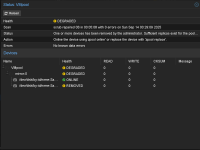
1760474864749.png
 
Could it be a glitch where I can just reseat the drive?
It could be. It could also be an experiment with PCI(e) passthrough and the second NVMe was part of the same IOMMU group. It could also be a cooling issues or some other kind of hardware failure. It's hard to say without more data. Run journalctl -b 0 and scroll through it (using the arrow keys) to maybe find a reason why the drive disappeared?
PS: Posting output of commands (like zpool status VMpool) in CODE-tags instead of screenshots is much more readable (and searchable) for people (even without visual impairments).
 
Hi! Thank you so much for your reply! I ran journalctl -b 0 and scrolled but could not find the exact reason on why it was removed. I could have missed it. Do you suggest I create a new thread with the CODE tag or continue to post here?

---------------------------------
Herer is the output for zpool status VMpool.

root@worklab:~# zpool status VMpool
pool: VMpool
state: DEGRADED
status: One or more devices has been removed by the administrator.
Sufficient replicas exist for the pool to continue functioning in a
degraded state.
action: Online the device using zpool online' or replace the device with
'zpool replace'.
scan: scrub repaired 0B in 00:05:08 with 0 errors on Sun Sep 14 00:29:09 2025
config:

NAME STATE READ WRITE CKSUM
VMpool DEGRADED 0 0 0
mirror-0 DEGRADED 0 0 0
nvme-Samsung_SSD_990_PRO_4TB_S7KGNJ0X202778K_1 ONLINE 0 0 0
nvme-Samsung_SSD_990_PRO_4TB_S7KGNU0X503817W_1 REMOVED 0 0 0

errors: No known data errors
--------------------------------
Do you have any recommendations on how I should go about getting this drive back online. Not having that redundant drive is not something that lets me sleep easy at night... haha
 
That might explain it...
Code:
root@worklab:~# zpool status VMpool

  pool: VMpool

 state: DEGRADED

status: One or more devices has been removed by the administrator.
 
Last edited: