

Hello
I recently replaced a failed disk in ZFS data pool. Everything worked without problems but after command zpool status shows the new disk differently in command line.
I wonder if it would cause me problems down the line?
What I did. Working disk in pool is /dev/sda and new disk is /dev/sdb. Old disk failed completely. So I shut down the server and replaced the disk first.
Then these commands:
sgdisk /dev/sda -R /dev/sdb
sgdisk -G /dev/sdb
zpool replace -f storage01 16383656347721028438 ata-Micron_5300_MTFDDAK960TDS_2218377YYYY-part1
The pool before disk change
pool: storage01
state: DEGRADED
status: One or more devices could not be used because the label is missing or
invalid. Sufficient replicas exist for the pool to continue
functioning in a degraded state.
action: Replace the device using 'zpool replace'.
see: https://openzfs.github.io/openzfs-docs/msg/ZFS-8000-4J
scan: scrub repaired 0B in 00:06:51 with 0 errors on Sun May 8 00:30:52 2022
config:
NAME STATE READ WRITE CKSUM
storage01 DEGRADED 0 0 0
mirror-0 DEGRADED 0 0 0
ata-Micron_5300_MTFDDAK960TDS_20522C5CXXXX ONLINE 0 0 0
16383656347721028438 UNAVAIL 0 0 0 was /dev/disk/by-id/ata-Micron_5300_MTFDDAK960TDS_20522C5XXXY-part1
Pool after disk change.
pool: storage01
state: ONLINE
status: Some supported features are not enabled on the pool. The pool can
still be used, but some features are unavailable.
action: Enable all features using 'zpool upgrade'. Once this is done,
the pool may no longer be accessible by software that does not support
the features. See zpool-features(5) for details.
scan: scrub repaired 0B in 00:06:55 with 0 errors on Tue May 31 09:09:11 2022
config:
NAME STATE READ WRITE CKSUM
storage01 ONLINE 0 0 0
mirror-0 ONLINE 0 0 0
ata-Micron_5300_MTFDDAK960TDS_20522C5CXXXX ONLINE 0 0 0
ata-Micron_5300_MTFDDAK960TDS_2218377CYYYY-part1 ONLINE 0 0 0
errors: No known data errors
The new disk has additinal -part1 after the name. If I look the pool in Proxmox WebUI then it shows -part1 for both disks.
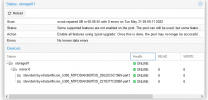
Is this some weird bug that only shows in command line zpool status or could I have a problem with this?
I recently replaced a failed disk in ZFS data pool. Everything worked without problems but after command zpool status shows the new disk differently in command line.
I wonder if it would cause me problems down the line?
What I did. Working disk in pool is /dev/sda and new disk is /dev/sdb. Old disk failed completely. So I shut down the server and replaced the disk first.
Then these commands:
sgdisk /dev/sda -R /dev/sdb
sgdisk -G /dev/sdb
zpool replace -f storage01 16383656347721028438 ata-Micron_5300_MTFDDAK960TDS_2218377YYYY-part1
The pool before disk change
pool: storage01
state: DEGRADED
status: One or more devices could not be used because the label is missing or
invalid. Sufficient replicas exist for the pool to continue
functioning in a degraded state.
action: Replace the device using 'zpool replace'.
see: https://openzfs.github.io/openzfs-docs/msg/ZFS-8000-4J
scan: scrub repaired 0B in 00:06:51 with 0 errors on Sun May 8 00:30:52 2022
config:
NAME STATE READ WRITE CKSUM
storage01 DEGRADED 0 0 0
mirror-0 DEGRADED 0 0 0
ata-Micron_5300_MTFDDAK960TDS_20522C5CXXXX ONLINE 0 0 0
16383656347721028438 UNAVAIL 0 0 0 was /dev/disk/by-id/ata-Micron_5300_MTFDDAK960TDS_20522C5XXXY-part1
Pool after disk change.
pool: storage01
state: ONLINE
status: Some supported features are not enabled on the pool. The pool can
still be used, but some features are unavailable.
action: Enable all features using 'zpool upgrade'. Once this is done,
the pool may no longer be accessible by software that does not support
the features. See zpool-features(5) for details.
scan: scrub repaired 0B in 00:06:55 with 0 errors on Tue May 31 09:09:11 2022
config:
NAME STATE READ WRITE CKSUM
storage01 ONLINE 0 0 0
mirror-0 ONLINE 0 0 0
ata-Micron_5300_MTFDDAK960TDS_20522C5CXXXX ONLINE 0 0 0
ata-Micron_5300_MTFDDAK960TDS_2218377CYYYY-part1 ONLINE 0 0 0
errors: No known data errors
The new disk has additinal -part1 after the name. If I look the pool in Proxmox WebUI then it shows -part1 for both disks.
Is this some weird bug that only shows in command line zpool status or could I have a problem with this?
