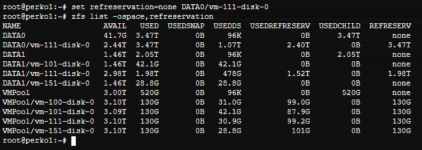
I have a 3.7 TB zfs pool but cant use replication because the windows VM disk is 3.6TB and was not created with thin provisioning. Real usage is 1.2TB so I need to convert it to thin-provision to free up the disk space. I ran the "set refreservation=none DATA0/wm-111-disk-0" command, in Datacenter set the thin-provision checkbox, set discard and ssd on the VM disk on. But still get response when I run (zfs list -o name,refreservation,volsize DATA0/vm-111-disk-0)
DATA0/vm-111-disk-0 3.47T 3.42T
Running zfs list gets
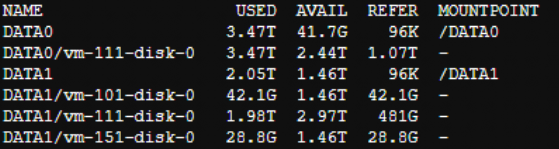
Any way to activate ThinProv on this windows VM to free up the space.
DATA0/vm-111-disk-0 3.47T 3.42T
Running zfs list gets
Any way to activate ThinProv on this windows VM to free up the space.