Hi all,
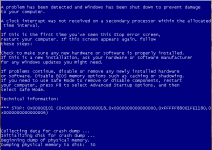
If i stop my WS 2008R2 and start it, i have bluescreen.
This is with virtio uptodate.
With no cache all is fine, but verry slow.
Do i miss some thing ?
PS :
Finaly BSOD with no cache too
pve-manager: 2.3-13 (pve-manager/2.3/7946f1f1)
running kernel: 2.6.32-19-pve
proxmox-ve-2.6.32: 2.3-96
pve-kernel-2.6.32-19-pve: 2.6.32-96
pve-kernel-2.6.32-18-pve: 2.6.32-88
lvm2: 2.02.95-1pve2
clvm: 2.02.95-1pve2
corosync-pve: 1.4.4-4
openais-pve: 1.1.4-2
libqb: 0.10.1-2
redhat-cluster-pve: 3.1.93-2
resource-agents-pve: 3.9.2-3
fence-agents-pve: 3.1.9-1
pve-cluster: 1.0-36
qemu-server: 2.3-20
pve-firmware: 1.0-21
libpve-common-perl: 1.0-49
libpve-access-control: 1.0-26
libpve-storage-perl: 2.3-7
vncterm: 1.0-4
vzctl: 4.0-1pve2
vzprocps: 2.0.11-2
vzquota: 3.1-1
pve-qemu-kvm: 1.4-10
ksm-control-daemon: 1.1-1
cat /etc/pve/qemu-server/100.conf
bootdisk: virtio0
cores: 4
ide2: local:iso/SW_DVD5_Windows_Svr_DC_EE_SE_Web_2008_R2_64Bit_French_w_SP1_MLF_X17-22584.ISO,media=cdrom,size=3122620K
ide3: local:iso/SW_DVD5_Office_2010w_SP1_W32_French_CORE_MLF_X17-82116.ISO,media=cdrom,size=1154384K
keyboard: fr
memory: 35840
name: MWS2008R2
net0: virtio=66:CC:75:AB:BC:7D,bridge=vmbr0
ostype: win7
sockets: 1
vga: std
virtio0: local:100/vm-100-disk-1.raw,size=200G
virtio1: backup:100/vm-100-disk-1.raw,size=5G
If i stop my WS 2008R2 and start it, i have bluescreen.
This is with virtio uptodate.
With no cache all is fine, but verry slow.
Do i miss some thing ?
PS :
Finaly BSOD with no cache too
pve-manager: 2.3-13 (pve-manager/2.3/7946f1f1)
running kernel: 2.6.32-19-pve
proxmox-ve-2.6.32: 2.3-96
pve-kernel-2.6.32-19-pve: 2.6.32-96
pve-kernel-2.6.32-18-pve: 2.6.32-88
lvm2: 2.02.95-1pve2
clvm: 2.02.95-1pve2
corosync-pve: 1.4.4-4
openais-pve: 1.1.4-2
libqb: 0.10.1-2
redhat-cluster-pve: 3.1.93-2
resource-agents-pve: 3.9.2-3
fence-agents-pve: 3.1.9-1
pve-cluster: 1.0-36
qemu-server: 2.3-20
pve-firmware: 1.0-21
libpve-common-perl: 1.0-49
libpve-access-control: 1.0-26
libpve-storage-perl: 2.3-7
vncterm: 1.0-4
vzctl: 4.0-1pve2
vzprocps: 2.0.11-2
vzquota: 3.1-1
pve-qemu-kvm: 1.4-10
ksm-control-daemon: 1.1-1
cat /etc/pve/qemu-server/100.conf
bootdisk: virtio0
cores: 4
ide2: local:iso/SW_DVD5_Windows_Svr_DC_EE_SE_Web_2008_R2_64Bit_French_w_SP1_MLF_X17-22584.ISO,media=cdrom,size=3122620K
ide3: local:iso/SW_DVD5_Office_2010w_SP1_W32_French_CORE_MLF_X17-82116.ISO,media=cdrom,size=1154384K
keyboard: fr
memory: 35840
name: MWS2008R2
net0: virtio=66:CC:75:AB:BC:7D,bridge=vmbr0
ostype: win7
sockets: 1
vga: std
virtio0: local:100/vm-100-disk-1.raw,size=200G
virtio1: backup:100/vm-100-disk-1.raw,size=5G
Last edited: