

Hi
I was having issues with not been able to login to my proxmox web ui after updating my server a few months ago. So I decided I should give it a reboot. After the reboot it wont even load the web UI. I can SSH into the server, but everything seems to be broken. When I try any qm commands I get this error:
Running systemctl list-units --state=failed gives me:
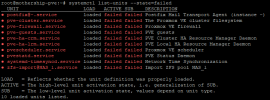
I read somewhere that it could be to do with my hosts file, but I think its correct?

I am at a loss here. I dont know what to do as all my VM's are down and I cannot start them anymore. Does anyone here in this wonderful community have any ideas?
I was having issues with not been able to login to my proxmox web ui after updating my server a few months ago. So I decided I should give it a reboot. After the reboot it wont even load the web UI. I can SSH into the server, but everything seems to be broken. When I try any qm commands I get this error:
Code:
ipcc_send_rec[1] failed: Connection refused
ipcc_send_rec[2] failed: Connection refused
ipcc_send_rec[3] failed: Connection refused
Unable to load access control list: Connection refused
Running systemctl list-units --state=failed gives me:
I read somewhere that it could be to do with my hosts file, but I think its correct?
Code:
root@mothership-pve:~# cat /etc/hosts
127.0.0.1 localhost.localdomain localhost
192.168.1.149 mothership-pve.localdomain mothership-pve

# The following lines are desirable for IPv6 capable hosts

::1     ip6-localhost ip6-loopback
fe00::0 ip6-localnet
ff00::0 ip6-mcastprefix
ff02::1 ip6-allnodes
ff02::2 ip6-allrouters
ff02::3 ip6-allhosts
Code:
root@mothership-pve:~# lvs
  LV                         VG      Attr       LSize    Pool Origin        Data%  Meta%  Move Log Cpy%Sync Convert
  vm-100-disk-0              M.2-SSD -wi-a-----   32.00g
  vm-100-disk-1              M.2-SSD -wi-a-----    4.00m
  vm-101-disk-0              M.2-SSD -wi-a-----   20.00g
  vm-102-disk-0              M.2-SSD -wi-a-----   32.00g
  vm-102-disk-1              M.2-SSD -wi-a-----    4.00m
  vm-103-disk-0              M.2-SSD -wi-a-----   32.00g
  vm-104-disk-0              M.2-SSD -wi-a-----  600.00g
  vm-106-disk-0              M.2-SSD -wi-a-----   32.00g
  vm-107-disk-0              M.2-SSD -wi-a-----   32.00g
  data                       pve     twi-aotz-- <338.36g                    2.26   0.61
  root                       pve     -wi-ao----   96.00g
  snap_vm-105-disk-0_Working pve     Vri---tz-k   32.00g data vm-105-disk-0
  swap                       pve     -wi-ao----    8.00g
  vm-105-disk-0              pve     Vwi-a-tz--   32.00g data               18.12
  vm-105-state-Working       pve     Vwi-a-tz--   <8.49g data               13.39
Code:
root@mothership-pve:~# df -h
Filesystem            Size  Used Avail Use% Mounted on
udev                   32G     0   32G   0% /dev
tmpfs                 6.3G  122M  6.2G   2% /run
/dev/mapper/pve-root   94G   94G     0 100% /
tmpfs                  32G     0   32G   0% /dev/shm
tmpfs                 5.0M     0  5.0M   0% /run/lock
tmpfs                 6.3G     0  6.3G   0% /run/user/0
I am at a loss here. I dont know what to do as all my VM's are down and I cannot start them anymore. Does anyone here in this wonderful community have any ideas?
Last edited: