WireGuard LXC Container Performance Questions.

Treebeardz

New Member
Mar 1, 2024
1
1
1
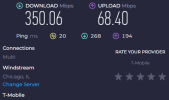
Has anyone setup WireGuard in an LXC Container? I have it fully setup and working using the "ubuntu-20.04-standard_20.04-1_amd64.tar.gz" template. The speed is not meeting my expectations bandwidth wise. I have sequential 2.5Gbps fiber however currently Proxmox is on a 1Gbps LAN port for now. I'm using my mobile phone as a test case here and over 5G.

What I speed test over USB type C tethering to my desktop.
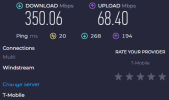
1stSpeed.png

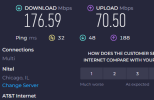
Connected to the Windows Desktop WireGuard client
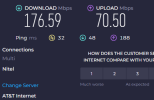
1stSpeedVPN.png


I wanted to test another internet source so I remoted into my brothers house and setup the Windows Desktop WireGuard client.
Speed he gets from his ISP
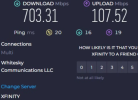
2ndSpeed.png

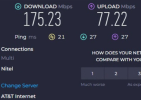
Speed Connected to the WireGuard client.
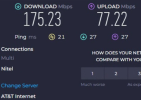
2ndSpeedVPN.png

Looks to be the same bandwidth cap using both internet sources.

I have a few questions, would WireGuard perform better running in a full VM vs an LXC Container. Is there any Proxmox settings or features that can improve network performance? Where else might I need to troubleshoot this performance issue? From what I've seen WireGuard is supposed to be capable of much faster performance.

For reference my full ISP speed my proxmox box is behind.
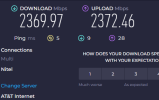
Full Speed.png
 

Attachments

  • image.png
    image.png
    26.8 KB · Views: 0
  • asd1.png
    asd1.png
    29.8 KB · Views: 0
  • 2ndSpeedVPN.png
    2ndSpeedVPN.png
    133.8 KB · Views: 0
  • Like
Reactions: metaphase
Appreciate this was posted about 10 months ago but it fits with my impression of performance too and would be interested in what others have found.

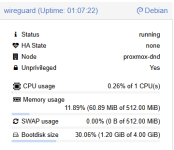
I've setup Wireguard LXC using the Community Helper script. I can connect fine but have noticed quite a reduction in speed to what I was used to on my QNAP NAS. My connection isn't anything like as fast as the OPs (just 300Mbps symmetric), but I'm still getting much slower speeds than my old QNAP managed when testing from the same 5G connection (about 100Mbps down/9Mbps up - in comparison usually about 200Mbps/40Mbps). CPU and memory usage is negligible when looking at the container (see below) - most I can get it to peak at is 0.54%! - so I don't think it's a limitation there?

1736104849114.png
Speeds when checking via speedtest-cli in the container seem not far off those expected from my connection:
Bash:
Testing download speed................................................................................
Download: 309.78 Mbit/s
Testing upload speed......................................................................................................
Upload: 263.19 Mbit/s
 
I am running into the same issue, I used a raspberry pi before and I was getting speeds around 500Mbps with my 1 Gbps upload and download speed but I can barely reach 200mbps and it's the same thing for the cpu and ram, they are barely utilized.
 
  • Like
Reactions: metaphase
This is the result of running iperf locally inside the LXC container so the container itself doesn't have any problem with the speed.

Bash:
iperf3 --client 192.168.1.168
Connecting to host 192.168.1.168, port 5201
[  5] local 192.168.1.213 port 37442 connected to 192.168.1.168 port 5201
[ ID] Interval           Transfer     Bitrate         Retr  Cwnd
[  5]   0.00-1.00   sec   283 MBytes  2.38 Gbits/sec    0    880 KBytes       
[  5]   1.00-2.00   sec   281 MBytes  2.36 Gbits/sec    0    880 KBytes       
[  5]   2.00-3.00   sec   280 MBytes  2.35 Gbits/sec    0    880 KBytes       
[  5]   3.00-4.00   sec   281 MBytes  2.36 Gbits/sec    0    880 KBytes       
[  5]   4.00-5.00   sec   280 MBytes  2.35 Gbits/sec    0    880 KBytes       
[  5]   5.00-6.00   sec   281 MBytes  2.36 Gbits/sec    0    880 KBytes       
[  5]   6.00-7.00   sec   280 MBytes  2.35 Gbits/sec    0    880 KBytes       
[  5]   7.00-8.00   sec   280 MBytes  2.35 Gbits/sec    0    880 KBytes       
[  5]   8.00-9.00   sec   281 MBytes  2.36 Gbits/sec    0    976 KBytes       
[  5]   9.00-10.00  sec   280 MBytes  2.35 Gbits/sec    0   1022 KBytes       
- - - - - - - - - - - - - - - - - - - - - - - - -
[ ID] Interval           Transfer     Bitrate         Retr
[  5]   0.00-10.00  sec  2.74 GBytes  2.36 Gbits/sec    0             sender
[  5]   0.00-10.00  sec  2.74 GBytes  2.35 Gbits/sec                  receiver

iperf Done.
root@wireguard:~# iperf3 --client 192.168.1.168 --reverse
Connecting to host 192.168.1.168, port 5201
Reverse mode, remote host 192.168.1.168 is sending
[  5] local 192.168.1.213 port 33852 connected to 192.168.1.168 port 5201
[ ID] Interval           Transfer     Bitrate
[  5]   0.00-1.00   sec   277 MBytes  2.32 Gbits/sec                 
[  5]   1.00-2.00   sec   278 MBytes  2.33 Gbits/sec                 
[  5]   2.00-3.00   sec   278 MBytes  2.33 Gbits/sec                 
[  5]   3.00-4.00   sec   278 MBytes  2.33 Gbits/sec                 
[  5]   4.00-5.00   sec   278 MBytes  2.33 Gbits/sec                 
[  5]   5.00-6.00   sec   278 MBytes  2.33 Gbits/sec                 
[  5]   6.00-7.00   sec   278 MBytes  2.33 Gbits/sec                 
[  5]   7.00-8.00   sec   278 MBytes  2.33 Gbits/sec                 
[  5]   8.00-9.00   sec   276 MBytes  2.31 Gbits/sec                 
[  5]   9.00-10.00  sec   278 MBytes  2.33 Gbits/sec                 
- - - - - - - - - - - - - - - - - - - - - - - - -
[ ID] Interval           Transfer     Bitrate         Retr
[  5]   0.00-10.00  sec  2.72 GBytes  2.33 Gbits/sec  307             sender
[  5]   0.00-10.00  sec  2.71 GBytes  2.33 Gbits/sec                  receiver

iperf Done.
 
  • Like
Reactions: metaphase