Good day.
Installed:
OS: MS Windows Server 2016 Standard. Latest updates installed.
Windows VirtIO Drivers: virtio-win-0.1.266
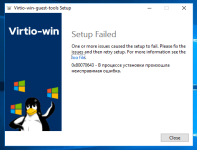
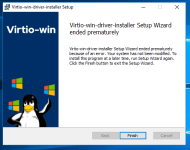
Trying to update Windows VirtIO Drivers to 0.1.271, but it gives an error. I've tried mounting the CD-ROM (iso image) and simply running virtio-win-guest-tools.exe, but it doesn't work. Tested on several virtual machines, still the same.
Never had any problems with Windows VirtiO Drivers updating before. Always updated without any problems.
What are the options for a solution?
Part of the log:
[175C:0C20][2026-05-19T10:01:53]e000: Error 0x80070643: Failed to install MSI package.
[175C:0C20][2026-05-19T10:01:53]e000: Error 0x80070643: Failed to execute MSI package.
[0B8C:02C0][2026-05-19T10:01:53]e000: Error 0x80070643: Failed to configure per-machine MSI package.
[0B8C:02C0][2026-05-19T10:01:53]i319: Applied execute package: virtio_win_gt_x64.msi, result: 0x80070643, restart: None
[0B8C:02C0][2026-05-19T10:01:53]e000: Error 0x80070643: Failed to execute MSI package.
[175C:0C20][2026-05-19T10:01:53]i318: Skipped rollback of package: virtio_win_gt_x64.msi, action: Uninstall, already: Absent
Installed:
OS: MS Windows Server 2016 Standard. Latest updates installed.
Windows VirtIO Drivers: virtio-win-0.1.266
Trying to update Windows VirtIO Drivers to 0.1.271, but it gives an error. I've tried mounting the CD-ROM (iso image) and simply running virtio-win-guest-tools.exe, but it doesn't work. Tested on several virtual machines, still the same.
Never had any problems with Windows VirtiO Drivers updating before. Always updated without any problems.
What are the options for a solution?
Part of the log:
[175C:0C20][2026-05-19T10:01:53]e000: Error 0x80070643: Failed to install MSI package.
[175C:0C20][2026-05-19T10:01:53]e000: Error 0x80070643: Failed to execute MSI package.
[0B8C:02C0][2026-05-19T10:01:53]e000: Error 0x80070643: Failed to configure per-machine MSI package.
[0B8C:02C0][2026-05-19T10:01:53]i319: Applied execute package: virtio_win_gt_x64.msi, result: 0x80070643, restart: None
[0B8C:02C0][2026-05-19T10:01:53]e000: Error 0x80070643: Failed to execute MSI package.
[175C:0C20][2026-05-19T10:01:53]i318: Skipped rollback of package: virtio_win_gt_x64.msi, action: Uninstall, already: Absent