Windows Server 2003 Import from ESXI 6.5

DanLinuxZA

New Member
Feb 19, 2025
6
0
1
Good day
I am having an issue using the import wizard to import and a VM from ESXI 6.5 , the import completes but when I boot the the VM I get a blue screen seems to be an issue with initializing the drive
 
Hello DanLinuxZA! Could you please post the VM configuration?

In your specific case, you should probably set the drive to use IDE, and might need the MergeIDE registry fix recommended by this wiki page. Afterwards you should be able to export the VM from ESXi, import it into Proxmox VE and boot correctly.

Maybe you are already aware of it, but there's a guide for Windows Server 2003 where you might also find other useful information :) Also note that you will need an older version of the VirtIO drivers (or maybe the even older deprecated ISOs), since newer ones dropped support for Windows Server 2003 some time ago.
 
Hello DanLinuxZA! Could you please post the VM configuration?

In your specific case, you should probably set the drive to use IDE, and might need the MergeIDE registry fix recommended by this wiki page. Afterwards you should be able to export the VM from ESXi, import it into Proxmox VE and boot correctly.

Maybe you are already aware of it, but there's a guide for Windows Server 2003 where you might also find other useful information :) Also note that you will need an older version of the VirtIO drivers (or maybe the even older deprecated ISOs), since newer ones dropped support for Windows Server 2003 some time ago.
Hi thanks I did try one od the older virtio dirvers but it is complaining that it not signed so driver doesn't start but it does install , on the esxi it is set IDE and when it imports on proxmox it is also IDE
 
The attached file in the Proxmox VE documentation only contains one file - mergeide.reg (not sure if there are newer versions of MergeIDE containing more files). I did not try it myself (maybe there are guides on the internet), but the procedure should look like this:
  1. Just to be on the safe side, make sure to make a backup of the VM before applying mergeide.reg, just in case something goes wrong.
  2. Apply mergeide.reg
  3. Export VM and import to Proxmox VE.
 
Please check the documentation on the Import Wizard and the wiki page on VM migration, since they explain all the concepts and provide a detailed step-by-step guide on how to do the migration. It would be a bit too much to explain it here, but I can of course help if you have issues ;)
 
Good day, I also wanted to find out I am not getting network traffic infrom my VM , but can ping the vmbr0 but not IP of the the VM
 
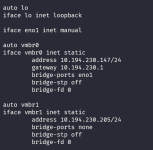
How did you configure your network? Please post the network configuration (/etc/network/interfaces) of the host and VM.
 
Thanks. And how did you configure the network in the VM?
Good day, I also wanted to find out I am not getting network traffic infrom my VM , but can ping the vmbr0 but not IP of the the VM
If I understand you correctly, the VM -> host communication works, but the host -> VM communication doesn't? Is this correct?