After upgrade from PVE 8.x to 9.0 - the Windows guest machine shows memory usage about 100,47%. I have installed latest virtio drivers, dosabled balooning and checked many other parameters... Nothing helps. Is that a PVE bug? I have never had similar problem with this VM before upgrade to PVE 9.0.x


Windows Guest memory utilization problem on PVE 9.0.x
- Thread starter rzirzi
- Start date
You are using an out of date browser. It may not display this or other websites correctly.
You should upgrade or use an alternative browser.
You should upgrade or use an alternative browser.

See https://pve.proxmox.com/wiki/Upgrade_from_8_to_9#VM_Memory_Consumption_Shown_is_Higher
Is the Ballooning Device enabled and is the BallooningService running?
Is the Ballooning Device enabled and is the BallooningService running?

pve-manager/9.0.6/49c767b70aeb6648 (running kernel: 6.14.11-1-pve)
one of the windows VMs shows 100.xx% memory usage in PVE VM summary.
windows 11 guest, memory 16384MB, ballooning enabled, minimum memory 16384MB.
virtio 0.1.271 (updated from 0.1.240 to 0.1.266 and 0.1.271 due that issue), taskmanager shows 3.2GB ram usage.
BalloonService / blnsvr.exe up and running.
everything works fine so far, so it is cosmetic issue for me.
one of the windows VMs shows 100.xx% memory usage in PVE VM summary.
windows 11 guest, memory 16384MB, ballooning enabled, minimum memory 16384MB.
virtio 0.1.271 (updated from 0.1.240 to 0.1.266 and 0.1.271 due that issue), taskmanager shows 3.2GB ram usage.
BalloonService / blnsvr.exe up and running.
everything works fine so far, so it is cosmetic issue for me.
Last edited:
following output:
balloon: actual=8192 max_mem=8192 last_update=1756638096
interesting, last update August 31. 01:51 oclock. about that time i did a minor PVE update + reboot + updated virtio drivers to 0.1.271
checked on different VM where memory is shown correctly:
balloon: actual=4096 max_mem=4096 total_mem=4095 free_mem=2355 mem_swapped_in=10480902144 mem_swapped_out=297967616 major_page_faults=383769 minor_page_faults=96456984 last_update=1756784004
both VMs are nearly identical, both on same node, both got same virtio driver in the night.
another affected vm, guest is server 2012r2 with some old virtio drivers:
balloon: actual=8192 max_mem=8192 last_update=1756605071
balloon: actual=8192 max_mem=8192 last_update=1756638096
interesting, last update August 31. 01:51 oclock. about that time i did a minor PVE update + reboot + updated virtio drivers to 0.1.271
checked on different VM where memory is shown correctly:
balloon: actual=4096 max_mem=4096 total_mem=4095 free_mem=2355 mem_swapped_in=10480902144 mem_swapped_out=297967616 major_page_faults=383769 minor_page_faults=96456984 last_update=1756784004
both VMs are nearly identical, both on same node, both got same virtio driver in the night.
another affected vm, guest is server 2012r2 with some old virtio drivers:
balloon: actual=8192 max_mem=8192 last_update=1756605071
Last edited:
Also had a win11 guest showing 100% cpu usage after upgrading to pve9.
Fixed by installing new virtio drivers iso (0.1.285)
Fixed by installing new virtio drivers iso (0.1.285)
Running a Windows Server 2008 SP2 machine which shows 100% memory consumption since upgrade to Proxmox 9. Same machine on Proxmox 8 shows correct value.
Ballooning driver needs to be x86 which isn't available on latest virtio iso.
Is there any way to make the ballooing work again on such legacy VMs?
Ballooning driver needs to be x86 which isn't available on latest virtio iso.
Is there any way to make the ballooing work again on such legacy VMs?
Why don't you stick with the last possible virtio version for 2008 SP2?Ballooning driver needs to be x86 which isn't available on latest virtio iso.
Which one that is, I don't know right away.
Running ballooing driver version 60.80.104.17300, which is the latest x86 version I can find (interestingly not contained in latest ISO) and Proxmox shows 99,23% memory usage.
Mem usage for Proxmox 8 was like 66%, so I don't think it's working properly.
I have a second Proxmox 8 host with a couple of similar VMs so a solution would be much appreciated.
Edit: Balloon Driver 60.78.104.15400, which is on virtio-win-0.1.285.iso, doesnt seem to do the trick, either.
Edit 2: "monitor -> info balloon" shows "balloon: actual=4096 max_mem=4096 last_update=1765793989" in both cases, Proxmox 8 and 9 running 2he win Server 2k8 VM .. but on Proxmox 8 it shows a smaller than 99,xx% memory usage. So I'm not sure whats going on there. Is the balloon driver actually working on Proxmox 8?
Mem usage for Proxmox 8 was like 66%, so I don't think it's working properly.
I have a second Proxmox 8 host with a couple of similar VMs so a solution would be much appreciated.
Edit: Balloon Driver 60.78.104.15400, which is on virtio-win-0.1.285.iso, doesnt seem to do the trick, either.
Edit 2: "monitor -> info balloon" shows "balloon: actual=4096 max_mem=4096 last_update=1765793989" in both cases, Proxmox 8 and 9 running 2he win Server 2k8 VM .. but on Proxmox 8 it shows a smaller than 99,xx% memory usage. So I'm not sure whats going on there. Is the balloon driver actually working on Proxmox 8?
Last edited:
If that is all you get, then no, it is not working as expected. Is the Balloon Device enabled in the VMs -> Hardware -> Memory settings? Is the "Balloon Service" running in the Windows guest?Edit 2: "monitor -> info balloon" shows "balloon: actual=4096 max_mem=4096 last_update=1765793989" in both cases, Proxmox 8 and 9 running 2he win Server 2k8 VM .. but on Proxmox 8 it shows a smaller than 99,xx% memory usage. So I'm not sure whats going on there. Is the balloon driver actually working on Proxmox 8?
Is there no device without a driver in the device manager?
One reason why you see a lower memory usage on Proxmox VE 8 in such a situation, compared to 9, is that with 9 we improved the accounting for memory of the VM from the hosts perspective and it is now quite a bit more accurate.
Ballooning Device is checked in the memory settings.If that is all you get, then no, it is not working as expected. Is the Balloon Device enabled in the VMs -> Hardware -> Memory settings? Is the "Balloon Service" running in the Windows guest?
Is there no device without a driver in the device manager?
One reason why you see a lower memory usage on Proxmox VE 8 in such a situation, compared to 9, is that with 9 we improved the accounting for memory of the VM from the hosts perspective and it is now quite a bit more accurate.
VirtIO Balloon Driver seems to be installed in the VM, not sure how to check if it's actually "running". Status says "running properly".
Proxmox says 99% mem used, task manager says like 50% free right after reboot.
Now found the driver ver. 60.81.104.17400 in iso 1.229, which also doesnt seem to help.
Seems to be all over the place in the ISOs.
There's one device without driver "ACPI/QEMUVGID" - not sure if it's relevant to the mem issue.
Last edited:

Generally a hypervisor sees (simplified) the max memory ever used by the VM because it was allocated there. The VM can free memory by closing programs but that doesn't change the host's perspective because it was already allocated to the VM.Proxmox says 99% mem used, task manager says like 50% free right after reboot.
Ballooning kicks in when the host is over 80% RAM usage, by default.
Only once you get more detailed infos back via `
So if the BalloonService is up and running, the Ballooning Device enabled, things should be good. Except that Device without a driver. Try to let Windows find a driver on the VirtIO ISO by installing a driver via Device Manager. Point it to the root of the ISO. Make sure it is one that contains 2k8 directories for the different drivers.
info balloon` in the Monitor menu, can Proxmox VE itself show the inside view of the VM.So if the BalloonService is up and running, the Ballooning Device enabled, things should be good. Except that Device without a driver. Try to let Windows find a driver on the VirtIO ISO by installing a driver via Device Manager. Point it to the root of the ISO. Make sure it is one that contains 2k8 directories for the different drivers.
No, I don't think so. I've got a pfSense/OpenBSD-machine here on Proxmox 9 with installed balloon-driver that saysOnly once you get more detailed infos back via `info balloon` in the Monitor menu, can Proxmox VE itself show the inside view of the VM.
Type 'help' for help.
# info balloon
balloon: actual=1024 max_mem=1024
Right now it says like

So there is no correlation between "79.81% (817.26MiB of 1.00GiB)" and "balloon: actual=1024 max_mem=1024"
The machine showed like 25% mem on Proxmox 8, now it shows 100% right after boot and then goes down to like 50%.

So if the BalloonService is up and running, the Ballooning Device enabled, things should be good. Except that Device without a driver. Try to let Windows find a driver on the VirtIO ISO by installing a driver via Device Manager. Point it to the root of the ISO. Make sure it is one that contains 2k8 directories for the different drivers.
On the mentioned Windows Server 2k8 machine with Ballooning Device enabled sadly it always seems to show 100% or more memory in the graph with no decline over time. It used to show like 60% mem used on Proxmox 8. See the "month"-graph below.
Monitor says
Type 'help' for help.
# info balloon
balloon: actual=4096 max_mem=4096 last_update=1765806717
Webpage says:

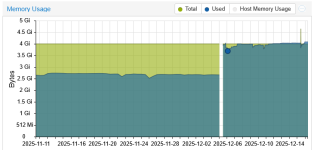
Both machines don't show the stated levels of memory consumption when you look at the reporting of Windows or OpenBSD.
Concerning the unidentified device: tried several virtio-ISOs to no avail.
Right now I have difficulties justifying upgrading my remaining Proxmox 8 hosts to the current state of Proxmox 9 as it seems to be not quite ready for production yet.
Those will not report detailed memory usage. See https://pve.proxmox.com/wiki/Upgrade_from_8_to_9#VM_Memory_Consumption_Shown_is_HigherNo, I don't think so. I've got a pfSense/OpenBSD-machine here on Proxmox 9 with installed balloon-driver that says
The old Win 2008 machine does not report back detailed memory info. What you need is to get the guest to return information like this:
Code:
# info balloon
balloon: actual=4096 max_mem=4096 total_mem=3914 free_mem=2078 mem_swapped_in=0 mem_swapped_out=0 major_page_faults=3171 minor_page_faults=997821 last_update=1765875366What intricacies there might be for Win 2008 to get it working, besides having all drivers installed and working and a running BalloonAgent, I don't know. I haven't touched a Win 2008 for almost 10 years.
Someone else might have more experience with such old Windows versions.
Ok, I have some news:
My pfSense/OpenBSD VM and a Windows XP VM seem to have triggered ballooning - their mem usage went down significantly - despite showing
"actual=1024 max_mem=1024" using "info balloon" in monitor.
The mentioned Windows Server 2k8 machine is still at 104% mem usage. But the host has so much free memory that I suspect ballooning hasn't been triggered yet.
So I conclude that ballooning still works but the behaviour has changed from Proxmox 8 to 9 and one has to get used to it.
My pfSense/OpenBSD VM and a Windows XP VM seem to have triggered ballooning - their mem usage went down significantly - despite showing
"actual=1024 max_mem=1024" using "info balloon" in monitor.
The mentioned Windows Server 2k8 machine is still at 104% mem usage. But the host has so much free memory that I suspect ballooning hasn't been triggered yet.
So I conclude that ballooning still works but the behaviour has changed from Proxmox 8 to 9 and one has to get used to it.
PVE 9.1.1 with vm win2008R2 the memory usage show correctly after install balloon service
https://pve.proxmox.com/wiki/Dynamic_Memory_Management#Enable_Auto-Ballooning_on_Windows_2008r2
win2008r2 with virtio version 173
https://pve.proxmox.com/wiki/Dynamic_Memory_Management#Enable_Auto-Ballooning_on_Windows_2008r2
win2008r2 with virtio version 173
Last edited:
Awesome. This seems to be the step I was missing. Thanks!
Copying virtio.iso:\Balloon\2k8\x86\* to c:\Program Files\Balloon and executing "blnsvr.exe -i" as admin did the trick for me on win2k8/x86. BalloonService now shows as service. Graph in Proxmox instantly goes down to 31% mem usage, as expected and "info balloon" returns a bunch of values, too.
# info balloon
balloon: actual=4096 max_mem=4096 total_mem=4094 free_mem=2802 mem_swapped_in=5117063168 mem_swapped_out=839155712 major_page_faults=102672 minor_page_faults=108113747 last_update=1765961258
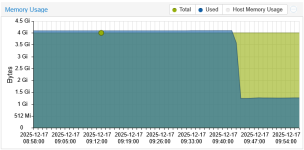
Copying virtio.iso:\Balloon\2k8\x86\* to c:\Program Files\Balloon and executing "blnsvr.exe -i" as admin did the trick for me on win2k8/x86. BalloonService now shows as service. Graph in Proxmox instantly goes down to 31% mem usage, as expected and "info balloon" returns a bunch of values, too.
# info balloon
balloon: actual=4096 max_mem=4096 total_mem=4094 free_mem=2802 mem_swapped_in=5117063168 mem_swapped_out=839155712 major_page_faults=102672 minor_page_faults=108113747 last_update=1765961258