Hi
I used e1000 driver & i got dhcp ip too, but i can not ping GW
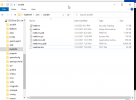
I do not see Redhat related stuff when i mounted the ISO
Any suggestions pls ?
"
https://pve.proxmox.com/wiki/Windows_10_guest_best_practices
Also tried diff drivers no luck
I am running 6.0.0 version & windows 2016 server was ok.
Centos 7 works fine too
Thanks
Kiran
I used e1000 driver & i got dhcp ip too, but i can not ping GW
I do not see Redhat related stuff when i mounted the ISO
Any suggestions pls ?
"
- Network: Repeat the steps from above (click again "Load driver", etc.) and select the folder "NetKVM\w10\amd64", confirm it and select "Redhat VirtIO Ethernet Adapter" and click next."
https://pve.proxmox.com/wiki/Windows_10_guest_best_practices
Also tried diff drivers no luck
I am running 6.0.0 version & windows 2016 server was ok.
Centos 7 works fine too
Thanks
Kiran