

I'm new to Proxmox so I'm pretty sure I made a mistake when setting up my VM. As my title say's, I'm running out of space on the root partition of my VM even if dedicated 2TB for my os.
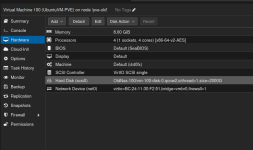
Setup:
3-node Proxmox cluster (9.1.4)
No HA activated
VM istalled on a SMB mount (OldNas) 2TiB
VM ID=100
OS on ID is Ubuntu server 24.04
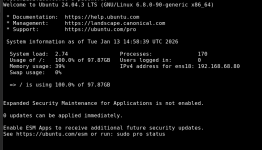
Notice that /dev/mapper/ubuntu-vg-ubuntu--lv is 100%. Why is that?
This is my fdisk output.
Parted printout:
So what kind of stupid newbie mistake have I done and what can I do to fix it?
Setup:
3-node Proxmox cluster (9.1.4)
No HA activated
VM istalled on a SMB mount (OldNas) 2TiB
VM ID=100
OS on ID is Ubuntu server 24.04
roysen@seafile-pve:~$ sudo df -h
Filesystem Size Used Avail Use% Mounted on
tmpfs 795M 79M 716M 10% /run
/dev/mapper/ubuntu--vg-ubuntu--lv 98G 98G 0 100% /
tmpfs 3.9G 0 3.9G 0% /dev/shm
tmpfs 5.0M 0 5.0M 0% /run/lock
/dev/sda2 2.0G 102M 1.7G 6% /boot
overlay 98G 98G 0 100% /var/lib/docker/rootfs/overlayfs/9b6d4b7752e4e1b087fb312780674f632370505ca74929fb251267d8495dab0a
tmpfs 795M 12K 795M 1% /run/user/1000
Notice that /dev/mapper/ubuntu-vg-ubuntu--lv is 100%. Why is that?
This is my fdisk output.
sudo fdisk -l
Disk /dev/sda: 1.95 TiB, 2147483648000 bytes, 4194304000 sectors
Disk model: QEMU HARDDISK
Units: sectors of 1 * 512 = 512 bytes
Sector size (logical/physical): 512 bytes / 512 bytes
I/O size (minimum/optimal): 512 bytes / 512 bytes
Disklabel type: gpt
Disk identifier: 3B552D70-EE69-4EDD-ADB3-E4E2A147B43B
Device Start End Sectors Size Type
/dev/sda1 2048 4095 2048 1M BIOS boot
/dev/sda2 4096 4198399 4194304 2G Linux filesystem
/dev/sda3 4198400 4194301951 4190103552 2T Linux filesystem
Disk /dev/mapper/ubuntu--vg-ubuntu--lv: 100 GiB, 107374182400 bytes, 209715200 sectors
Units: sectors of 1 * 512 = 512 bytes
Sector size (logical/physical): 512 bytes / 512 bytes
I/O size (minimum/optimal): 512 bytes / 512 bytes
Parted printout:
(parted) print all
Model: QEMU QEMU HARDDISK (scsi)
Disk /dev/sda: 2147GB
Sector size (logical/physical): 512B/512B
Partition Table: gpt
Disk Flags:
Number Start End Size File system Name Flags
1 1049kB 2097kB 1049kB bios_grub
2 2097kB 2150MB 2147MB ext4
3 2150MB 2147GB 2145GB
Model: Linux device-mapper (linear) (dm)
Disk /dev/mapper/ubuntu--vg-ubuntu--lv: 107GB
Sector size (logical/physical): 512B/512B
Partition Table: loop
Disk Flags:
Number Start End Size File system Flags
1 0.00B 107GB 107GB ext4
So what kind of stupid newbie mistake have I done and what can I do to fix it?
Last edited:


