Hi All,
New to PVE.
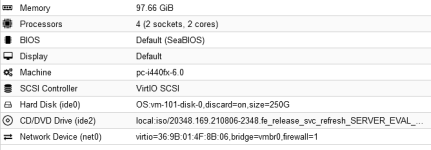
Had to rebuild a VM.
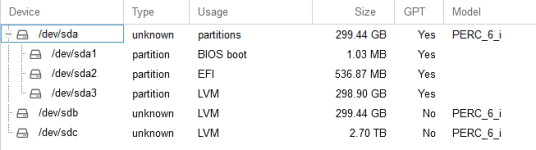
Removed the old datastore, "DATA" (via GUI - Wipe Disk) and created the same again "Create: Volume Group).
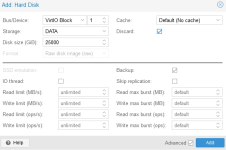
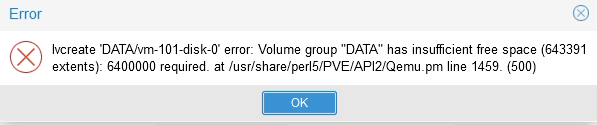
Trying to just add the Hard Disk to the VM, VirtIO Block type, but getting the below (see attached)
Been searching through the entire GUI on how to fix this but to no avail.
Are there any GUI solution here as most of the stuff I read up on is command line based solutions?
- vgdisplay, lvdisplay and pvdisplay does not show any old volumes or disks (after I wiped from the GUI)
Any help sorting this out will be appreciated.
update VM 101: -ide1 DATA1:20000,discard=on
TASK ERROR: lvcreate 'DATA1/vm-101-disk-0' error: Volume group "DATA1" has insufficient free space (643391 extents): 5120000 required.
New to PVE.
Had to rebuild a VM.
Removed the old datastore, "DATA" (via GUI - Wipe Disk) and created the same again "Create: Volume Group).
Trying to just add the Hard Disk to the VM, VirtIO Block type, but getting the below (see attached)
Been searching through the entire GUI on how to fix this but to no avail.
Are there any GUI solution here as most of the stuff I read up on is command line based solutions?
- vgdisplay, lvdisplay and pvdisplay does not show any old volumes or disks (after I wiped from the GUI)
Any help sorting this out will be appreciated.
update VM 101: -ide1 DATA1:20000,discard=on
TASK ERROR: lvcreate 'DATA1/vm-101-disk-0' error: Volume group "DATA1" has insufficient free space (643391 extents): 5120000 required.
Attachments

Last edited: