

https://imgur.com/a/Rh03Vja
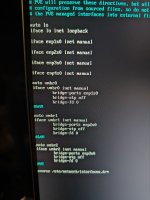
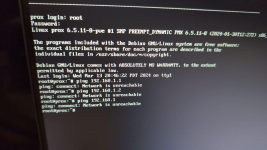
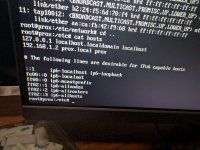
I'm about 99% sure the networks file is misconfigured after I edited a bridge (somehow) in proxmox. What do I need to do to get the gui back up and running? Pretty sure it should be as simple as putting the IP and gateway for vmbr0/1? 2 is the new one, so it hasn't even been configured yet.
vmbr0 is 192.168.0.1 which is the WAN gateway, and br1 is 192.168.1.1/24 with a .1 gateway. I want to say I need configure the networks file as below, but would prefer to ask before I possibly make the problem worse.
vmbr2 I figure I can configure once I have gui access again.
I'm about 99% sure the networks file is misconfigured after I edited a bridge (somehow) in proxmox. What do I need to do to get the gui back up and running? Pretty sure it should be as simple as putting the IP and gateway for vmbr0/1? 2 is the new one, so it hasn't even been configured yet.
vmbr0 is 192.168.0.1 which is the WAN gateway, and br1 is 192.168.1.1/24 with a .1 gateway. I want to say I need configure the networks file as below, but would prefer to ask before I possibly make the problem worse.
auto vmbr0iface vmbr0 inet manual[FONT=Monaco, Menlo, Consolas, Roboto Mono, Andale Mono, Ubuntu Mono, monospace] gateway 192.168.0.1[/FONT]auto vmbr1iface vmbr1 inet manual address 192.168.1.1/24 gateway 192.168.1.1vmbr2 I figure I can configure once I have gui access again.
Attachments
Last edited: