VM Migration hangs

jeffgott

New Member
Jan 12, 2026
14
1
3
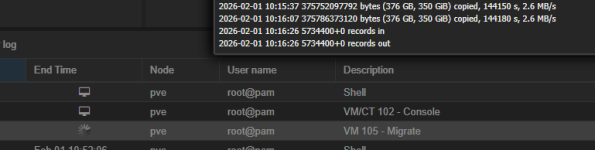
I am trying to migrate a VM from one server to another in the same cluster (two servers in the cluster). I am running Proxmox 9.1.4. The VM in question has two disks - disk 0 is 120GB, disk 1 is 350GB. The migration appears to work (although it takes over a day) but appears to hang at the end:

1769966190829.png

The last message was at 10:16 nd this screen shot was taken about 2 hours later.

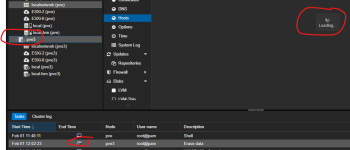
I then tried to stop the migration by clicking the Stop button. The server then showed "Loading..." for quite sometime.

1769966263995.png

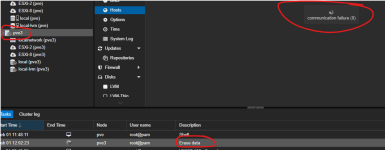
Then I had a communication failure:

1769966329692.png

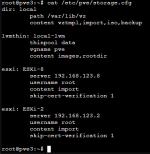
I rebooted the server and I now get "Connection Refused (595)" message:
1769966509720.png

I cannot connect to the server even with SSH.

I'm concerned that Proxmox is not the answer for us.

Any thoughts on what is going on?
 
Connect a keyboard and monitor and check journalctl -kr.
I see some errors in the output. Is there something I should be looking for?

1769973438392.png

1769973492284.png

1769973523996.png

I am also using Veeam 13 and it successfully installed the Veeam worker VM on the new Proxmox server. When trying to install the worker on the older server, it fails to create the worker VM - also hangs.

Are these errors telling me that Proxmox is not compatible with the older server? It is an HP DL380 Gen 8 and the server I am migrating the VM to and installing the Veeam worker.
 
With logs you rarely know exactly what you look for. Just share all of it (as text). What hardware do the servers use?
 
Last edited:
I only have a phone right now but it looks like it just booted? You might have to check the last boot's log. Something like journalctl -b -1 -kr.
 
I only have a phone right now but it looks like it just booted? You might have to check the last boot's log. Something like journalctl -b -1 -kr.
Sorry for the delay. I tried to add the veeam worker again and it failed again. Logs attached.
 

Attachments

That is more interesting.
Bash:
Feb 01 19:28:12 pve3 kernel:  </TASK>
Feb 01 19:28:12 pve3 kernel: R13: 0000000000000001 R14: 0000000000000000 R15: 0000000000000000
Feb 01 19:28:12 pve3 kernel: R10: 0000000000000000 R11: 0000000000000246 R12: 00006061e5e21080
Feb 01 19:28:12 pve3 kernel: RBP: 000000000000000b R08: 0000000000000000 R09: 0000000000000000
Feb 01 19:28:12 pve3 kernel: RDX: 0000000000000000 RSI: 0000000000000000 RDI: 000000000000000b
Feb 01 19:28:12 pve3 kernel: RAX: ffffffffffffffda RBX: 0000726d4cc67500 RCX: 0000726d4f0a59ee
Feb 01 19:28:12 pve3 kernel: RSP: 002b:00007ffdc481f778 EFLAGS: 00000246 ORIG_RAX: 0000000000000003
Feb 01 19:28:12 pve3 kernel: RIP: 0033:0x726d4f0a59ee
Feb 01 19:28:12 pve3 kernel:  entry_SYSCALL_64_after_hwframe+0x76/0x7e
Feb 01 19:28:12 pve3 kernel:  ? exc_page_fault+0x90/0x1b0
Feb 01 19:28:12 pve3 kernel:  ? irqentry_exit+0x43/0x50
Feb 01 19:28:12 pve3 kernel:  ? irqentry_exit_to_user_mode+0x2e/0x290
Feb 01 19:28:12 pve3 kernel:  ? do_user_addr_fault+0x2f8/0x830
Feb 01 19:28:12 pve3 kernel:  ? handle_mm_fault+0x254/0x370
Feb 01 19:28:12 pve3 kernel:  ? count_memcg_events+0xd7/0x1a0
Feb 01 19:28:12 pve3 kernel:  ? __handle_mm_fault+0x62a/0xfd0
Feb 01 19:28:12 pve3 kernel:  ? numa_rebuild_single_mapping.isra.0+0x13f/0x1c0
Feb 01 19:28:12 pve3 kernel:  ? mpol_misplaced+0x69/0x230
Feb 01 19:28:12 pve3 kernel:  ? task_numa_fault+0x68/0xb90
Feb 01 19:28:12 pve3 kernel:  ? node_is_toptier+0x42/0x60
Feb 01 19:28:12 pve3 kernel:  do_syscall_64+0x80/0xa30
Feb 01 19:28:12 pve3 kernel:  x64_sys_call+0x1742/0x2330
Feb 01 19:28:12 pve3 kernel:  __x64_sys_close+0x3e/0x90
Feb 01 19:28:12 pve3 kernel:  fput_close_sync+0x3d/0xa0
Feb 01 19:28:12 pve3 kernel:  __fput+0xed/0x2d0
Feb 01 19:28:12 pve3 kernel:  blkdev_release+0x11/0x20
Feb 01 19:28:12 pve3 kernel:  bdev_release+0x171/0x1b0
Feb 01 19:28:12 pve3 kernel:  filemap_write_and_wait_range+0xd5/0x130
Feb 01 19:28:12 pve3 kernel:  __filemap_fdatawait_range+0x87/0xf0
Feb 01 19:28:12 pve3 kernel:  folio_wait_writeback+0x2b/0xa0
Feb 01 19:28:12 pve3 kernel:  folio_wait_bit+0x18/0x30
Feb 01 19:28:12 pve3 kernel:  ? __pfx_wake_page_function+0x10/0x10
Feb 01 19:28:12 pve3 kernel:  folio_wait_bit_common+0x124/0x2f0
Feb 01 19:28:12 pve3 kernel:  io_schedule+0x4c/0x80
Feb 01 19:28:12 pve3 kernel:  schedule+0x27/0xf0
Feb 01 19:28:12 pve3 kernel:  ? asm_sysvec_apic_timer_interrupt+0x1b/0x20
Feb 01 19:28:12 pve3 kernel:  __schedule+0x468/0x1310
Feb 01 19:28:12 pve3 kernel:  <TASK>
Feb 01 19:28:12 pve3 kernel: Call Trace:
Feb 01 19:28:12 pve3 kernel: task:qemu-img        state:D stack:0     pid:54031 tgid:54031 ppid:53944  task_flags:0x400100 flags:0x00004002
Feb 01 19:28:12 pve3 kernel: "echo 0 > /proc/sys/kernel/hung_task_timeout_secs" disables this message.
Feb 01 19:28:12 pve3 kernel:       Tainted: P          IO        6.17.4-2-pve #1
Feb 01 19:28:12 pve3 kernel: INFO: task qemu-img:54031 blocked for more than 122 seconds.


What kind of storage does 105 use?
Bash:
cat /etc/pve/storage.cfg
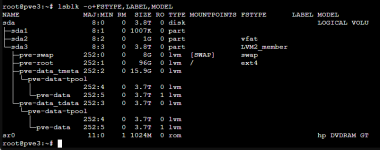
lsblk -o+FSTYPE,LABEL,MODEL
qm config 105
 
Last edited:
Here are the results:

1770034904491.png

1770034974528.png

1770035096774.png

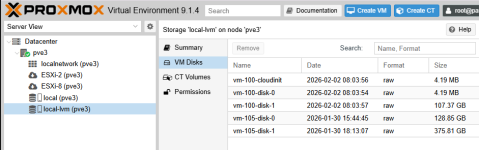
VM 105 was the VM I was migrating last week. It hung up and never completed. Looks like the disk files were left there. Seems like the issue is when a VM is created thru a migration or a tird party app (like Veeam). I can create a new VM from the browser menu without issue.
 
Hmm. I see no guest volumes on pve3. Might need to run them on the new host for 105. I'm assuming the disks were on local-lvm? I'm not sure why I didn't ask for this before but can you share the migration task log too?
 
I'm not sure what you mean by "run them on the new host".
Yes, disks were on local-lvm.

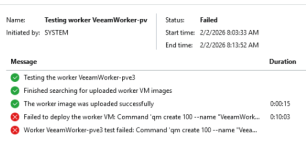
I attempted another deployment of the worker VM for Veeam and it failed again:
1770038124591.png
The new VM appears for a while and then disappears. The disks are left behind for VM 100 (105 files are from a failed migration):
1770038222605.png

I attached a zip file that contains a folder with the migration logs.
 

Attachments

With new host I meant the place where 105 is now but maybe I misunderstood. I'm not familair with veeam but maybe the connection to it has issues in some way? That's a lot of logs. Hard to say which one is the one that needs to be looked at, especially because the ctime/mtime is all the same.
Considering that you cannot SSH to the server too this might just be a general networking issue similar to this: https://forum.proxmox.com/threads/pve-network-kernel-tg3-issue-intermittent-lost-of-network.89485/
E1000E is known for causing issues too but you probably don't use that. You can check via ls -l /sys/class/net/*/device/driver.
I'd likely connect via keyboard and monitor or IPMI if if works and follow journalctl -f while triggering the issue. Maybe something of interest is logged.
 
I am able to connect via SSH - it's only after the migration fails that I am unable to use SSH.

Here is the output from the device driver command - doesn't look like a driver issue:
1770051707974.png

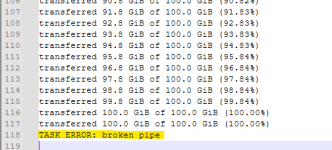
In one of the log files, I see this line that might be the issue:
1770051788954.png

Any idea how I diagnose "broken pipe"?
 

Attachments