

Hello everyone,
I have installed Proxmox (previously used ESXi) on my server equipped with 4 network cards.
Two cards are connected to the same switch and are a trunk carrying VLANs 0 (192.168.24.x) and 1 (192.168.26.x).
In addition, these two cards are in redundancy.
I would like to ask for your help in configuring these cards.
I have made an initial configuration that seems to work but I would like to be sure that this is the correct way to do it.
This is the configuration file “/etc/network/interfaces”
And this is the view of the network cards:
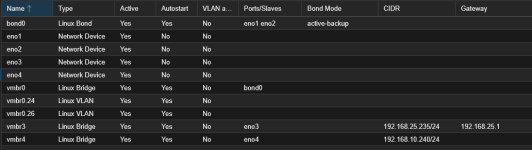
If I create a container and as a network I use the bridge “vmbr0” by putting the “VLAN Tag” equal to 1, the container takes an IP address on the LAN “192.168.26.x” corectly
In the case of the network access “192.168.24.x” (VLAN Tag=0), in my container I just select the “vmbr0” without specifying the VLAN tag and in this way the tag is put directly from the switch since VLAN 0 is the default one.
I have another question, how can I access the Proxmox GUI from the 192.168.24.x network?
Creating a VLAN aware bridge is not possible with VALN Tags 0 and 1.
Is there an alternative way?
Thank you all for your help
I have installed Proxmox (previously used ESXi) on my server equipped with 4 network cards.
Two cards are connected to the same switch and are a trunk carrying VLANs 0 (192.168.24.x) and 1 (192.168.26.x).
In addition, these two cards are in redundancy.
I would like to ask for your help in configuring these cards.
I have made an initial configuration that seems to work but I would like to be sure that this is the correct way to do it.
This is the configuration file “/etc/network/interfaces”
Bash:
auto lo
iface lo inet loopback

iface eno1 inet manual

iface eno2 inet manual

iface eno3 inet manual
#LAN Tecnici

iface eno4 inet manual
#DMZ

# create bond with  eno1 eno2 for redundancy

auto bond0

iface bond0 inet manual
        bond-slaves eno1 eno2
        bond-miimon 100
        bond-mode active-backup
        bond-primary eno1
        #bond-mode 802.3ad
        #bond-xmit-hash-policy layer2+3

#added by Marco for VLAN test

auto vmbr0
iface vmbr0 inet manual
        bridge-ports  bond0
        bridge-stp off
        bridge-fd 0

auto vmbr3
iface vmbr3 inet static
        address 192.168.25.235/24
        gateway 192.168.25.1
        bridge-ports eno3
        bridge-stp off
        bridge-fd 0
#LAN Tecnici

auto vmbr4
iface vmbr4 inet static
        address 192.168.10.240/24
        bridge-ports eno4
        bridge-stp off
        bridge-fd 0
#DMZ


auto vmbr0.26
iface vmbr0.26 inet manual
        vlan-raw-device vmbr0

auto vmbr0.24
iface vmbr0.24 inet manual
        vlan-raw-device vmbr0
And this is the view of the network cards:
If I create a container and as a network I use the bridge “vmbr0” by putting the “VLAN Tag” equal to 1, the container takes an IP address on the LAN “192.168.26.x” corectly
In the case of the network access “192.168.24.x” (VLAN Tag=0), in my container I just select the “vmbr0” without specifying the VLAN tag and in this way the tag is put directly from the switch since VLAN 0 is the default one.
I have another question, how can I access the Proxmox GUI from the 192.168.24.x network?
Creating a VLAN aware bridge is not possible with VALN Tags 0 and 1.
Is there an alternative way?
Thank you all for your help