

Hi, can anyone help me with vGPU configuration.
I watch Jeff Craft Computing. I follow all of his configuration but after I do all of that and install the gpu driver in VM the display didn't notice the second display which is the GPU.
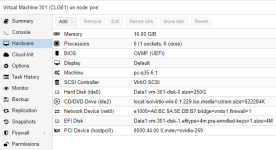
in my /etc/vgpu_unlock/profile_override.toml, I put this
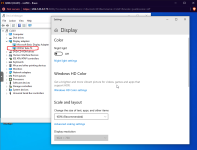
Jeff says that once installed the gpu driver after the tutorial it shows that there is a 2 display, the ms default display and the gpu, but in my case there is only 1 dislplay and that is the default display.
This is my machine;
32 x AMD EPYC 7351P 16-Core Processor
NVIDIA Tesla T4
Using Proxmox 7.1-7
pve-headers-5.13.19-2-pve_5.13.19-4_amd64
Hoping someone help with this issue. Thank you all in advance!
I watch Jeff Craft Computing. I follow all of his configuration but after I do all of that and install the gpu driver in VM the display didn't notice the second display which is the GPU.
Code:
  nvidia-259
    Available instances: 5
    Device API: vfio-pci
    Name: GRID RTX6000-4Q
    Description: num_heads=4, frl_config=60, framebuffer=4096M, max_resolution=7680x4320, max_instance=6
in my /etc/vgpu_unlock/profile_override.toml, I put this
Code:
[profile.nvidia-259]
num_displays = 1
display_width = 1920
display_height = 1080
max_pixels = 2073600
cuda_enabled = 1
frl_enabled = 60
framebuffer = 0x3B0000000
pci_id = 0x1EB812A2
pci_device_id = 0x1EB8
Jeff says that once installed the gpu driver after the tutorial it shows that there is a 2 display, the ms default display and the gpu, but in my case there is only 1 dislplay and that is the default display.
This is my machine;
32 x AMD EPYC 7351P 16-Core Processor
NVIDIA Tesla T4
Using Proxmox 7.1-7
pve-headers-5.13.19-2-pve_5.13.19-4_amd64
Hoping someone help with this issue. Thank you all in advance!
Last edited: