Very slow creation of LXC (Proxmox 9)

gusto

Well-Known Member
Feb 10, 2018
117
3
58
26
When I was using proxmox 8, creating LXC debian 12 took very fast (5-10 seconds).
Now I'm using Proxmox 9 and creating LXC debian 13 takes more than a minute.
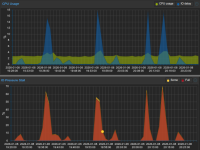
See graphs of what happens when creating LXC

Is this a bug?

Code:
pct create 114 \
     local:vztmpl/debian-13-standard_13.1-2_amd64.tar.zst \
     --ssh-public-keys ~/ssh.key \
     --ostype debian \
     --hostname debian-13-service-box \
     --unprivileged 0 \
     --net0 name=eth0,bridge=vmbr1,gw=192.168.1.1,hwaddr=XX:XX:XX:AA:A0:62,ip=192.168.1.114/24,type=veth \
     --cores 1 \
     --arch amd64 \
     --memory 512 --swap 512 \
     --rootfs local-zfs:2 \
     --features nesting=1 \
     --onboot 1 \
     --start 1 \
 

Attachments

  • cpu-io.png
    cpu-io.png
    106.1 KB · Views: 12
Last edited:
Code:
NAME      MAJ:MIN RM   SIZE RO TYPE MOUNTPOINTS FSTYPE     MODEL
sda         8:0    0 238.5G  0 disk                        Patriot P200 256GB
├─sda1      8:1    0  1007K  0 part                       
├─sda2      8:2    0     1G  0 part             vfat       
└─sda3      8:3    0   237G  0 part             zfs_member
sdb         8:16   0 238.5G  0 disk                        Patriot P200 256GB
├─sdb1      8:17   0  1007K  0 part                       
├─sdb2      8:18   0     1G  0 part             vfat       
└─sdb3      8:19   0   237G  0 part             zfs_member
sdc         8:32   0 931.5G  0 disk                        WDC WDS100T2B0A-00SM50
├─sdc1      8:33   0 931.5G  0 part             zfs_member
└─sdc9      8:41   0     8M  0 part                       
sdd         8:48   0 931.5G  0 disk                        WDC WDS100T2B0A-00SM50
├─sdd1      8:49   0 931.5G  0 part             zfs_member
└─sdd9      8:57   0     8M  0 part                       
zd0       230:0    0    10G  0 disk                       
├─zd0p1   230:1    0   260M  0 part             vfat       
├─zd0p2   230:2    0   512K  0 part                       
├─zd0p3   230:3    0     1G  0 part                       
└─zd0p4   230:4    0   8.7G  0 part             zfs_member
zd16      230:16   0     4M  0 disk             iso9660   
zd32      230:32   0    13G  0 disk                       
├─zd32p1  230:33   0  12.9G  0 part             ext4       
├─zd32p14 230:46   0     3M  0 part                       
└─zd32p15 230:47   0   124M  0 part             vfat
 
I don't like it at all. If I backup LXC (zstd), the size is 250MB.
If I do a restore via the web gui, it takes 70 seconds. Something is definitely wrong there.
In Proxmox 8, backup and restore were in the order of seconds.
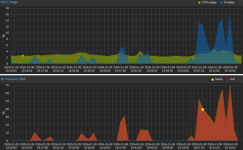
Graphs during LXC manipulation (creation, backup, restoration).
 

Attachments

  • aa.png
    aa.png
    199.8 KB · Views: 3
Today I updated Proxmox to 9.1.4 and rebooted. I still have problems. LXC (debian 13) takes 70-90 seconds to create. Restoring takes the same amount of time. It's pure LXC (the compressed backup is not even 250MB).

Code:
zpool status -v
  pool: datapool
 state: ONLINE
  scan: scrub repaired 0B in 00:13:31 with 0 errors on Sun Dec 14 00:37:32 2025
config:

        NAME                        STATE     READ WRITE CKSUM
        datapool                    ONLINE       0     0     0
          mirror-0                  ONLINE       0     0     0
            wwn-0xxxxxxxxxxxxxxxxx  ONLINE       0     0     0
            wwn-0xxxxxxxxxxxxxxxxx  ONLINE       0     0     0

errors: No known data errors

  pool: rpool
 state: ONLINE
config:

        NAME                                                   STATE     READ WRITE CKSUM
        rpool                                                  ONLINE       0     0     0
          mirror-0                                             ONLINE       0     0     0
            ata-Patriot_P200_256GB_AA000000000000000978-part3  ONLINE       0     0     0
            ata-Patriot_P200_256GB_AA000000000000000025-part3  ONLINE       0     0     0

errors: No known data errors
 
Please try some things from my link. For example run this and then create the CT. Maybe one of the disks sticks out.
Bash:
watch -cd -n1 "zpool iostat -vyl 1 1"
Also check pveperf for a basic test. fio would be another thing to try to take PVE out of the equation and just test the pool itself.
 
Last edited:
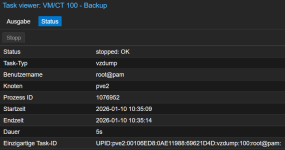
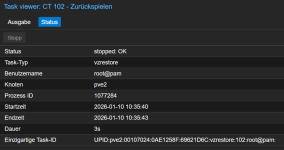
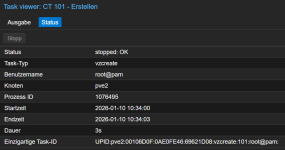
You have an IO problem. With PVE9, creating and backing up/restoring LXCs is about as fast as with PVE8.

I tested it with the same template and everything is OK under PVE 9.1.4.

vzcreate: 3s
vzdump: 5s
vzrestore: 3s

backup.pngrestore.pngvzcreate.png
 
Last edited:
Please try some things from my link. For example run this and then create the CT. Maybe one of the disks sticks out.
Bash:
watch -cd -n1 "zpool iostat -vyl 1 1"
Also check pveperf for a basic test. fio would be another thing to try to take PVE out of the equation and just test the pool itself.
I tried watch -cd -n1 "zpool iostat -vyl 1 1", but I'm not an expert, I can't judge if it's okay.
I also tried pveperf 3x

Code:
pveperf /var/lib/vz
CPU BOGOMIPS:      69597.24
REGEX/SECOND:      4606004
HD SIZE:           205.62 GB (rpool/var-lib-vz)
FSYNCS/SECOND:     41.41
DNS EXT:           28.69 ms
DNS INT:           42.55 ms (sk)
root@local-proxmox:~# mc

pveperf /var/lib/vz
CPU BOGOMIPS:      69597.24
REGEX/SECOND:      4512933
HD SIZE:           205.62 GB (rpool/var-lib-vz)
FSYNCS/SECOND:     1208.28
DNS EXT:           29.21 ms
DNS INT:           42.20 ms (sk)

pveperf /var/lib/vz
CPU BOGOMIPS:      69597.24
REGEX/SECOND:      4579483
HD SIZE:           205.62 GB (rpool/var-lib-vz)
FSYNCS/SECOND:     8.53
DNS EXT:           28.64 ms
DNS INT:           43.23 ms (sk)
They look similar, but FSYNCS/SECOND is significantly different in each test
 

Attachments

  • io01.png
    io01.png
    65.9 KB · Views: 8
According to AI, my SSD patriot P200 are old disks and not very suitable for ZFS. They have 39000 hours of operation which is more than 4 years (that's true).
I had Proxmox 8 on ZFS RIAD0 and now I have Proxmox 9 on ZFS RAID1 (mirror).
Could this be the problem?
AI advised me to use this
zfs set sync=disabled rpool
This can speed it up extremely

Code:
smartctl 7.4 2024-10-15 r5620 [x86_64-linux-6.17.4-2-pve] (local build)
Copyright (C) 2002-23, Bruce Allen, Christian Franke, www.smartmontools.org

=== START OF INFORMATION SECTION ===
Model Family:     Silicon Motion based SSDs
Device Model:     Patriot P200 256GB
Serial Number:    AA000000000000000978
Firmware Version: S0424A0
User Capacity:    256,060,514,304 bytes [256 GB]
Sector Size:      512 bytes logical/physical
Rotation Rate:    Solid State Device
Form Factor:      2.5 inches
TRIM Command:     Available, deterministic, zeroed
Device is:        In smartctl database 7.3/5528
ATA Version is:   ACS-2 T13/2015-D revision 3
SATA Version is:  SATA 3.2, 6.0 Gb/s (current: 6.0 Gb/s)
Local Time is:    Sat Jan 10 14:46:59 2026 CET
SMART support is: Available - device has SMART capability.
SMART support is: Enabled

=== START OF READ SMART DATA SECTION ===
SMART overall-health self-assessment test result: PASSED

General SMART Values:
Offline data collection status:  (0x00) Offline data collection activity
                                        was never started.
                                        Auto Offline Data Collection: Disabled.
Self-test execution status:      (   0) The previous self-test routine completed
                                        without error or no self-test has ever
                                        been run.
Total time to complete Offline
data collection:                (  120) seconds.
Offline data collection
capabilities:                    (0x11) SMART execute Offline immediate.
                                        No Auto Offline data collection support.
                                        Suspend Offline collection upon new
                                        command.
                                        No Offline surface scan supported.
                                        Self-test supported.
                                        No Conveyance Self-test supported.
                                        No Selective Self-test supported.
SMART capabilities:            (0x0002) Does not save SMART data before
                                        entering power-saving mode.
                                        Supports SMART auto save timer.
Error logging capability:        (0x01) Error logging supported.
                                        General Purpose Logging supported.
Short self-test routine
recommended polling time:        (   2) minutes.
Extended self-test routine
recommended polling time:        (  10) minutes.

SMART Attributes Data Structure revision number: 1
Vendor Specific SMART Attributes with Thresholds:
ID# ATTRIBUTE_NAME          FLAG     VALUE WORST THRESH TYPE      UPDATED  WHEN_FAILED RAW_VALUE
  1 Raw_Read_Error_Rate     0x0032   100   100   050    Old_age   Always       -       0
  5 Reallocated_Sector_Ct   0x0032   100   100   050    Old_age   Always       -       0
  9 Power_On_Hours          0x0032   100   100   050    Old_age   Always       -       39190
 12 Power_Cycle_Count       0x0032   100   100   050    Old_age   Always       -       142
160 Uncorrectable_Error_Cnt 0x0032   100   100   050    Old_age   Always       -       0
161 Valid_Spare_Block_Cnt   0x0033   100   100   050    Pre-fail  Always       -       100
163 Initial_Bad_Block_Count 0x0032   100   100   050    Old_age   Always       -       8
164 Total_Erase_Count       0x0032   100   100   050    Old_age   Always       -       775419
165 Max_Erase_Count         0x0032   100   100   050    Old_age   Always       -       3747
166 Min_Erase_Count         0x0032   100   100   050    Old_age   Always       -       978
167 Average_Erase_Count     0x0032   100   100   050    Old_age   Always       -       1438
168 Max_Erase_Count_of_Spec 0x0032   100   100   050    Old_age   Always       -       7000
169 Remaining_Lifetime_Perc 0x0032   100   100   050    Old_age   Always       -       80
175 Program_Fail_Count_Chip 0x0032   100   100   050    Old_age   Always       -       0
176 Erase_Fail_Count_Chip   0x0032   100   100   050    Old_age   Always       -       0
177 Wear_Leveling_Count     0x0032   100   100   050    Old_age   Always       -       0
178 Runtime_Invalid_Blk_Cnt 0x0032   100   100   050    Old_age   Always       -       0
181 Program_Fail_Cnt_Total  0x0032   100   100   050    Old_age   Always       -       0
182 Erase_Fail_Count_Total  0x0032   100   100   050    Old_age   Always       -       0
192 Power-Off_Retract_Count 0x0032   100   100   050    Old_age   Always       -       120
194 Temperature_Celsius     0x0022   100   100   050    Old_age   Always       -       25
195 Hardware_ECC_Recovered  0x0032   100   100   050    Old_age   Always       -       2606653
196 Reallocated_Event_Count 0x0032   100   100   050    Old_age   Always       -       0
197 Current_Pending_Sector  0x0032   100   100   050    Old_age   Always       -       0
198 Offline_Uncorrectable   0x0032   100   100   050    Old_age   Always       -       0
199 UDMA_CRC_Error_Count    0x0032   100   100   050    Old_age   Always       -       13
232 Available_Reservd_Space 0x0032   100   100   050    Old_age   Always       -       100
241 Host_Writes_32MiB       0x0030   100   100   050    Old_age   Offline      -       1729915
242 Host_Reads_32MiB        0x0030   100   100   050    Old_age   Offline      -       82535
245 TLC_Writes_32MiB        0x0032   100   100   050    Old_age   Always       -       9951447

SMART Error Log Version: 1
No Errors Logged

SMART Self-test log structure revision number 1
No self-tests have been logged.  [To run self-tests, use: smartctl -t]

Selective Self-tests/Logging not supported

The above only provides legacy SMART information - try 'smartctl -x' for more

 
The disk is very slow, so upgrading to an enterprise SSD would prevent this kind of issue.

That setting might make it faster, but since data is more important to me, I'd buy a proper SSD instead of making that adjustment.


The following results were obtained without running a virtual machine.
Inexpensive NVMe SSDs (let alone SATA ones) do not deliver eye-popping speeds.

Code:
sas KIOXIA KPM5XMG400G

HD SIZE:           358.47 GB (rpool/ROOT/pve-1)
FSYNCS/SECOND:     9668.38

U.2 KIOXIA KCD6XLUL960G

HD SIZE:           860.53 GB (rpool/ROOT/pve-1)
FSYNCS/SECOND:     16415.25

nvme maxio 256gb

HD SIZE:           215.33 GB (rpool/ROOT/pve-1)
FSYNCS/SECOND:     891.32
 
Last edited:
I don't really mind. I don't create and restore LXC that often.
I just wanted to know why it behaves like that in PVE9, when it was OK in PVE8.
The HW is exactly the same.
I accidentally installed PVE8 in ZFS RAID0.
Now in PVE9 I have it installed in ZFS RAID1
It is possible that stripping was faster than mirroring
 
It is possible that stripping was faster than mirroring
Is that a question

...?

Sure.

Simplified: for reading data it should be nearly the same as data is read from all devices in parallel, but for writing data you now have only a single vdev instead of two. The effect is that IOPS (and bandwidth) may go down 50%.
 
Sorry, yes, that was a question.
However, I tried to create LXC several times. Sometimes it takes 50-70 seconds until LXC starts.
Today I tried again and LXC was created and started in 10 seconds (like in the old days).
Here is the script how I create LXC

Code:
pct create 114 \
     local:vztmpl/debian-13-standard_13.1-2_amd64.tar.zst \
     --ssh-public-keys ~/ssh.key \
     --ostype debian \
     --hostname debian-13-service-box \
     --unprivileged 0 \
     --net0 name=eth0,bridge=vmbr1,gw=192.168.1.1,hwaddr=XX:XX:XX:XX:XX:XX,ip=192.168.1.114/24,type=veth \
     --cores 1 \
     --arch amd64 \
     --memory 512 --swap 512 \
     --rootfs local-zfs:2 \
     --features nesting=1 \
     --onboot 1 \
     --start 1 \