

Hello Proxmox Community,
I wanted to share my recent experience integrating Veeam Backup & Replication v12 with Proxmox VE. We've successfully moved away from agent-based backups to Veeam's new native Proxmox support, and the results are honestly mind-blowing.
Best regards,Sami

I wanted to share my recent experience integrating Veeam Backup & Replication v12 with Proxmox VE. We've successfully moved away from agent-based backups to Veeam's new native Proxmox support, and the results are honestly mind-blowing.
Our Environment:
- Hypervisor: Proxmox VE (Running on NVMe SSD Clusters)
- Backup Server: Veeam B&R v12 (Windows Server 2022 VM)
- Offsite Repository: Hetzner Storage Box (via SMB/CIFS)
- Networking: 10G Infrastructure with VLAN-aware bridges.
Key Takeaways from the Setup:
- Veeam Worker Deployment: The deployment of the Veeam Worker on Proxmox was seamless. We assigned it a static IP on our management VLAN (VLAN 4000) and it immediately started communicating with the VBR server.
- LVM-Thin Snapshots: Since our VMs are on LVM-Thin storage, Veeam utilizes native snapshots, which avoids the overhead of file-level snapshotting.
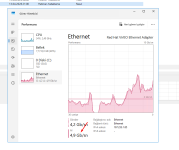
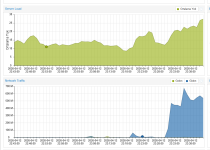
- Performance: As you can see in the attached screenshot, we are hitting internal processing speeds of 4.9 Gbps. The throughput between the NVMe storage and the Veeam proxy is utilizing the 10G link almost to its half-capacity during the initial full backup.
Pro-Tips for Others:
- VLAN Configuration: If you are using a vSwitch/VLAN tagged environment, make sure to set the VLAN tag on the Veeam Worker's network interface within Proxmox hardware settings if the installer doesn't pick it up.
- Storage Compatibility: When adding a Hetzner Storage Box as a repository, enabling "Use per-machine backup files" significantly improved stability over the SMB connection.
Best regards,Sami
Last edited: